This is the full developer documentation for API Primer
# Digital Transformation
> Astro is the web framework for building content-driven websites like blogs, marketing, and e-commerce. Learn why Astro might be a good choice for your next website.
Digital transformation is the integration of digital technology into all aspects of a business, fundamentally changing how it operates and delivers value to its customers. It is not simply about adopting new technologies, but about using them to create new business models, improve customer experiences, and gain a competitive advantage.
## Embracing Digital Transformation
[Section titled “Embracing Digital Transformation”](#embracing-digital-transformation)
In today’s rapidly evolving business landscape, companies are recognizing the critical need for digital transformation. This involves leveraging technology to reimagine business processes, enhance customer experiences, and drive innovation. Let’s explore the key factors propelling organizations toward digital transformation.
1. Customer Expectations: The modern customer demands seamless, digital interactions with businesses. They expect to access information, make purchases, and receive support through websites, mobile apps, and social media platforms. Companies that fail to meet these expectations risk losing customers to competitors who provide a more convenient and engaging digital experience.
2. Technological Disruption: The advent of disruptive technologies such as artificial intelligence (AI), machine learning (ML), and big data analytics is reshaping industries and creating new opportunities. These technologies empower companies to optimize operations, streamline decision-making, and deliver personalized products and services that meet evolving customer needs.
3. Competitive Dynamics: Businesses face intense competition from established players and emerging digital-native rivals. Digital transformation enables companies to differentiate themselves by offering innovative and digitally enhanced products and services, capturing a larger market share.
4. Data-Driven Insights: Digital technologies generate vast amounts of data that can be analyzed to understand customer preferences, market trends, and operational inefficiencies. Companies leverage data-driven insights to make informed decisions, improve customer experiences, and optimize their supply chains and marketing campaigns.
5. Agility and Scalability: Digital transformation enhances an organization’s agility and scalability, enabling it to respond swiftly to market changes and customer demands.
By adopting cloud computing and software-as-a-service (SaaS) solutions, companies can scale resources up or down as needed, reducing costs and improving operational efficiency.
## Examples of digital transformation
[Section titled “Examples of digital transformation”](#examples-of-digital-transformation)
Here are a few examples of how companies are using digital transformation to improve their businesses:
* **Netflix**: Netflix has used digital transformation to revolutionize the way people watch movies and TV shows. By streaming content over the internet, Netflix has made it possible for people to watch what they want, when they want.
* **Amazon**: Amazon has used digital transformation to create a one-stop shop for everything from groceries to electronics. Amazon’s website and mobile app make it easy for customers to find and purchase products, and its efficient fulfillment system ensures that products are delivered quickly and accurately.
* **Paytm**: Paytm is a digital payments and financial services company that was founded in 2010. It has become one of the leading players in India’s digital payments market, thanks to its innovative products and services such as mobile wallets, online payments, and financial services. Paytm has been successful in adopting digital transformation by focusing on mobile-first solutions and building a strong user base. It has also partnered with a number of businesses and organizations to offer its services, which has helped it to reach a wider audience.
## Benefits of digital transformation
[Section titled “Benefits of digital transformation”](#benefits-of-digital-transformation)
Digital transformation can offer a number of benefits to companies, including:
* **Improved customer experience**: Digital transformation can help companies to improve the customer experience by making it easier for customers to interact with the company, purchase products and services, and get support.
* **Increased efficiency and productivity**: Digital transformation can help companies to improve their efficiency and productivity by automating tasks, streamlining processes, and improving communication and collaboration.
* **New products and services**: Digital transformation can enable companies to create new products and services that were not possible before. For example, companies can use digital technologies to develop new online services, mobile apps, and digital products.
Competitive advantage
Digital transformation can help companies to gain a competitive advantage by differentiating them from their competitors and making it more difficult for competitors to enter the market.
## Boom
[Section titled “Boom”](#boom)
The digital transformation boom started in the early 2010s. This was a time when many of the technologies that are now essential for digital transformation, such as cloud computing, big data, and artificial intelligence, were becoming more mature and affordable.
In addition, the rise of mobile devices and the internet of things (IoT) created new opportunities for businesses to interact with their customers and partners in a digital way.
Some of the key events that contributed to the digital transformation boom include:
* The launch of the Amazon Web Services (AWS) cloud computing platform in 2006.
* The release of the iPhone in 2007.
* The launch of the Google App Store in 2008.
* The introduction of the Hadoop big data processing framework in 2008.
* The launch of the IBM Watson artificial intelligence platform in 2011.
These events made it possible for businesses to adopt digital technologies more easily and affordably. As a result, digital transformation began to accelerate in the early 2010s.
## Post Covid Era
[Section titled “Post Covid Era”](#post-covid-era)
The COVID-19 pandemic has accelerated the digital transformation of companies in several ways.
1. **Remote Work**: The pandemic forced many companies to adopt remote work policies, which in turn led to an increased reliance on digital tools for communication, collaboration, and project management. This has led to a surge in the adoption of cloud-based software, video conferencing tools, and other digital workplace solutions.
2. **E-commerce and Online Services**: With lockdowns and restrictions on physical interactions, businesses had to quickly adapt to provide services and products online. This led to a rapid expansion of e-commerce platforms, online delivery services, and virtual consultations.
3. **Automation and Efficiency**: The pandemic highlighted the need for businesses to operate more efficiently and reduce costs. This has driven the adoption of automation technologies, such as robotic process automation (RPA), to streamline processes and reduce manual tasks.
4. **Data-driven Decision Making**: The pandemic has emphasized the importance of data in making informed decisions. Companies are increasingly investing in data analytics and business intelligence tools to gain insights from their data and make better decisions.
5. **Customer Experience**: With physical interactions limited, businesses had to focus on enhancing their digital customer experience. This led to investments in customer relationship management (CRM) systems, chatbots, and other digital customer service tools.
Here are some specific examples of how companies have used digital transformation to adapt to the pandemic:
* **Retailers**: Retailers have used digital transformation to shift from brick-and-mortar stores to online sales. They have also used digital technologies to improve their supply chains and fulfillment processes.
* **Financial services companies**: Financial services companies have used digital transformation to offer contactless payments and mobile banking services. They have also used digital technologies to improve their risk management and fraud detection capabilities.
* **Healthcare companies**: Healthcare companies have used digital transformation to offer virtual doctor’s visits and remote patient monitoring. They have also used digital technologies to develop new treatments and vaccines for COVID-19.
Overall, the COVID-19 pandemic has acted as a catalyst for digital transformation, forcing companies to adapt and embrace digital technologies to survive and thrive in the new normal. This accelerated adoption of digital tools and strategies is likely to have a lasting impact on the way businesses operate in the years to come.
# C2C Workshop
> Learn Digital Transformation, Cloud Computing and DevOps
We know you have strived in your college days to be the best and have done great work. But, was it enough to transition to your next desired role - to work as a Software Engineer. We will help you get the edge by introducing you to the latest tools and products that top companies use, to crack your first job.
Introducing Campus to Corp **(C2C)** Program
## Workshop Details
[Section titled “Workshop Details”](#workshop-details)
This workshop is designed to be delivered in person so that its more interactive and effective to grasp the concepts and clarify. [Connect](https://www.linkedin.com/comm/mynetwork/discovery-see-all?usecase=PEOPLE_FOLLOWS\&followMember=johnwilliams-sp) with me for additional information.
| S.no | Topic | Duration |
| ---- | ------------------------------- | -------- |
| 1 | Traditional SDLC | 30 mins |
| 2 | Need for Agile | 30 mins |
| 3 | Containers | 15 mins |
| 4 | Intro to Digital Transformation | 15 mins |
| 5 | Cloud Computing 101 | 120 mins |
| 6 | DevOps 101 | 30 mins |
| 7 | Demos & Hands-on Excercises | 90 mins |
| 8 | Quiz & Clarifications | 30 mins |
| 9 | Feedback | 5 mins |
| 10 | Assessment | 60 mins |
### Pre-requisites
[Section titled “Pre-requisites”](#pre-requisites)
* **Laptop or Desktop**
* Git, JDK17, Maven, NodeJS 18.x, AWS CLI, VS Code or your favorite editor
* Docker for Desktop
* **AWS Account** - [Create](./labs/login)
* **GitHub Account** - [Create](./labs/git#create-your-github-account)
* **DockerHub Account** - [Create](./labs/docker#create-your-dockerhub-account)
Must Have
Text marked in Bold are mandatory ones.
## Areas you explore
[Section titled “Areas you explore”](#areas-you-explore)
We would like to be part of your learning and help you navigate in the right path based on your interests and strengths. We would also like to help you tranistion from your campus role as Student to a corporate role as an Engineer. There are **3** main areas which you will explore,
* **Digital Transformation**
* **Cloud Computing**
* **DevOps**
## Self Learn vs Guided - The Choice
[Section titled “Self Learn vs Guided - The Choice”](#self-learn-vs-guided---the-choice)
You can follow through the documentations and self learn the concepts, else you can enroll on this workshop and get benefited from the explanations and tutoring where there is a clarity required.
You can also join my [Slack](https://join.slack.com/t/campus2corpc2c/shared_invite/zt-28ll0levk-9_Zbo8rM0b8MjKNJwyVxSA) channel and post your queries and get clarifications.
Tip
Having someone to guide on your learning can help you learn faster.
Just like Morpheus to Neo
# Compute
> Astro is the web framework for building content-driven websites like blogs, marketing, and e-commerce. Learn why Astro might be a good choice for your next website.
In cloud computing, the term “compute” describes concepts and objects related to `software computation`. It is a generic term used to reference processing power, memory, networking, storage, and other resources required for the computational success of any program.
Compute resources are measurable quantities of compute power that can be requested, allocated, and consumed for computing activities. Some examples of compute resources include:
* CPU: The central processing unit (CPU) is the brain of any computer. CPU is measured in units called millicores. Application developers can specify how many allocated CPUs are required for running their application and to process data.
* Memory: Memory is measured in bytes. Applications can make memory requests that are needed to run efficiently.
## Compute Services in AWS
[Section titled “Compute Services in AWS”](#compute-services-in-aws)
* **Amazon Elastic Compute Cloud (EC2)**: EC2 is a web service that provides virtual servers that can be used to run a wide variety of applications.
* **Amazon Lightsail**: Lightsail is a simple cloud platform that provides everything you need to build and deploy a web app or website.
* **Amazon Elastic Beanstalk**: Elastic Beanstalk is a fully managed service that makes it easy to deploy and scale web applications and APIs.
* **Amazon Elastic Kubernetes Service (EKS)**: EKS is a managed Kubernetes service that makes it easy to deploy, manage, and scale containerized applications.
* **AWS Lambda**: Lambda is a serverless compute service that lets you run code without provisioning or managing servers.
## EC2
[Section titled “EC2”](#ec2)
Amazon EC2 provides on-demand, scalable computing capacity in the Amazon Web Services (AWS) Cloud. Using Amazon EC2 reduces hardware costs so you can develop and deploy applications faster. You can use Amazon EC2 to launch as many or as few virtual servers as you need, configure security and networking, and manage storage.
Creating and managing EC2 instances is a fundamental aspect of cloud computing, allowing users to provision and maintain virtual machines for various applications and workloads.
Tip
This will be first service you explore to understand the power of cloud computing. You can create an instance of required CPU, RAM and Disk and use it to install any application and can terminate the instance once you are done.
## Lambda
[Section titled “Lambda”](#lambda)
Lambda is a serverless computing platform that allows you to run code without having to provision or manage servers. You simply upload your code to Lambda, and it will execute it on demand. Lambda is a good choice for applications that are triggered by events, such as when a file is uploaded to Amazon S3 or an HTTP request is received.
## Difference between EC2 vs Lambda
[Section titled “Difference between EC2 vs Lambda”](#difference-between-ec2-vs-lambda)
| Feature | EC2 | Lambda |
| ------------ | -------------------------------------------------------------------------------------------------------- | --------------------------------------------------------------------------------------------------- |
| Provisioning | You must provision and manage VMs | No provisioning required |
| Control | You have complete control over your VMs | Less control over the execution environment |
| Cost | You pay for the resources you consume, including CPU, memory, and storage | You pay only for the time your code runs |
| Scalability | You can scale your VMs up or down manually or using Auto Scaling | Lambda scales automatically based on demand |
| Use cases | Suitable for long-running applications, batch processing, and applications with high memory requirements | Suitable for event-driven applications, short-lived tasks, and applications with variable workloads |
# Database
> Astro is the web framework for building content-driven websites like blogs, marketing, and e-commerce. Learn why Astro might be a good choice for your next website.
A cloud database is a database that is hosted and managed by a third-party provider. This means that you do not have to worry about the hardware, software, or maintenance of the database. Instead, you can focus on using the database to store and manage your data.
There are many different types of cloud databases available, including:
1. Relational databases: Relational databases store data in tables, which are made up of rows and columns. Relational databases are well-suited for storing structured data, such as customer information or product catalogs.
2. NoSQL databases: NoSQL databases are designed for storing unstructured data, such as documents, images, or videos. NoSQL databases are often used for applications that require high scalability and performance.
3. In-memory databases: In-memory databases store data in the computer’s main memory, which makes them very fast. In-memory databases are often used for applications that require real-time data processing.
4. Graph databases: Graph databases store data in a graph, which is a collection of nodes and edges. Graph databases are well-suited for storing data that has relationships between different entities, such as social networks or knowledge graphs.
## Database Services in AWS
[Section titled “Database Services in AWS”](#database-services-in-aws)
* **Amazon Relational Database Service (RDS)**: RDS is a fully managed service that makes it easy to set up, operate, and scale relational databases in the cloud. RDS supports a variety of database engines, including MySQL, PostgreSQL, Oracle Database, and Microsoft SQL Server.
* **Amazon DynamoDB**: DynamoDB is a fully managed, NoSQL database that provides high performance and scalability for a wide range of applications.
* **Amazon ElastiCache**: ElastiCache is a fully managed, in-memory caching service that can accelerate performance for web applications, mobile applications, and database-backed applications.
* **Amazon Neptune**: Neptune is a fully managed graph database that makes it easy to build and manage graph-powered applications.
## Dynamo DB
[Section titled “Dynamo DB”](#dynamo-db)
Amazon DynamoDB is a fully managed, serverless NoSQL database service designed to run high-performance applications at any scale. It offers built-in security, continuous backups, automated multi-Region replication, in-memory caching, and data import and export tools.
DynamoDB is a key-value and document database that delivers consistent, single-digit millisecond latency at any scale. It is a non-relational database, meaning that it does not use traditional relational tables and schemas. Instead, DynamoDB stores data in JSON-formatted documents, which are organized by primary keys and secondary indexes.
### Key Features of DynamoDB:
[Section titled “Key Features of DynamoDB:”](#key-features-of-dynamodb)
1. **Fully managed**: DynamoDB is a fully managed service, so you don’t have to worry about provisioning or managing servers.
2. **Serverless**: DynamoDB is a serverless service, so you only pay for the resources you use.
3. **Scalable**: DynamoDB can scale to any size, so you can handle any amount of traffic without having to worry about provisioning more servers. High-performance: DynamoDB delivers consistent, single-digit millisecond latency at any scale.
4. **Durable**: DynamoDB is a highly durable service, and your data is replicated across multiple Availability Zones (AZs) to protect against hardware failures.
5. **Secure**: DynamoDB is a secure service, and it offers a variety of security features to protect your data.
### Use Cases of DynamoDB:
[Section titled “Use Cases of DynamoDB:”](#use-cases-of-dynamodb)
* **Mobile backends**: DynamoDB can be used to store the data for mobile backends, and it can handle the high-volume traffic that mobile applications generate.
* **Gaming**: DynamoDB can be used to store the game state for online multiplayer games, and it can deliver the low latency that gamers need.
* **Real-time applications**: DynamoDB can be used to store the data for real-time applications, such as chat applications and stock tickers.
* **Customer relationship management (CRM) applications**: DynamoDB can be used to store customer data for CRM applications, and it can provide a 360-degree view of each customer.
* **Catalogs and product information**: DynamoDB can be used to store product catalogs and product information for e-commerce websites.
* **IoT data storage**: DynamoDB can be used to store data from IoT devices, and it can handle the high volume of data that IoT devices generate.
# Data Center
> Astro is the web framework for building content-driven websites like blogs, marketing, and e-commerce. Learn why Astro might be a good choice for your next website.
In the past, companies had to build and maintain their own data centers to host their applications and data. This was a costly and complex undertaking. The cloud has changed all that. Now, companies can rent computing resources from cloud providers such as Amazon Web Services (AWS) and Microsoft Azure. This can be a more cost-effective and scalable way to manage IT infrastructure.

## Need to maintain own DC
[Section titled “Need to maintain own DC”](#need-to-maintain-own-dc)
However, there are a number of reasons why a company might choose to stick to its own data center, even after moving to the cloud. These reasons include:
* **Compliance requirements**: Some industries, such as healthcare and finance, have strict data privacy regulations. These regulations may require companies to store certain data on-premises.
* **Performance and reliability**: For some applications, such as real-time data processing and mission-critical applications, companies may need the performance and reliability that only a dedicated data center can offer.
* **Security concerns**: Some companies may be concerned about the security of their data in the cloud. By keeping their data on-premises, they can maintain more control over security.
* **Data sovereignty**: Some companies may need to keep their data within a certain geographic region for regulatory or compliance reasons.
Note
In addition, some companies may simply prefer to have their own data center. They may have the expertise and resources to manage their own infrastructure, and they may want to avoid the potential vendor lock-in that can come with using a cloud provider.
## Industries using their own DC
[Section titled “Industries using their own DC”](#industries-using-their-own-dc)
Here are some examples of companies that might stick to their own data centers:
* **Financial institutions**: Banks and other financial institutions have strict data privacy regulations that they must comply with. They also need to ensure that their systems are highly reliable and available.
* **Government agencies**: Government agencies often have sensitive data that they need to keep secure. They may also have specific requirements for where their data can be stored.
* **Healthcare organizations**: Healthcare organizations need to protect their patients’ sensitive medical data. They also need to ensure that their systems are highly reliable and available.
* **Enterprises with mission-critical applications**: Enterprises with mission-critical applications, such as ERP and CRM systems, may need the performance and reliability that only a dedicated data center can offer.
# Cloud Infrastructure
> Astro is the web framework for building content-driven websites like blogs, marketing, and e-commerce. Learn why Astro might be a good choice for your next website.
The major components of cloud infrastructure are:
* **Security**: Security is a critical aspect of cloud computing that involves protecting cloud-based systems, applications, and data from unauthorized access, modification, or destruction.
* **Networking**: Networking resources provide the connectivity needed to communicate between applications and services in the cloud. Networking resources can be provisioned in a variety of forms, such as virtual private clouds (VPCs), load balancers, and firewalls.
* **Compute**: Compute resources provide the processing power needed to run applications and services in the cloud. Compute resources can be provisioned in a variety of forms, such as virtual machines, containers, and serverless computing.
* **Storage**: Storage resources provide the space to store data in the cloud. Storage resources can be provisioned in a variety of forms, such as block storage, object storage, and file storage.
* **Databases**: Database resources provide the ability to store and manage structured data in the cloud. Database resources can be provisioned in a variety of forms, such as relational databases, NoSQL databases, and in-memory databases.
* **Management services**: Management services provide the tools and capabilities needed to manage and monitor cloud infrastructure. Management services can be used to provision and deprovision resources, monitor resource utilization, and troubleshoot problems.
## Cloud Redundancy
[Section titled “Cloud Redundancy”](#cloud-redundancy)
Cloud redundancy refers to the duplication of certain components or functions of a cloud system with the intention of increasing its reliability and availability. It’s a common strategy used to prevent data loss and downtime in the event of a failure. Redundancy can be implemented at various levels, including hardware, software, and data.
### How does cloud redundancy work?
[Section titled “How does cloud redundancy work?”](#how-does-cloud-redundancy-work)
Cloud redundancy works by creating duplicates of critical components or functions of the system. If a component fails, the redundant component takes over to ensure the system continues to operate smoothly. For instance, cloud storage systems often replicate data across multiple servers, so if one server fails, the data is still accessible from the other servers.
### Types of cloud redundancy
[Section titled “Types of cloud redundancy”](#types-of-cloud-redundancy)
There are several types of cloud redundancy, each addressing specific aspects of cloud infrastructure and operations:
**Hardware redundancy**: This involves replicating physical components like servers, storage devices, and network equipment. If one component fails, the redundant component can take over without interrupting service.
**Software redundancy**: This involves running redundant instances of software applications and services. If one instance fails, the other instances can continue to handle requests and maintain availability.
**Data redundancy**: This involves replicating data across multiple storage locations, whether within a single data center or across different regions. This ensures that data remains accessible even if one storage location experiences a failure.
## AWS Infrastructure
[Section titled “AWS Infrastructure”](#aws-infrastructure)
The AWS Global Infrastructure is designed to be highly reliable and scalable. It consists of multiple layers of redundancy, including multiple Availability Zones (AZs) in each region, multiple regions around the world, and multiple edge networks. This redundancy helps to ensure that AWS services are available even in the case of hardware failures, natural disasters, or other disruptions.
### Regions
[Section titled “Regions”](#regions)
An AWS Region is a geographic area where AWS resources are located. Each region has multiple AZs, which are isolated fault domains. This means that an outage in one AZ will not affect the availability of resources in other AZs.
Regions are also designed to be close to major population centers and business hubs. This helps to reduce latency and improve performance for customers in those areas.
### Availability Zones (AZs)
[Section titled “Availability Zones (AZs)”](#availability-zones-azs)
An Availability Zone (AZ) is a physically distinct data center within an AWS Region. Each AZ has its own independent power and network infrastructure. This isolation helps to protect against physical failures, such as power outages or earthquakes.
AZs are also designed to be close together, with low latency and high bandwidth connections between them. This makes it easy to replicate data and applications across multiple AZs for high availability.
### How do regions and AZs work together
[Section titled “How do regions and AZs work together”](#how-do-regions-and-azs-work-together)
AWS services are deployed across multiple AZs within a region. This helps to ensure that the services are highly available and scalable. If there is an outage in one AZ, the other AZs will continue to operate.
You can choose to deploy resources across multiple regions for even greater availability and disaster recovery. This allows you to recover quickly from outages or disasters in one region by failing over to resources in another region.
Note
As of Nov 2023, AWS Cloud spans 102 Availability Zones within 32 geographic regions around the world, with announced plans for 15 more Availability Zones and 5 more AWS Regions in Canada, Germany, Malaysia, New Zealand, and Thailand.
# What is Cloud?
> Astro is the web framework for building content-driven websites like blogs, marketing, and e-commerce. Learn why Astro might be a good choice for your next website.
Cloud computing is a type of computing that delivers hosted services over the internet. These services include servers, storage, databases, networking, software, analytics, and intelligence. Cloud computing allows businesses to consume resources as needed and scale their operations up or down easily.
Cloud computing is based on the concept of resource pooling. This means that cloud providers have large pools of computing resources, such as servers and storage, that they can allocate to customers on an as-needed basis. This allows customers to avoid having to purchase and maintain their own IT infrastructure.
Cloud computing services are typically delivered through a web browser or mobile app. This means that customers can access their cloud-based resources from anywhere with an internet connection.

## Benefits
[Section titled “Benefits”](#benefits)
Cloud computing offers a number of benefits, including:
1. **Agility**: Cloud computing can help businesses to be more agile and responsive to change. By providing access to resources on demand, cloud computing allows businesses to quickly scale up or down their operations as needed.
2. **Cost savings**: Cloud computing can help businesses to save money on IT costs. By eliminating the need to purchase and maintain their own IT infrastructure, businesses can reduce their upfront capital costs and ongoing operating expenses.
3. **Scalability**: Cloud computing is highly scalable. This means that businesses can easily add or remove resources as needed, without having to worry about overprovisioning or underprovisioning.
4. **Reliability**: Cloud providers typically offer high levels of reliability and uptime. This is because they have redundant systems and infrastructure in place to ensure that their services are always available.
5. **Security**: Cloud providers typically have a strong focus on security. They offer a variety of security features and services to help protect their customers’ data.
## Drawbacks
[Section titled “Drawbacks”](#drawbacks)
Cloud computing has many benefits, but it also has some drawbacks. These include:
* **Security and privacy concerns**: Cloud computing providers store customer data on their servers, which means that customers must trust the providers to keep their data secure. There have been a number of high-profile data breaches in recent years, which has raised concerns about the security of cloud computing.
* **Vendor lock-in**: Once a business has migrated its data and applications to the cloud, it can be difficult and expensive to switch to a different provider. This is known as vendor lock-in.
* **Downtime**: Cloud computing services are not immune to downtime. If there is a problem with the cloud provider’s infrastructure, it can cause outages for customers.
* **Cost**: Cloud computing can be expensive, especially for businesses that use a lot of resources. It is important to carefully plan and budget for cloud computing costs before migrating to the cloud.
## Mitigations
[Section titled “Mitigations”](#mitigations)
* Security and privacy concerns
* Choose a cloud provider with a strong reputation for security.
* Encrypt your data at rest and in transit.
* Use strong passwords and enable multi-factor authentication.
* Implement security controls to restrict access to your data and applications.
* Regularly monitor your cloud environment for security threats.
* Vendor lock-in
* Choose a cloud provider that offers a wide range of services and features.
* Use cloud-agnostic tools and services to reduce vendor lock-in.
* Develop a cloud exit strategy in case you need to switch to a different provider.
* Downtime
* Use a multi-cloud strategy to distribute your workloads across multiple cloud providers.
* Implement a disaster recovery plan to ensure that your business can continue to operate in the event of a cloud outage.
* Monitor your cloud environment for performance and availability issues.
* Cost
* Carefully plan your cloud usage and budget accordingly.
* Use cloud pricing calculators to estimate your costs before migrating to the cloud.
* Consider using reserved instances to save money on long-term cloud usage.
* Monitor your cloud costs and make adjustments as needed.
# Network
> Astro is the web framework for building content-driven websites like blogs, marketing, and e-commerce. Learn why Astro might be a good choice for your next website.
Cloud networking is the process of creating and managing networks in the cloud. Cloud networks are similar to traditional on-premises networks, but they offer a number of advantages, such as agility, scalability, and cost savings.
One of the key benefits of cloud networking is that it allows businesses to quickly and easily deploy new networks. With cloud networking, there is no need to purchase and manage physical hardware, such as routers and switches. Instead, businesses can simply provision virtual resources from their cloud provider.
## VPC
[Section titled “VPC”](#vpc)
Virtual private cloud (VPC): A VPC is a logically isolated section of the cloud that is dedicated to a single customer. VPCs provide customers with control over their own network environment, including the IP address range, subnets, and route tables.
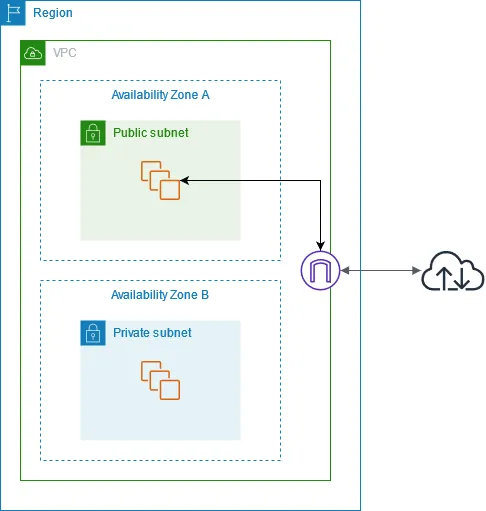
Components of Amazon VPC are,
1. **VPC**: A VPC is a logically isolated virtual network in the AWS Cloud.
2. **Subnet**: A subnet is a range of IP addresses in a VPC. A subnet must reside in a single Availability Zone.
3. **Route table**: A route table controls how traffic flows in and out of a subnet.
4. **Network gateway**: A network gateway connects your VPC to the internet or to another VPC.
Click me to view analogy
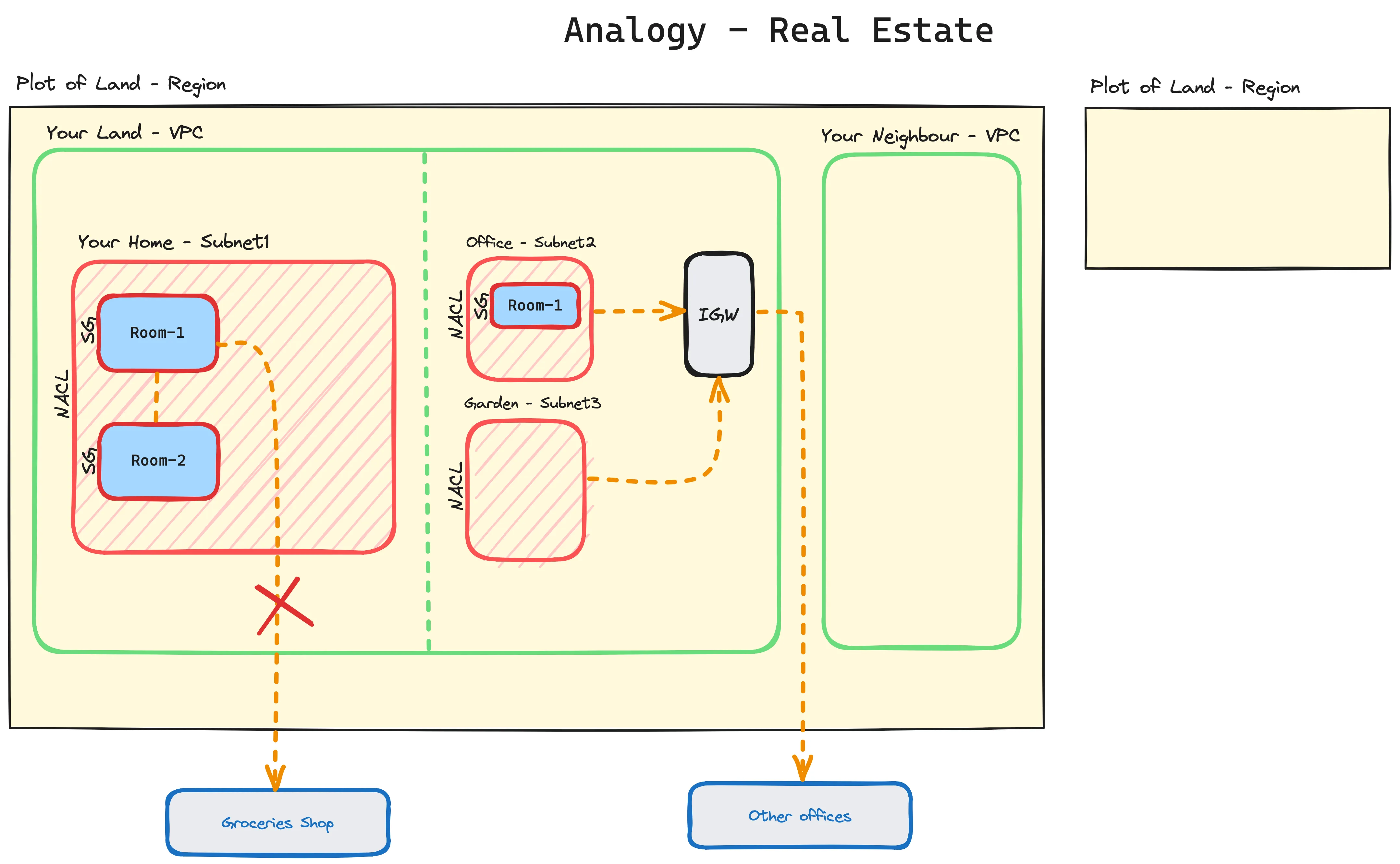
A VPC is a logically isolated section of the AWS cloud where you can launch AWS resources in a private network. It is similar to a gated community, where only authorized residents have access.
Here is a more detailed analogy:
VPC: A VPC is like a gated community, where only authorized residents have access. Subnets: Subnets are like the different neighborhoods within the gated community. Route tables: Route tables are like the street signs in the gated community. They tell traffic where to go. Security groups: Security groups are like the security gates in the gated community. They control who can enter and leave each neighborhood. Here is an example of how a VPC can be used to protect a residential property:
A homeowner can create a VPC to isolate their home network from the public internet. This can help to protect their home network from cyberattacks.
The homeowner can then create subnets to divide their home network into different zones, such as a guest network, a smart home network, and a work network. This can help to improve the security and performance of the home network.
The homeowner can then use route tables to direct traffic between the different subnets and to the public internet. For example, the homeowner can create a route table that allows guest devices to access the internet, but not the smart home network or the work network.
Finally, the homeowner can use security groups to control who can access each subnet. For example, the homeowner can create a security group that allows only authorized devices to access the work network.
By using a VPC, the homeowner can create a secure and isolated network for their home. This can help to protect their home network from cyberattacks and improve its performance.
## Subnet
[Section titled “Subnet”](#subnet)
A subnet is a range of IP addresses within a VPC. Subnets are used to segment a VPC into smaller networks, such as a public subnet for web servers and a private subnet for database servers.
There are two types of subnets in AWS:
* **Public subnets**: Public subnets have access to the internet. Resources in a public subnet can communicate with the internet using a NAT gateway or an internet gateway.
* **Private subnets**: Private subnets do not have access to the internet. Resources in a private subnet can communicate with each other and with resources in other VPCs using a VPC peering connection or a transit gateway.
When creating a subnet, you must specify the following:
* VPC ID: The ID of the VPC that the subnet is in.
* CIDR block: The range of IP addresses in the subnet.
* Availability zone: The availability zone where the subnet is located.
Click me to view analogy
Imagine that you are a homeowner and you have a large house. You want to have multiple Wi-Fi networks in your house, such as a separate Wi-Fi network for your guests and a separate Wi-Fi network for your smart home devices.
You can use a router to create multiple Wi-Fi networks in your house. Each Wi-Fi network would be isolated from the other Wi-Fi networks, so that each network would be secure and private.
## Routing Table
[Section titled “Routing Table”](#routing-table)
A route table in AWS is a set of rules that determine how traffic is routed within a VPC and to the internet. Route tables are associated with subnets, and each subnet can only be associated with one route table at a time.
Route tables contain the following information:
* Destination: The IP address or CIDR block that the rule applies to.
* Target: The next hop for traffic that matches the rule.
* Type: The type of route, such as gateway, internet gateway, or VPC peering connection.
* Priority: The priority of the rule. Rules with higher priorities are applied before rules with lower priorities.
When a packet is sent from a resource in a subnet, the VPC checks the route table associated with the subnet to determine how to route the packet. The VPC will route the packet to the next hop specified in the first rule that matches the packet’s destination.
Click me to view analogy
Imagine that you are a homeowner and you have a large house with multiple rooms. You have a router in your living room that is connected to the internet. You also have a Wi-Fi extender in your bedroom so that you can get good Wi-Fi coverage throughout your house.
When you send a packet from your phone in your bedroom to a website on the internet, the packet will first be routed to the Wi-Fi extender. The Wi-Fi extender will then route the packet to the router in your living room. The router will then route the packet to the internet.
## Internet Gateway
[Section titled “Internet Gateway”](#internet-gateway)
An internet gateway (IGW) in AWS is a highly available device that provides connectivity between your VPC and the internet. It allows instances in your public subnets to initiate outbound traffic to the internet and to receive inbound traffic initiated from the internet.
A default VPC includes an internet gateway, and each default subnet is a public subnet. Each instance that you launch into a default subnet has a private IPv4 address and a public IPv4 address.
## Securing the network
[Section titled “Securing the network”](#securing-the-network)
Security groups and network access control lists (NACLs) are both essential components of cloud networking that play a crucial role in safeguarding your resources and maintaining network security. While they share some similarities, they also have distinct features and serve different purposes.
### Security Groups
[Section titled “Security Groups”](#security-groups)
Security groups are stateful firewall-like tools that control inbound and outbound traffic at the instance level within a VPC. They act as virtual firewalls, allowing or denying traffic based on specified security rules. Each security group is associated with one or more instances, and the rules defined within the security group apply to all instances associated with it.
When to use Security Groups
* To control traffic to and from specific instances
* To implement granular access control policies for individual instances
* To define rules based on instance metadata or tags
### NACLs
[Section titled “NACLs”](#nacls)
NACLs, on the other hand, operate at the subnet level and control traffic entering and exiting a subnet. They are stateless, meaning they do not track the state of a connection and evaluate rules independently for each packet. NACLs provide an additional layer of security for subnets, complementing the security groups that protect individual instances.
When to use NACLs
* To control traffic entering and exiting subnets
* To provide an additional layer of security for subnets
* To define rules based on source IP address, destination IP address, and port number
Key Differences between Security Groups and NACL,
| Feature | Security Groups | NACLs |
| ----------- | ------------------ | -------------- |
| Scope | Instance level | Subnet level |
| Stateful | Yes | No |
| Rule Order | No order | Numbered order |
| Application | Specific instances | Subnets |
## Benefits of VPC
[Section titled “Benefits of VPC”](#benefits-of-vpc)
Here are some of the benefits of using Amazon VPC:
* **Isolation**: Amazon VPC isolates your resources from other VPCs, so you can control network access to your resources.
* **Security**: Amazon VPC provides a variety of security features to protect your resources, such as security groups, network access control lists (NACLs), and flow logs.
* **Scalability**: Amazon VPC is highly scalable, so you can easily add or remove resources as needed.
* **Reliability**: Amazon VPC is reliable and available, so you can be confident that your resources will be up and running when you need them.
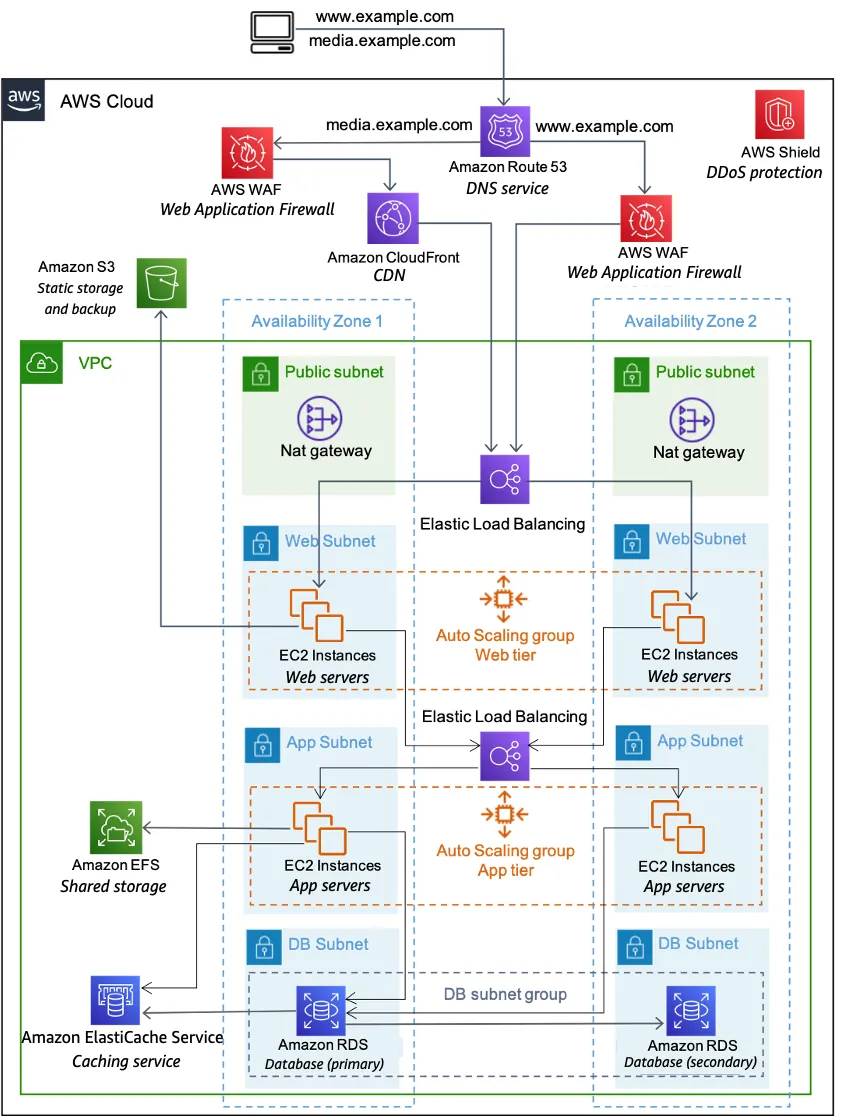
## Network Reference Architecture
[Section titled “Network Reference Architecture”](#network-reference-architecture)
## Analogy of Network Concepts
[Section titled “Analogy of Network Concepts”](#analogy-of-network-concepts)
# Security
> Astro is the web framework for building content-driven websites like blogs, marketing, and e-commerce. Learn why Astro might be a good choice for your next website.
Cloud security is a critical aspect of cloud computing that involves protecting cloud-based systems, applications, and data from unauthorized access, modification, or destruction. It encompasses a wide range of security measures and practices that are designed to safeguard sensitive information and ensure the integrity and availability of cloud-based resources.
## Key Concepts
[Section titled “Key Concepts”](#key-concepts)
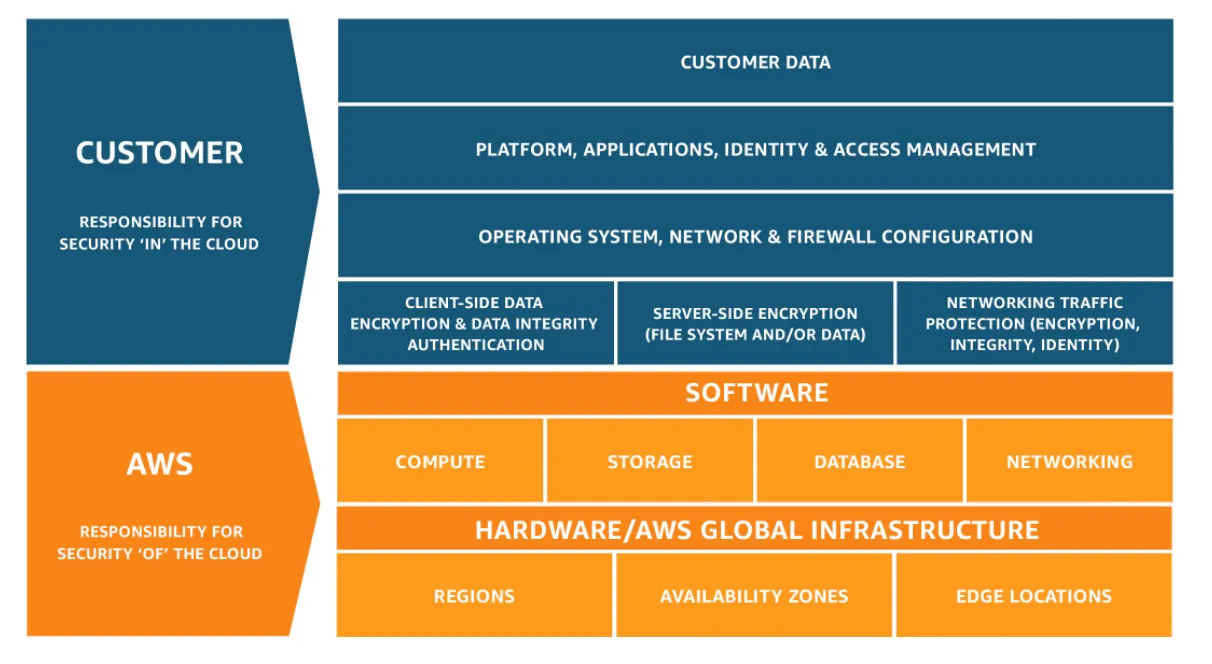
1. **Shared Responsibility Model**: Cloud security is a shared responsibility between cloud providers and cloud customers. Cloud providers are responsible for securing the infrastructure, while cloud customers are responsible for securing their workloads and data within the cloud environment.
2. **Threats and Vulnerabilities**: Cloud environments are susceptible to various threats, including cyberattacks, data breaches, insider threats, and misconfigurations. Vulnerabilities in software, systems, and configurations can be exploited by attackers to gain unauthorized access or disrupt operations.
## IAM
[Section titled “IAM”](#iam)
Identity and Access Management (IAM) is a web service that helps you securely manage access to AWS resources. IAM enables you to create and control users, groups, and roles that define who can access what within your AWS account.
Key Components of IAM are,
**Users**: Represent individual people who can access AWS resources. Each user has a unique name and a set of credentials, such as an access key ID and a secret access key.
**Groups**: Collections of users who share common permissions. Groups can be used to manage permissions for multiple users at once.
**Roles**: Entities that can be granted permissions to access AWS resources. Roles are often used to grant temporary access to resources, such as when launching EC2 instances.
**Policies**: Documents that define permissions for users, groups, and roles. Policies specify which actions users can perform on which resources.
## 5 Steps to securing your Cloud
[Section titled “5 Steps to securing your Cloud”](#5-steps-to-securing-your-cloud)
### Step 1: Implement Identity and Access Management (IAM)
[Section titled “Step 1: Implement Identity and Access Management (IAM)”](#step-1-implement-identity-and-access-management-iam)
**Enable IAM Roles**: Use IAM roles to grant temporary access permissions to resources instead of long-term access keys. This reduces the risk of credential exposure and unauthorized access.
**Enforce Multi-Factor Authentication (MFA)**: Mandate MFA for all IAM users to add an extra layer of security beyond passwords. This can significantly reduce the chances of unauthorized access even if passwords are compromised.
**Manage IAM User Permissions**: Regularly review and update IAM user permissions to ensure they align with their roles and responsibilities. Avoid granting excessive permissions that could lead to accidental or malicious actions.
**Principle of Least Privilege**: Apply the principle of least privilege, granting users only the minimum permissions necessary for their tasks. This minimizes the potential damage if an account is compromised.
### Step 2: Secure Your Storage
[Section titled “Step 2: Secure Your Storage”](#step-2-secure-your-storage)
**Encrypt Data at Rest and in Transit**: Encrypt your data at rest (stored in S3 buckets, EBS volumes, etc.) and in transit (when moving between resources) using industry-standard encryption methods like AES-256.
**Enable Access Controls for Storage Resources**: Implement access controls for storage resources, such as S3 buckets, to restrict access to authorized users and applications. Use IAM policies and VPC endpoints to control access from within your VPC.
**Audit Storage Access Logs**: Regularly audit storage access logs to identify and investigate suspicious activity. This can help detect unauthorized access attempts or data exfiltration.
### Step 3: Secure Your Networks
[Section titled “Step 3: Secure Your Networks”](#step-3-secure-your-networks)
**Use VPCs and Subnets**: Create virtual private clouds (VPCs) to isolate your resources from the public internet and control network traffic. Divide VPCs into subnets based on security requirements.
**Implement Network Access Control Lists (NACLs)**: Utilize NACLs to define rules for incoming and outgoing network traffic at the subnet level. NACLs provide an additional layer of security beyond VPCs.
**Use Security Groups**: Employ security groups to control inbound and outbound traffic at the instance level. Security groups allow or deny traffic based on specified rules, providing granular control over instance access.
**Monitor Network Traffic**: Continuously monitor network traffic for suspicious activity, such as unusual traffic patterns or attempts to access unauthorized resources. Use tools like VPC Flow Logs and CloudWatch Logs for monitoring.
### Step 4: Secure Your Applications
[Section titled “Step 4: Secure Your Applications”](#step-4-secure-your-applications)
**Implement Web Application Firewalls (WAFs)**: Utilize WAFs to protect web applications from common attacks, such as SQL injection, cross-site scripting (XSS), and cross-site request forgery (CSRF).
**Regularly Patch and Update Software**: Keep your applications, operating systems, and middleware up to date with the latest security patches to address newly discovered vulnerabilities.
**Scan for Vulnerabilities**: Regularly scan your applications and systems for vulnerabilities using automated tools. Promptly address identified vulnerabilities to prevent exploitation.
**Implement Secure Coding Practices**: Follow secure coding practices to avoid introducing vulnerabilities into your applications. Use secure libraries, validation techniques, and input sanitization.
### Step 5: Monitor and Audit Your AWS Account
[Section titled “Step 5: Monitor and Audit Your AWS Account”](#step-5-monitor-and-audit-your-aws-account)
**Enable CloudTrail**: Activate CloudTrail to log all actions performed within your AWS account. This provides a record of activity for auditing and investigation purposes.
**Configure CloudWatch Alarms**: Set up CloudWatch alarms to alert you when specific events occur, such as failed login attempts, resource usage spikes, or security policy changes.
**Regularly Review Logs and Audit Trails**: Periodically review logs and audit trails to identify potential security breaches, unauthorized access, or misconfigurations.
**Conduct Security Assessments**: Regularly conduct comprehensive security assessments of your AWS environment to identify and address potential risks.
Note
Remember, cloud security is an ongoing process that requires continuous attention and adaptation. By implementing robust security measures, staying informed about emerging threats, and seeking expert guidance when needed, you can effectively protect your cloud resources and maintain a secure cloud environment.
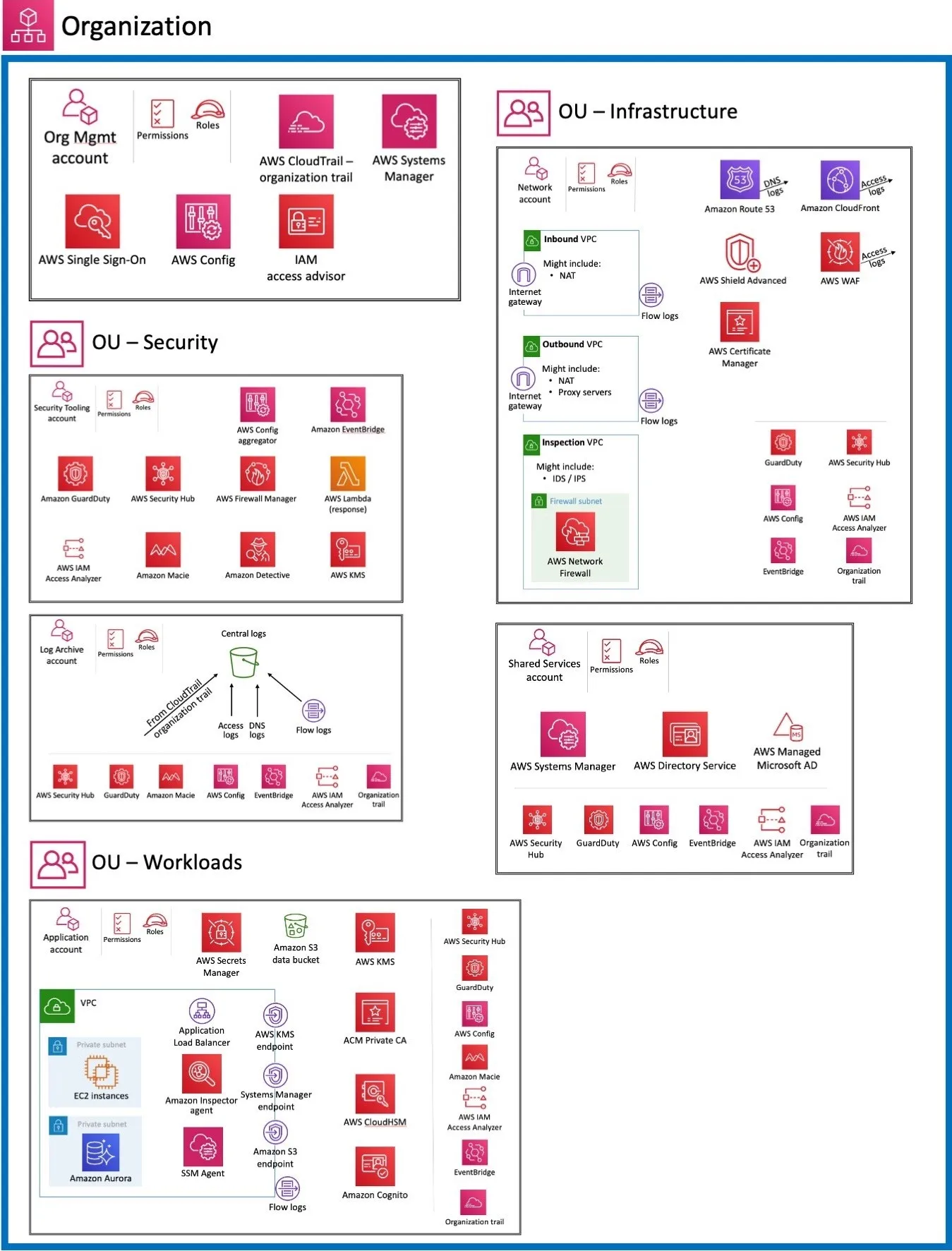
## Security Reference Architecture
[Section titled “Security Reference Architecture”](#security-reference-architecture)
# Cloud Services
> Astro is the web framework for building content-driven websites like blogs, marketing, and e-commerce. Learn why Astro might be a good choice for your next website.
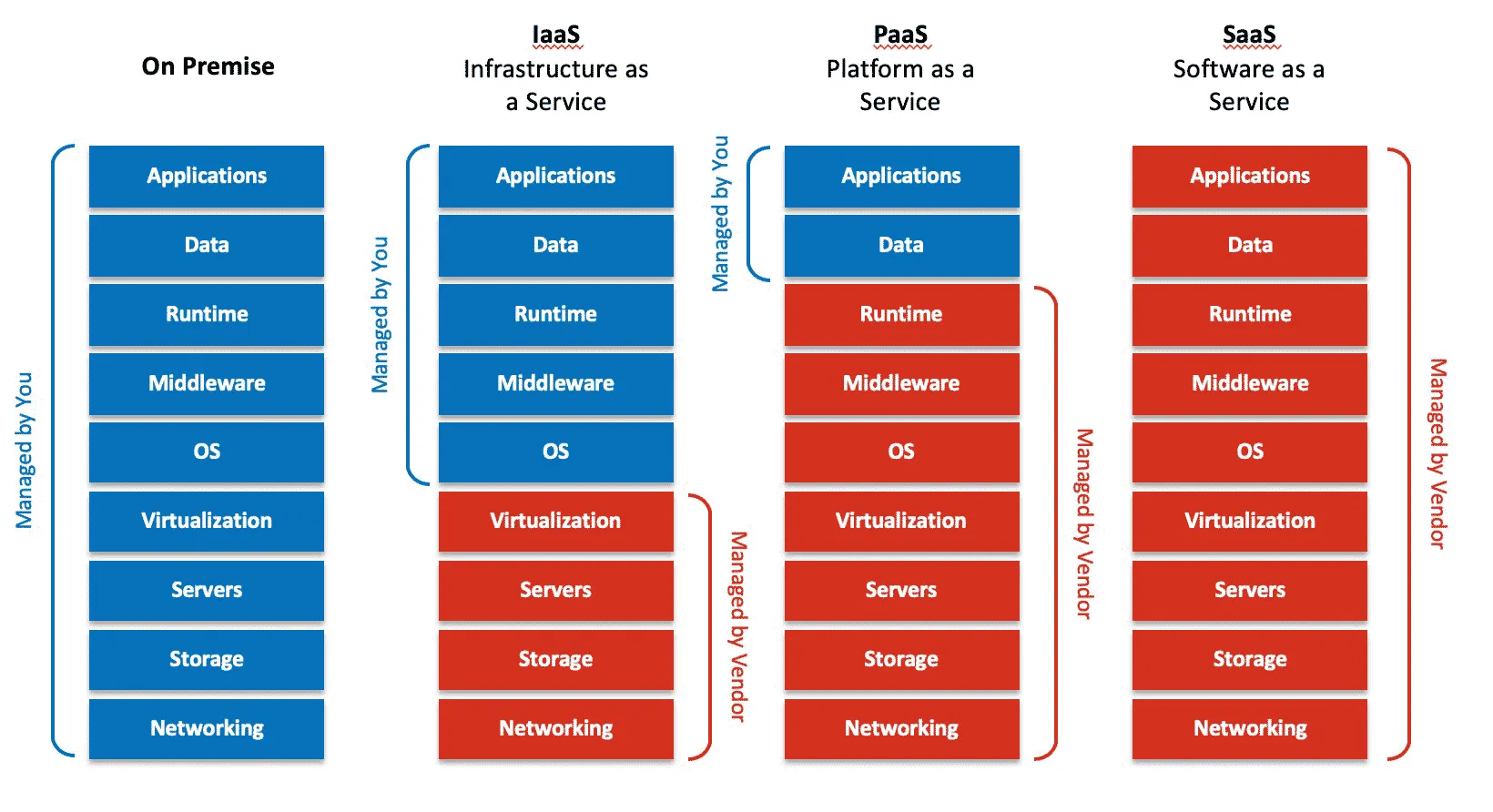
There are three main types of cloud services on the levels of abstractions they provide: Infrastructure as a Service (IaaS), Platform as a Service (PaaS), and Software as a Service (SaaS).
### IaaS
[Section titled “IaaS”](#iaas)
Infrastructure as a Service (IaaS) is a type of cloud computing service that provides access to computing resources such as servers, storage, and networking. IaaS customers can rent these resources on an as-needed basis, and they can scale their resources up or down as needed.
IaaS is a good choice for businesses that need a flexible and scalable IT infrastructure. For example, a business that experiences seasonal spikes in traffic may use IaaS to scale its infrastructure up during peak periods and then scale it back down during off-peak periods.
Analogy for IaaS
Imagine that you are a restaurant owner. You need to have tables, chairs, and dishes for your customers. However, you don’t want to buy all of this equipment upfront, because you don’t know how many customers you will have.
Instead, you could rent tables, chairs, and dishes from a company that specializes in renting equipment to restaurants. This way, you can only rent the equipment you need, and you can scale your rental up or down as needed.
Eg: Amazon Elastic Compute Cloud (Amazon EC2)
### PaaS
[Section titled “PaaS”](#paas)
Platform as a Service (PaaS) is a type of cloud computing service that provides a platform for developing, deploying, and managing applications. PaaS customers do not need to worry about managing the underlying infrastructure, such as servers, storage, and networking. Instead, they can focus on developing and deploying their applications.
PaaS is a good choice for businesses that want to focus on developing applications without having to worry about managing the underlying infrastructure. For example, a software company may use PaaS to develop and deploy its web applications.
Analogy for PaaS
Imagine that you are a chef and you want to open a restaurant. You need to have a kitchen, cooking equipment, and ingredients to prepare your food. However, you don’t want to buy all of this equipment upfront, because you don’t know how many customers you will have.
Instead, you could rent a kitchen from a company that specializes in renting kitchens to chefs. This company would provide you with everything you need to prepare your food, such as stoves, ovens, and refrigerators. You would then be able to focus on preparing your food and serving your customers.
Eg: AWS Elastic Beanstalk
### SaaS
[Section titled “SaaS”](#saas)
Software as a Service (SaaS) is a type of cloud computing service that provides software applications as a service over the internet. SaaS customers do not need to install or maintain any software on their own devices. Instead, they can access the software applications through a web browser or mobile app.
SaaS is a good choice for businesses of all sizes. It is a convenient and affordable way to access software applications. For example, a small business may use SaaS to manage its customer relationship management (CRM) system, or a large enterprise may use SaaS to manage its human resources (HR) system.
Analogy for SaaS
Imagine that you want to use a word processing application. You could buy a copy of Microsoft Word and install it on your computer. However, this would require you to pay for the software upfront and you would need to worry about installing and maintaining it.
Instead, you could use a SaaS word processing application such as Google Docs. Google Docs is a free word processing application that you can access through a web browser. You do not need to install or maintain any software, and you can access Google Docs from anywhere with an internet connection.
## Factors for choosing
[Section titled “Factors for choosing”](#factors-for-choosing)
When choosing between IaaS, PaaS, and SaaS, there are a number of factors to consider, including:
* Your needs and requirements: What are you trying to achieve with cloud computing? What kind of applications do you need to run? What are your security and compliance requirements?
* Your budget: How much can you afford to spend on cloud computing?
* Your expertise and resources: Do you have the expertise and resources to manage your own infrastructure?
| Factor | IaaS | PaaS | SaaS |
| ---------------- | --------------------------------------------------------------------------- | ---------------------------------------------------------------------- | ------------------------------------------ |
| Level of control | High | Medium | Low |
| Scalability | High | Medium | Low |
| Cost | High | Medium | Low |
| Security | Medium | High | High |
| Compliance | Flexible | Flexible | Less Flexible |
| Use case | High-performance computing, big data, machine learning, custom applications | Web applications, mobile applications, databases | CRM, ERP, HR, email, productivity tools |
| Business Need | Businesses that need a high level of control and scalability | Businesses that want to focus on developing and deploying applications | Businesses that need software applications |
# Storage
> Astro is the web framework for building content-driven websites like blogs, marketing, and e-commerce. Learn why Astro might be a good choice for your next website.
Cloud storage refers to the storage of data on servers located in the cloud, rather than on physical storage devices located on-premises. This enables users to access their data from anywhere with an internet connection.
## Storage Services in AWS
[Section titled “Storage Services in AWS”](#storage-services-in-aws)
* **Amazon Simple Storage Service (S3)**: S3 is a highly scalable, object storage service that is designed for storing large amounts of unstructured data.
* **Amazon Elastic Block Store (EBS)**: EBS is a block storage service that provides high-performance, block-level storage for Amazon EC2 instances.
* **Amazon Glacier**: Glacier is a low-cost, archival storage service that is designed for storing infrequently accessed data.
* **Amazon FSx for Windows File Server**: FSx for Windows File Server provides a fully managed, scalable, and highly available file system that is compatible with Windows Server.
* **Amazon S3 Glacier Deep Archive**: Glacier Deep Archive is an ultra-low-cost storage service that is designed for storing data that is accessed less frequently than once per year.
## S3
[Section titled “S3”](#s3)
Amazon S3 is an object storage service that offers industry-leading scalability, data availability, security, and performance. It is designed to store and protect any amount of data for a wide range of use cases, including websites, mobile applications, backup and restore, archive, enterprise applications, IoT devices, and big data analytics.
S3 provides a simple web service interface that you can use to store and retrieve data, and it can be accessed from anywhere in the world. S3 is a highly durable and available service, and it offers a variety of storage options to meet your needs.
### Storage Classes in S3
[Section titled “Storage Classes in S3”](#storage-classes-in-s3)
S3 offers a range of storage classes to meet different storage needs and cost requirements. These storage classes are:
1. **S3 Standard**: This is the most widely used storage class and is designed for frequently accessed data.
2. **S3 Standard-IA (Infrequent Access)**: This storage class is designed for data that is accessed less frequently than Standard data.
3. **S3 One Zone-IA (Infrequent Access)**: This storage class is designed for data that is accessed less frequently than Standard-IA data and that must reside in a specific AWS Region.
4. **S3 Glacier**: This storage class is designed for archiving data that is rarely accessed and that must be stored at a lower cost.
5. **S3 Intelligent-Tiering**: This storage class automatically tiers data between the Standard, Standard-IA, and Glacier storage classes based on how frequently it is accessed.
### Use Cases for S3
[Section titled “Use Cases for S3”](#use-cases-for-s3)
* **Websites and web applications**: S3 can be used to store the static content of websites and web applications, such as images, CSS, and JavaScript files.
* **Mobile applications**: S3 can be used to store the data and media files for mobile applications.
* **Backup and restore**: S3 can be used to back up data from on-premises servers and virtual machines. It can also be used to restore data from backups.
* **Archive**: S3 can be used to archive inactive data that is rarely accessed.
* **Enterprise applications**: S3 can be used to store data for enterprise applications, such as CRM and ERP systems.
* **IoT devices**: S3 can be used to store data from IoT devices.
* **Big data analytics**: S3 can be used to store data for big data analytics.
## EBS and EFS
[Section titled “EBS and EFS”](#ebs-and-efs)
* **EBS** is a block storage service that provides persistent, high-performance block storage for EC2 instances. It is designed for applications that require low latency and high throughput, such as databases, web servers, and applications that require direct access to block storage.
* **EFS** is a shared file storage service that provides scalable, elastic file storage for use with AWS Cloud and on-premises deployments. It is designed for applications that require a shared file system that is easy to use, scalable, and highly available.
### Differences between EBS and EFS
[Section titled “Differences between EBS and EFS”](#differences-between-ebs-and-efs)
| Feature | EBS | EFS |
| ------------ | -------------------------------------------------------------------------------- | ---------------------------------------------- |
| Storage type | Block storage | File storage |
| Use cases | Databases, web servers, applications that require direct access to block storage | Applications that require a shared file system |
| Scalability | Fixed size | Elastic |
| Availability | Highly available | Highly available |
| Performance | Low latency, high throughput | Scalable performance |
| Cost | Based on provisioned storage | Based on usage |
In addition to the key differences listed above, here are some other notable differences between EBS and EFS:
* EBS volumes can be attached to a single EC2 instance, while EFS file systems can be mounted by multiple EC2 instances.
* EBS volumes can be used as boot disks, while EFS file systems cannot.
* EBS volumes can be backed up to Amazon S3, while EFS file systems are automatically backed up by AWS.
### Choosing between EBS and EFS
[Section titled “Choosing between EBS and EFS”](#choosing-between-ebs-and-efs)
* If your application requires low latency and high throughput, then EBS is the best choice.
* If your application requires a shared file system that is easy to use, scalable, and highly available, then EFS is the best choice.
# Being Agile
> Learn about how Astro's islands architecture helps keep sites fast.
Agile development is an iterative and incremental approach to software development. It is based on the principle of continuous feedback and collaboration between the development team and the users and stakeholders.
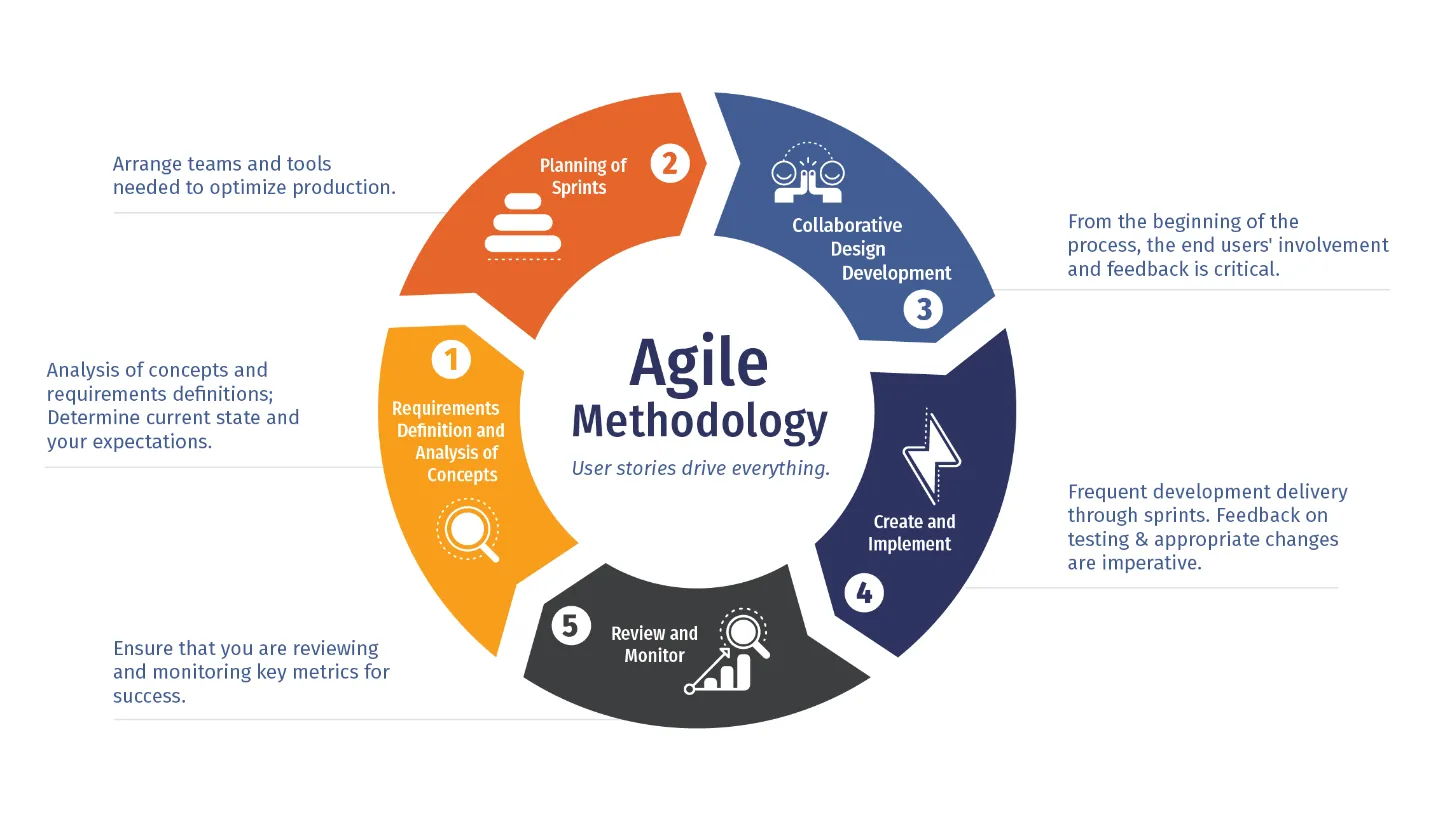
Agile development projects are typically divided into short cycles, called sprints.
* Each sprint begins with a planning meeting where the development team and the users and stakeholders prioritize the requirements for the sprint.
* The development team then works to implement the prioritized requirements during the sprint.
* At the end of the sprint, the development team demonstrates the implemented requirements to the users and stakeholders.
* The users and stakeholders then provide feedback on the implemented requirements and the development team uses this feedback to plan for the next sprint.
Agile development is a more flexible and responsive approach to software development than traditional SDLC development. It is also easier to make changes to the requirements of the software system during the development process.
## Why the shift towards agile development?
[Section titled “Why the shift towards agile development?”](#why-the-shift-towards-agile-development)
There are a number of reasons why companies are shifting towards agile development:
* **Faster time to market**: Agile development can help companies to get their products to market faster. This is because agile development is an iterative and incremental approach that allows companies to get feedback from users and stakeholders early and often.
* **Higher quality products**: Agile development can help companies to deliver higher quality products. This is because agile development is based on the principle of continuous feedback and collaboration between the development team and the users and stakeholders.
* **Increased customer satisfaction**: Agile development can help companies to increase customer satisfaction. This is because agile development allows companies to get feedback from users and stakeholders early and often, and to use this feedback to make changes to the software system during the development process.
* **Improved employee morale**: Agile development can help to improve employee morale. This is because agile development is a collaborative approach that gives employees a greater sense of ownership over the software system they are developing.
# AI Transformation
> Astro is the web framework for building content-driven websites like blogs, marketing, and e-commerce. Learn why Astro might be a good choice for your next website.
Imagine a world where machines can think, learn, and make decisions just like humans, but faster and more accurately. That’s the essence of AI Transformation.
## What is AI Transformation?
[Section titled “What is AI Transformation?”](#what-is-ai-transformation)
AI Transformation is the process of integrating artificial intelligence (AI) technologies like machine learning, data analysis, and automation into businesses, organizations, or even entire societies to fundamentally improve how things work. Instead of just using AI for small tasks, it’s about rethinking entire systems to leverage AI’s power for better outcomes. For instance, AI helps analyze huge amounts of data in seconds, predict trends, and automate repetitive jobs, allowing humans to focus on creative and complex problems. This shift is part of a broader digital transformation, where AI enables real time insights and smoother workflows.
## Real World Examples
[Section titled “Real World Examples”](#real-world-examples)
To make this concrete, let’s look at how AI Transformation is happening today. These examples show its potential to revolutionize fields and pave the way for a smarter future.
### Healthcare: Faster and More Accurate Diagnoses
[Section titled “Healthcare: Faster and More Accurate Diagnoses”](#healthcare-faster-and-more-accurate-diagnoses)
In medicine, AI is transforming how doctors detect and treat diseases. Tools like AI powered imaging software can analyze X-rays or MRIs to spot issues like cancer earlier than human eyes alone. For example, systems from companies like IBM Watson assist in oncology by reviewing patient data and suggesting personalized treatments, speeding up diagnoses and improving outcomes. This not only saves lives but also reduces healthcare costs by minimizing errors.
### Transportation: Self Driving Vehicles
[Section titled “Transportation: Self Driving Vehicles”](#transportation-self-driving-vehicles)
The automotive industry is being reshaped by AI through autonomous cars. Companies like Tesla and Waymo use AI algorithms to process sensor data, navigate roads, and make split second decisions for safer driving. This transformation reduces accidents caused by human error, eases traffic congestion, and could even make transportation more accessible for people who can’t drive. In the future, this could lead to smarter cities with efficient, eco-friendly transport systems.
### Customer Service: Intelligent Chatbots
[Section titled “Customer Service: Intelligent Chatbots”](#customer-service-intelligent-chatbots)
Businesses are using AI chatbots to revolutionize support. For instance, companies like Amazon and banks employ AI driven assistants that handle inquiries 24/7, resolving issues like order tracking or account questions instantly without waiting for a human agent. This boosts customer satisfaction and frees up staff for more complex tasks. It’s a prime example of how AI makes services more responsive and scalable.
### Finance: Fraud Detection and Predictions
[Section titled “Finance: Fraud Detection and Predictions”](#finance-fraud-detection-and-predictions)
In banking, AI transforms security and forecasting. Systems analyze transaction patterns in real time to flag suspicious activities, preventing fraud before it happens. Additionally, AI predicts market trends, helping investors and companies make informed decisions. This has made financial services more secure and efficient, protecting users while enabling growth. As you can see, AI Transformation isn’t just about technology, it’s about creating a better, more connected world. By adopting AI, we’re laying the foundation for innovations that will define the future, from sustainable energy to personalized education.
## Benefits of AI Transformation
[Section titled “Benefits of AI Transformation”](#benefits-of-ai-transformation)
1. Increased Efficiency: AI automates routine tasks, reducing manual work and speeding up processes, which saves time and cuts costs.
2. Better Decision Making: By processing vast data sets, AI provides accurate insights and predictions, helping leaders make smarter choices based on facts rather than guesses.
3. Enhanced Innovation: AI sparks new ideas and products, like personalized recommendations or advanced tools, driving growth and competitiveness.
4. Improved Customer Experiences: Personalized services, such as chatbots or tailored suggestions, make interactions faster and more satisfying.
5. Scalability and Adaptability: Businesses can handle more demands without proportional increases in resources, and AI systems learn over time to adapt to new challenges.
# Evolution of Software Architecture
> Learn about how Astro's islands architecture helps keep sites fast.
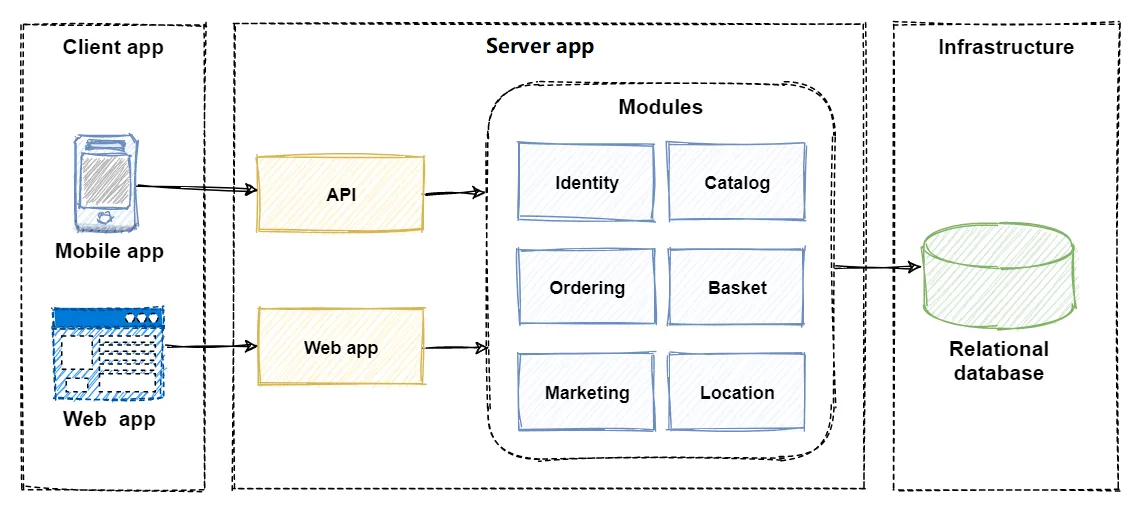
## Monolithic architecture
[Section titled “Monolithic architecture”](#monolithic-architecture)
In the early days of software development, most applications were monolithic in nature. This means that all of the application’s components were tightly coupled and deployed as a single unit. Monolithic architectures were relatively easy to develop and maintain, but they were also difficult to scale and update.
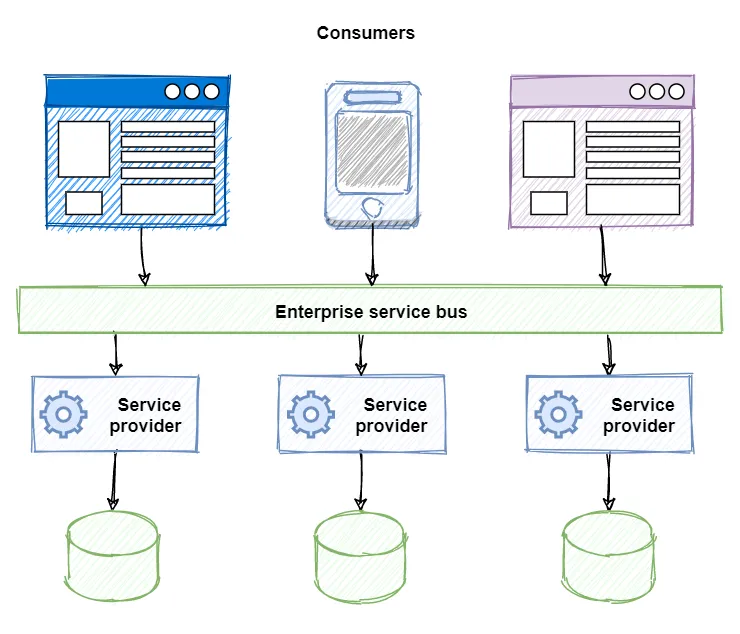
## Service-oriented architecture
[Section titled “Service-oriented architecture”](#service-oriented-architecture)
SOAs emerged in the early 2000s as a way to address the limitations of monolithic architectures. SOAs are based on the principle of loose coupling, which means that the application’s components are independent of each other and can be deployed and updated separately. This makes SOAs more scalable and flexible than monolithic architectures.
## Microservices architecture
[Section titled “Microservices architecture”](#microservices-architecture)
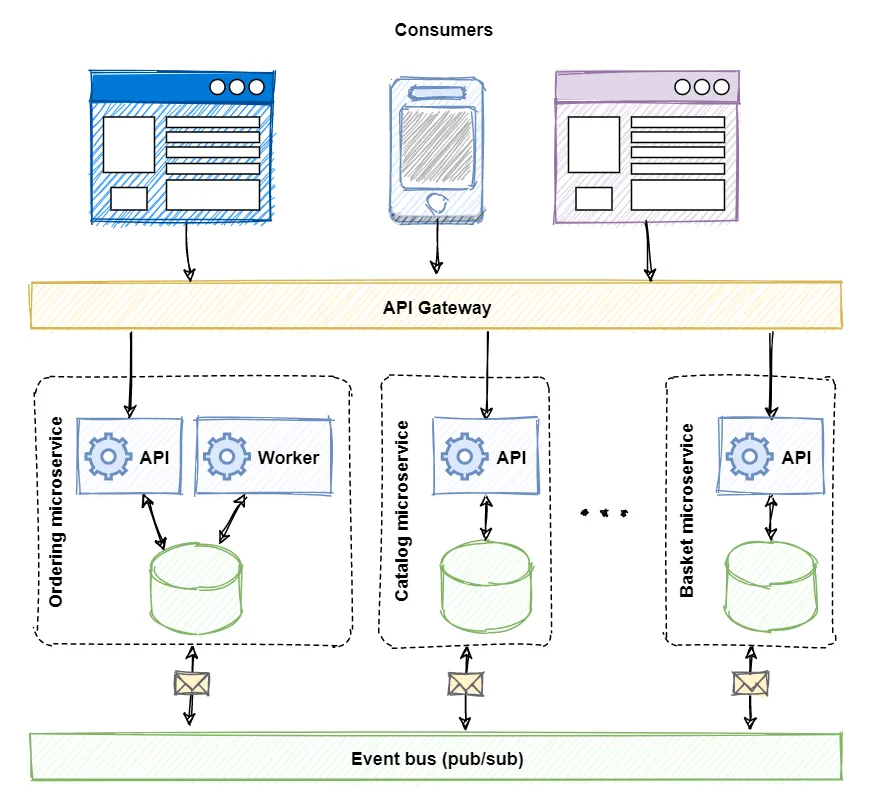
Microservices architectures emerged in the mid-2010s as a further evolution of SOAs. Microservices architectures are even more granular than SOAs, with each component representing a single business capability. This makes microservices architectures even more scalable and flexible than SOAs, but also more complex to develop and maintain.
# Rise of Containers
> Learn about how Astro's islands architecture helps keep sites fast.
Containers came into software systems in the early 2000s, with the development of technologies such as FreeBSD Jails and Solaris Zones. However, it was not until the mid-2010s, with the rise of Docker, that containers became mainstream.
## How it helped
[Section titled “How it helped”](#how-it-helped)
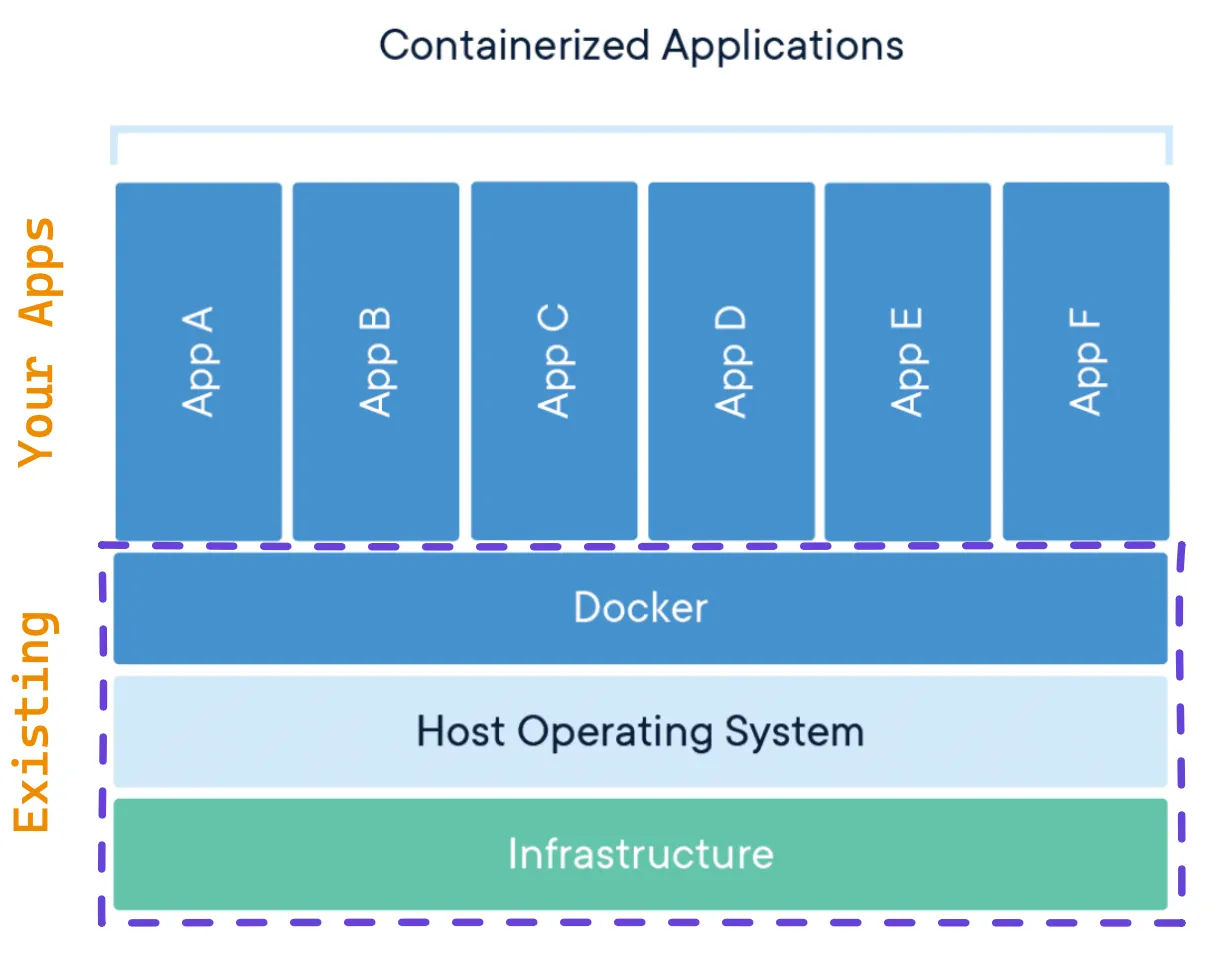
One of the key issues that containers addressed was the difficulty of deploying and managing software applications in a consistent and reliable way. Prior to containers, software applications were typically deployed as monolithic units, which meant that all of the application’s components were tightly coupled and deployed as a single unit. This made it difficult to deploy and manage monolithic applications, especially in distributed environments.
Containers address this problem by providing a lightweight and portable way to package and deploy software applications. Containers encapsulate all of the application’s components, including its code, libraries, and dependencies, into a single unit. This makes it easy to deploy and manage containers in any environment, regardless of the underlying operating system.
## Benefits
[Section titled “Benefits”](#benefits)
There are a number of benefits to container based deployment, including:
* **Portability**: Containers can be deployed on any platform that supports the container runtime. This makes it easy to deploy containers in different environments, such as on-premises, in the cloud, and on hybrid environments.
* **Scalability**: Containers can be easily scaled up or down by adding or removing containers. This makes it easy to scale containerized applications to meet changing demand.
* **Efficiency**: Containers share the underlying operating system and kernel, which makes them more efficient than virtual machines.
* **Isolation**: Containers are isolated from each other, which makes them more secure and reliable.
## How it works with Agile
[Section titled “How it works with Agile”](#how-it-works-with-agile)
Containers also paved the way for agile practices by making it easier to develop and deploy software applications in a continuous integration and continuous delivery (CI/CD) pipeline. CI/CD pipelines automate the software development and delivery process, which allows teams to deliver software to customers more quickly and reliably.
Containers are used in CI/CD pipelines to build, test, and deploy software applications in a consistent and reliable way. Containers can also be used to create isolated and reproducible development environments for developers. This helps to improve the quality of software development and makes it easier for developers to collaborate with each other.
Overall, containers have had a significant impact on software development. They have made it easier to deploy and manage software applications in a consistent and reliable way, and they have paved the way for agile practices such as CI/CD.
Here are some specific examples of how containers are used in agile practices:
* **Continuous integration**: Containers can be used to create isolated and reproducible development environments for developers. This makes it easier for developers to integrate their changes into the main codebase without breaking the build.
* **Continuous delivery**: Containers can be used to build and test software applications in a consistent and reliable way. This makes it easy to deploy software applications to production on demand.
* **Microservices**: Containers are often used to implement microservices architectures. Microservices architectures are based on the principle of breaking down a software application into small, independent services. This makes software applications more scalable and flexible.
Overall, containers are an essential tool for agile software development. They make it easier for teams to develop and deliver software to customers more quickly and reliably.
# Distributed Computing
> Learn about how Astro's islands architecture helps keep sites fast.
Distributed computing is a computing model where multiple computers or nodes are interconnected to form a single system. These nodes are geographically dispersed and communicate with each other through a network to share resources and solve problems collaboratively. Distributed systems are designed to be highly scalable, resilient, and fault-tolerant.
## Key Differences
[Section titled “Key Differences”](#key-differences)
Here’s a table summarizing the key differences between distributed computing and traditional computing:
| Feature | Distributed Computing | Traditional Computing |
| ----------- | ------------------------------------------- | ------------------------------------- |
| Structure | Multiple interconnected nodes | Single centralized system |
| Location | Nodes are geographically dispersed | System is housed in a single location |
| Scalability | Highly scalable | Limited scalability |
| Resiliency | Fault-tolerant and can handle node failures | Vulnerable to single-point failures |
| Management | Decentralised | Centralised |
## Applications
[Section titled “Applications”](#applications)
Distributed computing is widely used in various domains, including:
* **Web applications**: Distributed systems power large-scale web applications like Google Search and social media platforms.
* **Cloud computing**: Cloud infrastructure relies on distributed systems to manage and distribute resources across multiple data centers.
* **Scientific computing**: Distributed systems are used for large-scale scientific simulations and data analysis.
* **High-performance computing (HPC)**: Distributed systems enable parallel processing and distributed data storage for HPC applications.
* **IoT (Internet of Things)**: Distributed systems manage the massive data generated by IoT devices and provide real-time insights.
## Advantages
[Section titled “Advantages”](#advantages)
Distributed computing offers several advantages over traditional computing:
* **Scalability**: Distributed systems can easily scale up or down by adding or removing nodes, allowing them to handle increasing workloads efficiently.
* **Resiliency**: In distributed systems, the failure of a single node doesn’t bring down the entire system. Other nodes can continue operating, ensuring high availability and fault tolerance.
* **Efficiency**: Distributed systems can distribute tasks across multiple nodes, parallelizing processing and improving overall system efficiency.
* **Resource Sharing**: Distributed systems enable efficient resource sharing, allowing multiple users or applications to access and utilize resources simultaneously.
* **Global Reach**: Distributed systems can span across geographical boundaries, providing access to resources and data from anywhere in the world.
## Disadvantages
[Section titled “Disadvantages”](#disadvantages)
Despite its advantages, distributed computing also presents some challenges:
* **Complexity**: Designing, implementing, and managing distributed systems can be complex due to the interconnectedness and distributed nature of the system.
* **Networking Overhead**: Communication overhead between nodes can add latency and impact performance.
* **Data Consistency**: Maintaining data consistency across multiple nodes can be challenging, especially when dealing with concurrent updates.
* **Security**: Securing distributed systems requires careful consideration of network security and access control measures.
* **Debugging**: Debugging and troubleshooting distributed systems can be more complex due to the distributed nature of the system and the potential for node failures.
Note
Distributed computing has revolutionized the computing landscape, enabling the development of large-scale, scalable, and resilient systems that power modern web applications, cloud infrastructure, and scientific computing.
# 8 Fallacies
> Learn about how Astro's islands architecture helps keep sites fast.
The fallacies (a false belief) of distributed computing are a collection of assertions made by L Peter Deutsch and others at Sun Microsystems describing false assumptions that programmers new to distributed applications invariably make.
Source Pic:
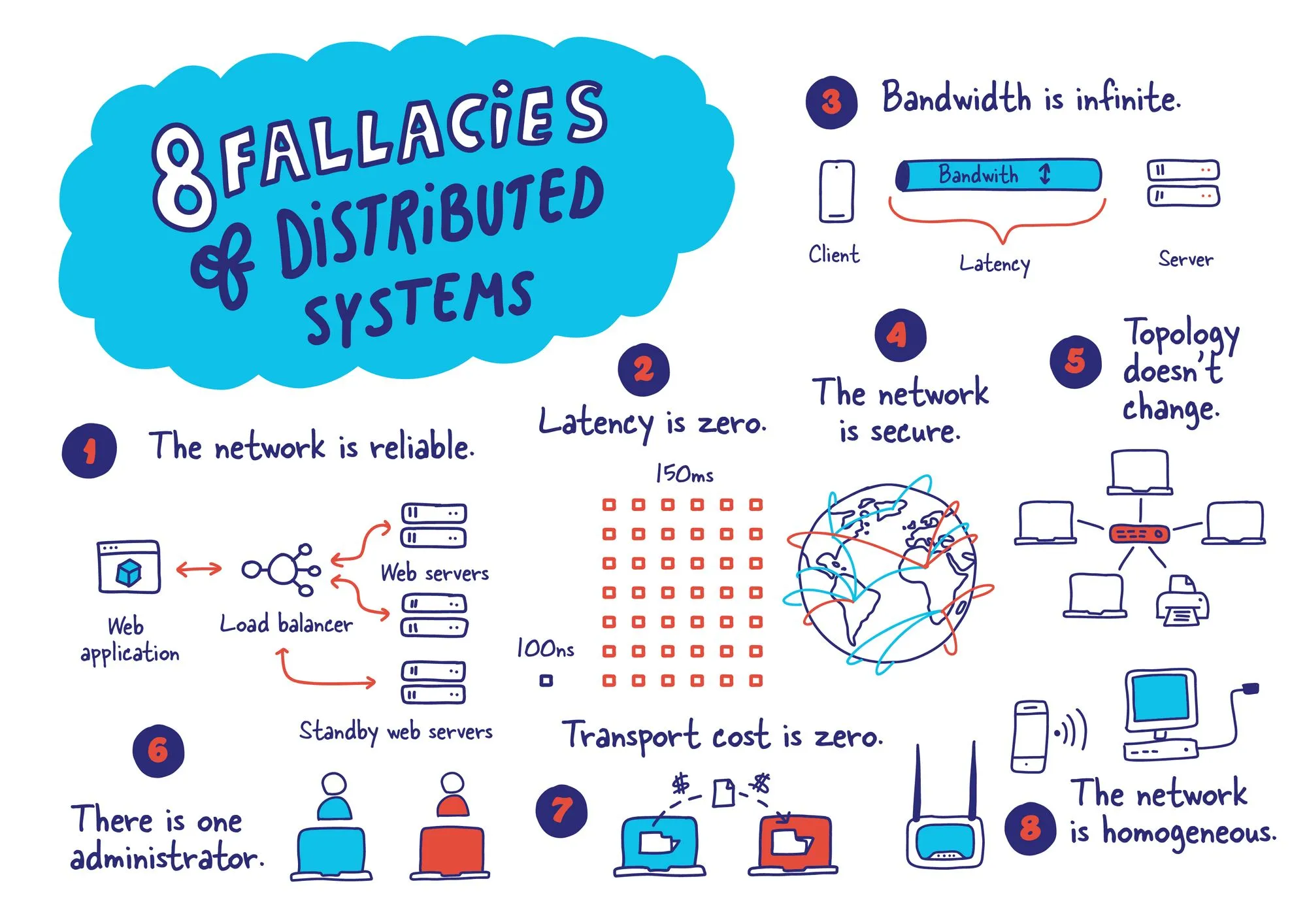
1. **The network is reliable**: The network is not always reliable. There can be outages, packet loss, and other problems. You should not assume that the network will always be available.
2. **Latency is zero**: Latency is the time it takes for a request to be sent to a remote server and for a response to be received. Latency is not zero, and it can be significant, especially for geographically distributed systems. You should design your applications to handle high latency.
3. **Bandwidth is infinite**: Bandwidth is the amount of data that can be transmitted over a network connection. Bandwidth is not infinite, and it can be a bottleneck for distributed applications. You should design your applications to minimize the amount of data that is transmitted over the network.
4. **The network is secure**: The network is not secure. There are many threats to security on the network, such as hackers, viruses, and malware. You should take steps to protect your applications from attack.
5. **Topology doesn’t change**: The topology of a network is the arrangement of the network devices and the connections between them. The topology of a network can change, for example, if a device is added or removed, or if a connection is broken. You should design your applications to be resilient to changes in topology.
6. **There is one administrator**: There is not always one administrator for a distributed system. There may be multiple administrators, and they may be located in different geographical locations. You should design your applications to be able to handle multiple administrators and different administrative domains.
7. **Transport cost is zero**: The cost of transporting data over a network is not zero. The cost of transport can vary depending on the distance between the sender and receiver, the type of network connection, and the amount of data being transmitted. You should design your applications to minimize the amount of data that is transmitted over the network.
8. **The network is homogeneous**: The network is not homogeneous. There may be different types of network devices, different types of network connections, and different operating systems running on the network. You should design your applications to be able to handle different types of network devices, connections, and operating systems.
Note
By understanding these fallacies, programmers can avoid making mistakes that can lead to performance problems, security vulnerabilities, and other problems in distributed applications. [Know more](https://architecturenotes.co/fallacies-of-distributed-systems/)
# LITIES
> Learn about how Astro's islands architecture helps keep sites fast.
The term “lities” is often used to describe the non-functional requirements or quality attributes of software systems. These qualities are typically related to the performance, usability, security, reliability, and maintainability of the system.
Here is a list of some of the most important lities in software architecture:
**Performance**: Performance refers to the speed, responsiveness, and throughput of a software system. It is typically measured in terms of metrics such as latency, throughput, and resource utilization.
**Usability**: Usability refers to the ease of use of a software system. It is typically measured in terms of metrics such as learnability, efficiency, memorability, error prevention, and satisfaction.
**Security**: Security refers to the protection of a software system from unauthorized access, use, disclosure, modification, or destruction. It is typically measured in terms of metrics such as confidentiality, integrity, availability, and non-repudiation.
**Reliability**: Reliability refers to the ability of a software system to perform its intended function correctly and consistently over time. It is typically measured in terms of metrics such as fault tolerance, mean time to failure (MTF), and mean time between failures (MTBF).
**Maintainability**: Maintainability refers to the ease of modifying a software system to fix bugs, add new features, or adapt to changing requirements. It is typically measured in terms of metrics such as modularity, understandability, changeability, and testability.
**Scalability**: The ability of a software system to handle increasing workloads or data volumes without significant performance degradation.
**Portability**: The ability of a software system to run on different hardware and software platforms.
**Interoperability**: The ability of a software system to communicate and exchange data with other systems.
**Extensibility**: The ability of a software system to be extended with new features or functionality.
**Flexibility**: The ability of a software system to adapt to changing requirements.
Note
These lities are not mutually exclusive, and there is often a trade-off between them. For example, a highly secure system may be less performant, or a highly scalable system may be less maintainable.
# Traditional SDLC
> Learn about how Astro's islands architecture helps keep sites fast.
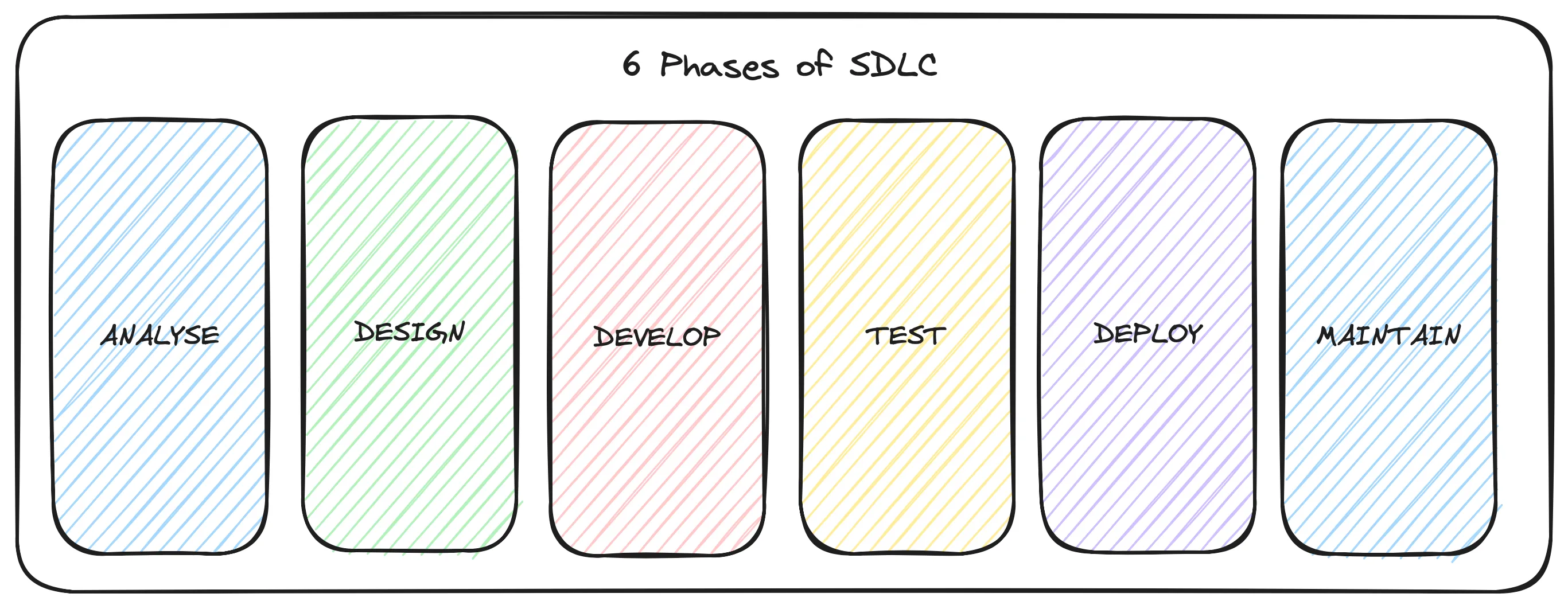
Traditional SDLC development is a sequential process that follows a set of well-defined steps. These steps typically include:
1. **Requirements gathering and analysis**: This step involves gathering and analyzing the requirements of the software system from the users and stakeholders.
2. **Design**: This step involves designing the architecture and components of the software system.
3. **Development**: This step involves developing the software system according to the design.
4. **Testing**: This step involves testing the software system to ensure that it meets the requirements and is free of defects.
5. **Deployment**: This step involves deploying the software system to the production environment.
6. **Maintenance**: This step involves maintaining the software system after it has been deployed.
Note
Traditional SDLC development is a well-established and proven process, but it can be slow and inflexible. It is also difficult to make changes to the requirements of the software system once the development process has begun.
# Latest Trends
> Learn about how Astro's islands architecture helps keep sites fast.
The current trend is towards cloud-native microservices architectures. Cloud-native microservices architectures are designed to be deployed and managed in the cloud, and they take advantage of cloud-native features such as containerization and orchestration. Cloud-native microservices architectures are the most scalable and flexible software architecture to date.
In addition to cloud-native microservices architectures, there is also the emergence of new software architecture patterns such as:
## Event-driven architecture
[Section titled “Event-driven architecture”](#event-driven-architecture)
Event-driven architectures are based on the principle of loose coupling and asynchronous communication. Components in an event-driven architecture communicate with each other by publishing and subscribing to events. This makes event-driven architectures very scalable and resilient.
## API-first architecture
[Section titled “API-first architecture”](#api-first-architecture)
API-first architectures are designed around the development and exposure of APIs. This makes it easy to integrate applications with each other and to create new products and services.
## Mesh architecture
[Section titled “Mesh architecture”](#mesh-architecture)
Mesh architectures are a distributed architecture pattern that is designed to improve the scalability and resilience of microservices applications. Mesh architectures use a service mesh to manage the communication and routing of traffic between microservices.
## Domain-driven design (DDD)
[Section titled “Domain-driven design (DDD)”](#domain-driven-design-ddd)
DDD is a design approach that focuses on modeling the software system around the business domain. This helps to create a software system that is easier to understand, maintain, and evolve.
## Continuous integration and continuous delivery (CI/CD)
[Section titled “Continuous integration and continuous delivery (CI/CD)”](#continuous-integration-and-continuous-delivery-cicd)
CI/CD is a set of practices that automate the software development and delivery process. CI/CD helps to deliver software to customers more quickly and reliably.
## Infrastructure as code (IaC)
[Section titled “Infrastructure as code (IaC)”](#infrastructure-as-code-iac)
IaC is a practice of using code to define and manage infrastructure. IaC helps to automate the infrastructure provisioning and configuration process, which can make it more efficient and less error-prone.
## Chaos engineering
[Section titled “Chaos engineering”](#chaos-engineering)
Chaos engineering is the practice of deliberately injecting failures into a software system to test its resilience. Chaos engineering helps to identify and fix weaknesses in the software system before they cause problems in production.
## Observability
[Section titled “Observability”](#observability)
Observability is the ability to understand the state and behavior of a software system. Observability is essential for troubleshooting problems and optimizing performance.
# API Primer Docs
> Guides, resources, and references to help you learn latest trends in technology
What will you learn here?
Explore our collection of documentation, tutorials, and examples to help you get started with understanding the latest trends in technology.
Take a guided tutorial
Complete our introductory [Build in cloud](/en/tutorial/0-introduction/) to learn the basics of cloud computing and deploy apps or services.
# Need to know
> Tutorial Build in cloud - Intro
This is a hands-on tutorial that will teach you the basics of cloud computing that you just finished learning in the chapters earlier, by building the basic components of cloud and then deploying applications on top of it.
Following are the recommended tools and knowledge to get the most out of this tutorial:
* **Laptop or Desktop**
* Git, JDK17, Maven, NodeJS 18.x, AWS CLI, VS Code or your favorite editor
* Docker for Desktop
* **AWS Account**
* **GitHub Account** - [Create](https://github.com)
* **DockerHub Account** - [Create](https://hub.docker.com/login)
How do I use the checklists at the bottom of each page?
You check them off!
At the end of each page, you’ll find a clickable checklist of tasks you should now be able to do. Check these items off to see your progress in the Tutorial Tracker.
Using the tracker is optional, but it can help you remember your place if you complete the tutorial over multiple visits. You can also leave some checklists blank as a reminder of units that you want to revisit later.
(This data is only saved to your browser’s local storage and is not available elsewhere. No data is sent to, nor stored by server.)
What if I need help, or want to learn more about the topic?
Our [friendly Slack Channel](https://join.slack.com/t/campus2corpc2c/shared_invite/zt-28ll0levk-9_Zbo8rM0b8MjKNJwyVxSA) is the place to be!
Hop into the Slack to ask questions, or say hi and chat in `#general` or `#cloud`.
* Lets get started!
# Create your cloud account
> Tutorial Build in cloud - Intro
You can provision free accounts on any major cloud providers like AWS, GCP, Azure. For the purpose of this tutorial, you will be using AWS. 🚀
To create an AWS account under the Free Tier, follow these steps:
1. Go to the [AWS Free Tier](https://aws.amazon.com/free/) and click Create a Free Account.
2. Enter your account information and click Continue.
3. Verify your email address and phone number.
4. Create a password for your root user and click Continue.
5. Review the AWS Customer Agreement and click Accept and Create Account.
You will receive an email notification once your account is created.
Once your account is created, you can start using the AWS Free Tier services. The Free Tier includes a number of popular services, such as Amazon Elastic Compute Cloud (Amazon EC2), Amazon Simple Storage Service (Amazon S3), and Amazon Relational Database Service (Amazon RDS).
Free Tier Details
The AWS cloud account is free for 12 months and with limitations on how much you can use for each different resources. In order to avoid exceeding the free tier limits, make sure you limit your explorations to limited set of services. You can apply IAM policies to users to make some restrictions and enable services when needed
## Securing the account
[Section titled “Securing the account”](#securing-the-account)
Once you login make sure to secure the account with MFA (Multi Factor Authentication) this can reduce the risk of account breach, leading to abuse of your cloud account.
1. Goto IAM console of the cloud account and follow all the Security recommendations given in the page.
2. The account you logged in is the root user for your account which has full privilege on your account. Do not use that account for the exploration purpose but use it only for administrative purpose like billing, user management.
3. Create a user in the upcoming section and assign only necessary permissions to the user. Use that user for login to account and other activities given in this hands-on tutorial.
* I have the AWS account created and secured with MFA.
# Traditional SDLC
> Tutorial Build in cloud - Intro
You will see below how traditionally the software development lifecycle (SDLC) works and how cloud changes the way we build, deploy and manage applications.
## Clone a respository
[Section titled “Clone a respository”](#clone-a-respository)
* You can use this [template](https://github.com/apiprimer/spring-rest-api) to create your own project repository. Click `Use this template` and `Create a new repository`. Provide a name for your repository `spring-rest-api`. You will have a copy of this code in your own github account
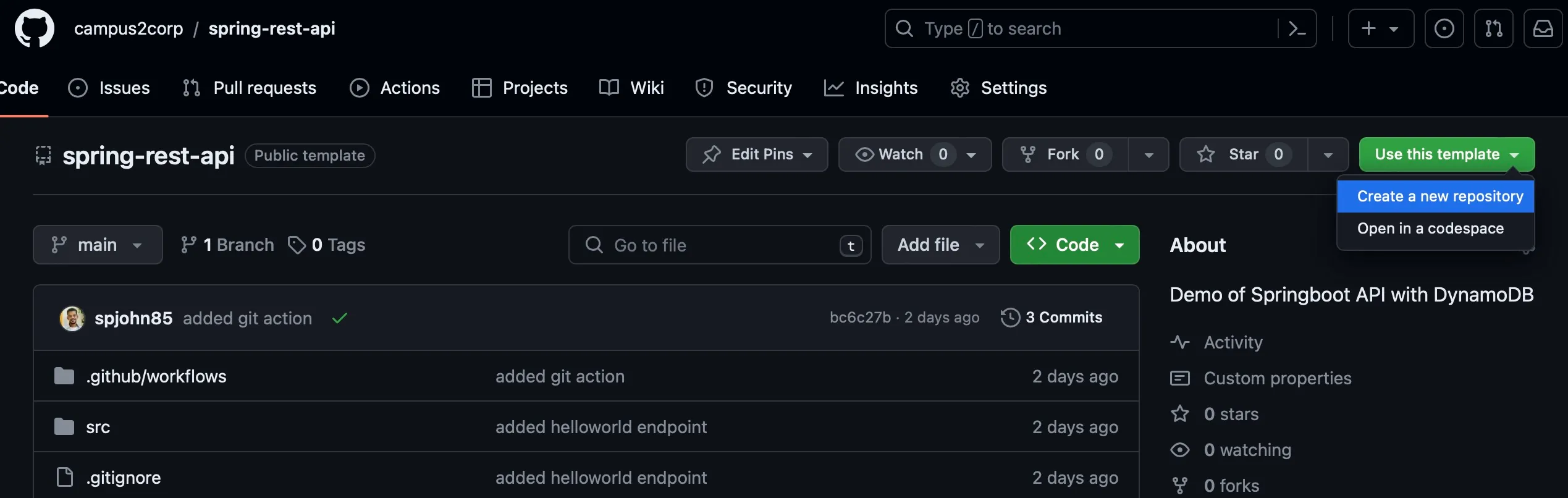
* Copy the URL next on dropdown `Code`. Login to your AWS Account and Click Shell icon on top right. Goto AWS Cloud Shell and issue this command in shell
```shell
git clone $COPIED_URL
```
* You have the copy of your code in your local shell. Check with command,
```shell
ls spring-rest-api
```
Output
```text
[cloudshell-user@ip-10-132-56-180]$ ls spring-rest-api
commands.sh Dockerfile mvnw mvnw.cmd pom.xml src target
```
## Installing JDK17 and Maven
[Section titled “Installing JDK17 and Maven”](#installing-jdk17-and-maven)
Since this is a demo of how to run Java project, you need to install the following tools in Cloud Shell,
```shell
sudo yum install java-17-amazon-corretto-devel
```
```shell
java -version
```
Output
```text
[cloudshell-user@ip-10-132-56-180 spring-rest-api]$ java -version
openjdk version "17.0.9" 2023-10-17 LTS
OpenJDK Runtime Environment Corretto-17.0.9.8.1 (build 17.0.9+8-LTS)
OpenJDK 64-Bit Server VM Corretto-17.0.9.8.1 (build 17.0.9+8-LTS, mixed mode, sharing)
```
```shell
sudo wget https://dlcdn.apache.org/maven/maven-3/3.9.6/binaries/apache-maven-3.9.6-bin.tar.gz
```
```shell
tar xzvf apache-maven-3.9.6-bin.tar.gz
```
```shell
sudo ln -s ~/apache-maven-3.9.6/bin/mvn /usr/local/bin/mvn
```
```shell
mvn -v
```
Output
```text
[cloudshell-user@ip-10-132-56-180 spring-rest-api]$ mvn -v
Apache Maven 3.9.6 (bc0240f3c744dd6b6ec2920b3cd08dcc295161ae)
Maven home: /home/cloudshell-user/apache-maven-3.9.6
Java version: 17.0.9, vendor: Amazon.com Inc., runtime: /usr/lib/jvm/java-17-amazon-corretto.x86_64
Default locale: en_US, platform encoding: UTF-8
OS name: "linux", version: "6.1.66-91.160.amzn2023.x86_64", arch: "amd64", family: "unix"
```
## Compile and run
[Section titled “Compile and run”](#compile-and-run)
Inorder to compile this program and create an executable jar. Issue the below command,
```shell
mvn clean install
```
To test the application run the following command,
```shell
java -jar target/dynamo-1.0.0.jar
```
```plaintext
curl http://localhost:8080/hello
```
You should see the output as below
```text
Hello World
```
* I am able to run the java and maven commands in Cloud Shell
* Lets proceed to building in cloud
# Security in Cloud
> Tutorial Build in cloud - Security
Now that you know what you’re going to build, it’s time to set up all the tools you’ll need!
This unit shows you how to set up security best practices for your cloud account, including creating a new user, roles, policies and groups.
## What you will do?
[Section titled “What you will do?”](#what-you-will-do)
* Create a new user with least privilege access.
* Use a default ViewOnlyAccess policy for the user.
* Create a group and assign policies to the group.
* Add the user to the group.
- I am logged in to my cloud account and ready to create a new user!
# Create Users
> Tutorial Build in cloud - Security
1. Open the AWS Management Console and sign in to your AWS account.
2. Navigate to the IAM service by clicking on the “Services” tab and selecting “IAM”.
3. In the IAM console, choose “Users” from the left-hand navigation pane.
4. Click on the “Add users” button.
5. In the “New user” window, enter a unique name for the user. `myuser`
6. Check the “Provide user access to AWS Management console”
7. Are you providing console access to a person? Select the `I want to create an IAM User`
8. Console Password - `Select custom password` and provide the password of choice
9. If granting access through the console, click on “Next: Permissions”.
10. Select option “Attach policies directly”
11. Search for `ViewOnly` and select the policy `ViewOnlyAccess`
12. Click on “Next: Review”. Review the user details, including permissions and tags.
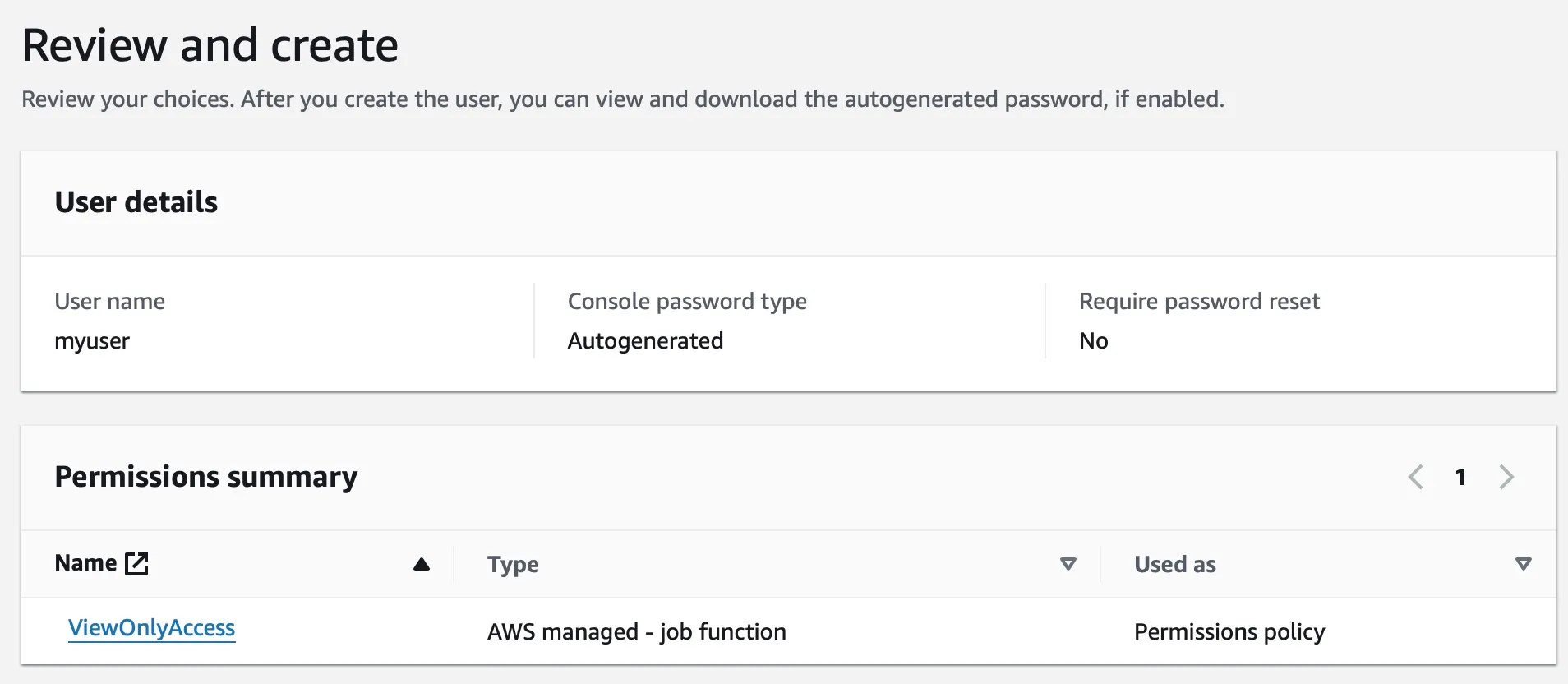
13. Click on “Create user”.
The newly created user will appear in the list of users. You can use this credentials to login as the specified user. But lets assign an appropriate policy to be used before trying this.
* I have created a new user with least privilege access.
# Create Policies
> Tutorial Build in cloud - Security
## Creating a Policy
[Section titled “Creating a Policy”](#creating-a-policy)
1. Navigate to the IAM service in the AWS Management Console.
2. In the IAM console, choose “Policies” from the left-hand navigation pane.
3. Click on the “Create policy” button.
4. In the “Create policy” window, choose the policy type as JSON
5. Add the below policy to the content
```json
{
"Version": "2012-10-17",
"Statement": [
{
"Effect": "Allow",
"Action": [
"compute-optimizer:GetEnrollmentStatus",
"iam:List*",
"iam:Get*",
"iam:AttachRolePolicy",
"iam:CreateRole",
"iam:CreatePolicy",
"iam:PutRolePolicy",
"iam:CreateAccessKey",
"iam:DeleteAccessKey",
"ec2-instance-connect:*",
"ec2:*",
"cloudshell:*",
"lambda:*",
"dynamodb:*",
"freetier:*",
"s3:*",
"cloudwatch:*"
],
"Resource": "*"
},
{
"Effect": "Allow",
"Action": "iam:PassRole",
"Resource": [
"arn:aws:iam::*:role/*"
]
},
{
"Effect": "Deny",
"Action": [
"ec2:RunInstances",
"ec2:StartInstances"
],
"Resource": [
"arn:aws:ec2:ap-south-1:*:instance/*"
],
"Condition": {
"StringNotEquals": {
"ec2:InstanceType": "t2.micro"
}
}
},
{
"Effect": "Deny",
"NotAction": [
"iam:*",
"freetier:*",
"cloudwatch:*"
],
"Resource": "*",
"Condition": {
"StringNotEquals": {
"aws:RequestedRegion": "ap-south-1"
}
}
}
]
}
```
6. Provide a unique name for the policy. `my-policy`
7. Click on “Review”. Review the policy details, including the policy name and type, as well as the policy document or selected AWS-managed policy.
8. Click on “Create policy”.
The newly created policy will appear in the list of policies. This policy can be used to create resources required for this tutorial.
## Assigning the policy to User
[Section titled “Assigning the policy to User”](#assigning-the-policy-to-user)
1. Navigate to the IAM service in the AWS Management Console.
2. In the IAM console, choose “Users” from the left-hand navigation pane.
3. Select the user you have create `myuser`
4. Click `Add Permission` and select the policy you have created before `my-policy`
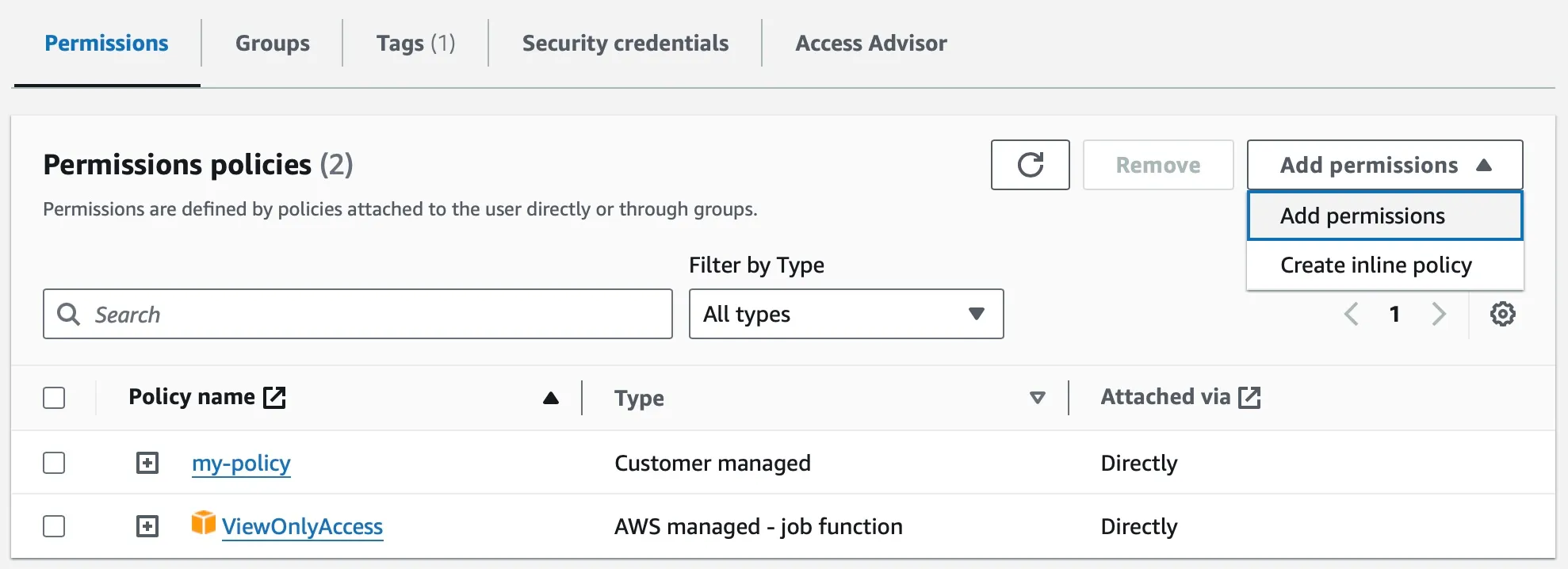
5. This user is now restrcited to the policy you have created + Read Only role on all AWS services.
6. Goto IAM Dashboard page and identify the URL specific for your aws account.
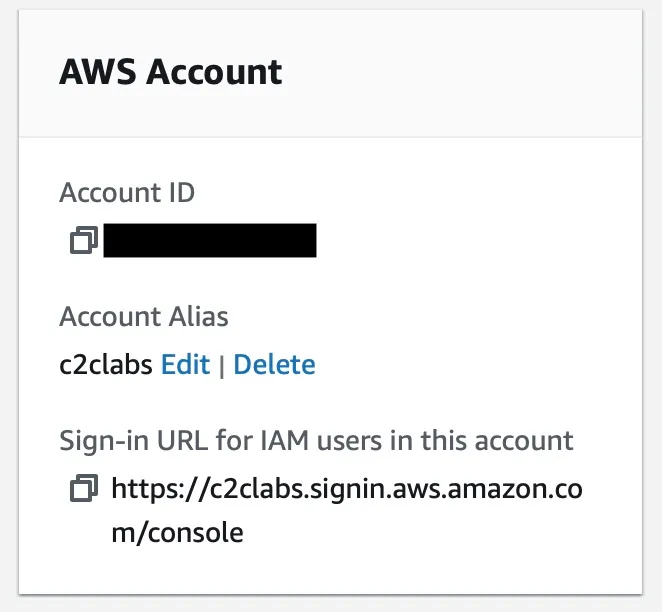
7. Open an incognito window in your browser and try logging in with your `myuser` account
Tip
For the upcoming activities from Unit 3 and other exploration use this user `myuser` to login to the aws console.
* I have applied the policy to the user.
# Create Roles
> Tutorial Build in cloud - Security
1. Navigate to the IAM service in the AWS Management Console.
2. In the IAM console, choose “Roles” from the left-hand navigation pane.
3. Click on the “Create role” button.
4. In the “Choose a trusted entity” window, select the `AWS service`
5. Choose the specific use cases, now select `EC2`, this will allow EC2 instances to call AWS services on your behalf.
6. Click on “Next: Permissions”.
7. Select the existing policies to assign permissions to the role. Search for `S3` and select the `AmazonS3FullAccess` and `AmazonDynamoDBReadOnlyAccess`
8. Click on “Next: Review”.
9. Provide a name `myrole` and review the role details, including permissions and tags.
10. Click on “Create role”.
The newly created role will appear in the list of roles.
* I have created a new role with existing policies.
# Create Groups
> Tutorial Build in cloud - Security
## Creating a Group
[Section titled “Creating a Group”](#creating-a-group)
1. Navigate to the IAM service in the AWS Management Console.
2. In the IAM console, choose “Groups” from the left-hand navigation pane.
3. Click on the “Create group” button.
4. In the “New group” window, enter a unique name for the group.
5. (Optional) Add a description for the group to provide context.
6. Click on “Next: Permissions”.Select the appropriate IAM policies or attach existing policies to assign permissions to the group.
7. Click on “Next: Review”.
8. Review the group details, including permissions and tags.
9. Click on “Create group”.
The newly created group will appear in the list of groups.
## Adding Users to a Group
[Section titled “Adding Users to a Group”](#adding-users-to-a-group)
1. Navigate to the IAM service in the AWS Management Console.
2. In the IAM console, choose “Users” from the left-hand navigation pane.
3. Select the user you want to add to a group.
4. Click on the “Add to group” button.
5. In the “Add users to group” window, select the group you want to add the user to.
6. Click on “Add users”.
The user will now be a member of the selected group.
* I have created a new group with users.
# Test your knowledge
> Tutorial Build in cloud - Security
1. What does IAM stand for in AWS?
1) Internet Access Manager
2) Identity Authentication Method
3) Identity and Access Management
Submit
2. What type of security is required to access one AWS resource to another resource in a secured manner considering least privilege?
1) Group Based
2) Role Based
3) Access Keys
Submit
3. Which of the following is a best practice for the root account?
1) Use it daily for administrative tasks
2) Store access keys in code
3) Enable MFA and don’t use it for everyday tasks
Submit
4. What happens when you attach a policy to an IAM group?
1) Only the group creator gets the permissions
2) All users in that group inherit the policy permissions
3) The policy is applied only when users log in via CLI
Submit
5. By default, when you create a new IAM user, what permissions does it have?
1) No permissions at all
2) Full administrator access
3) Read-only access to all services
Submit
* I am comfortable with security concepts in cloud!
* Good to proceed to the next unit!
# Networking in Cloud
> Tutorial Build in cloud - Network
Now that you have set up security for your cloud account, it’s time to configure networking to enable communication between your resources and the internet.
This unit shows you how to set up networking for your cloud account, including creating a VPC, Subnets and Security Groups.
## What you will do?
[Section titled “What you will do?”](#what-you-will-do)
* Create a new VPC with public and private subnets.
* Create an Internet Gateway and attach it to the VPC.
* Create Route Tables and associate them with the subnets.
* View Security Groups and Network Access Control Lists (NACLs).
- I am logged in to my cloud account with the admin/root user
# Create your VPC
> Tutorial Build in cloud - Network
## View VPC
[Section titled “View VPC”](#view-vpc)
By default every region in AWS will have a default VPC created so that you can start using them. This VPC will have default IP range of CIDR `172.31.0.0/16`
To view an existing VPC on AWS, follow these steps:
1. Go to the Amazon VPC console.
2. In the navigation pane, click VPCs.
3. Click the name of the VPC that you want to view.
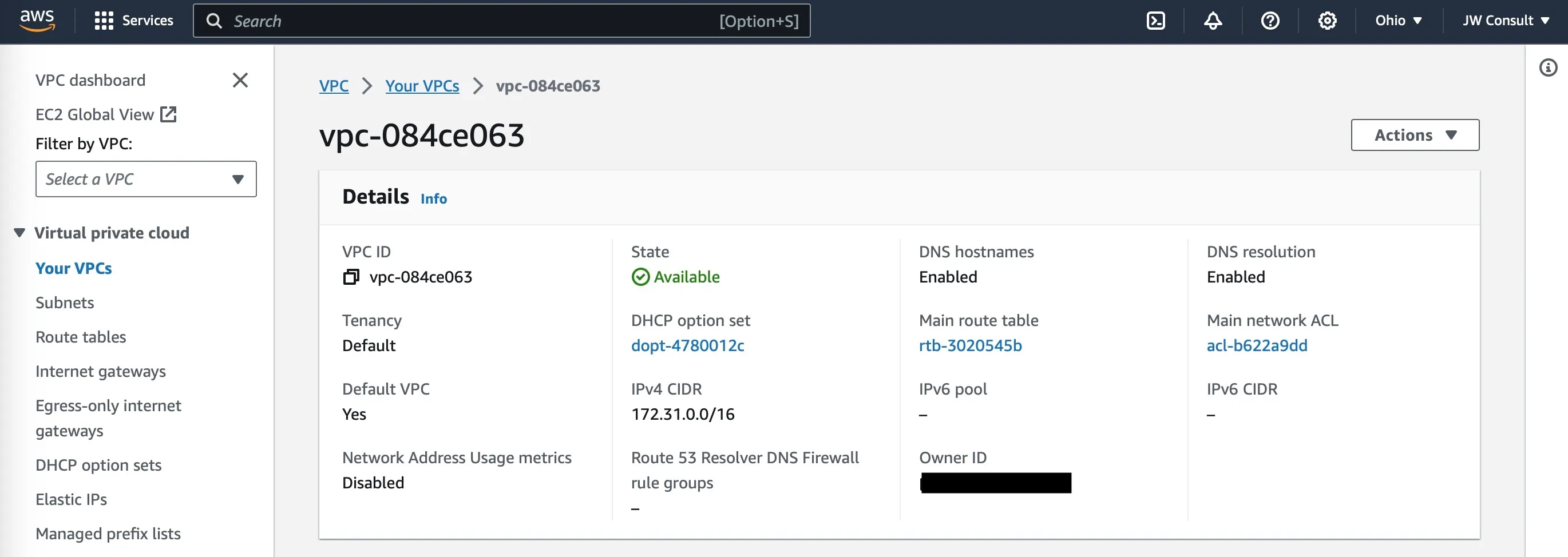
Tip
CIDR of 172.31.0.0/16 supports a maximum of 65,534 address in the range of 172.31.0.1 - 172.31.255.254
## Create VPC
[Section titled “Create VPC”](#create-vpc)
To create a VPC on AWS, follow these steps:
1. Go to the Amazon VPC console and click Create VPC.
2. Enter a name for your VPC in the VPC name field `myvpc`
3. Select a CIDR block for your VPC in the IPv4 CIDR block field. A CIDR block is a range of IP addresses that you can assign to resources in your VPC. `10.0.0.0/16`
4. Select a tenancy for your VPC in the Tenancy field. There are two types of tenancies: default and dedicated. Default tenancies are shared with other AWS customers. Dedicated tenancies are isolated from other AWS customers. `default`
5. Click Create VPC.
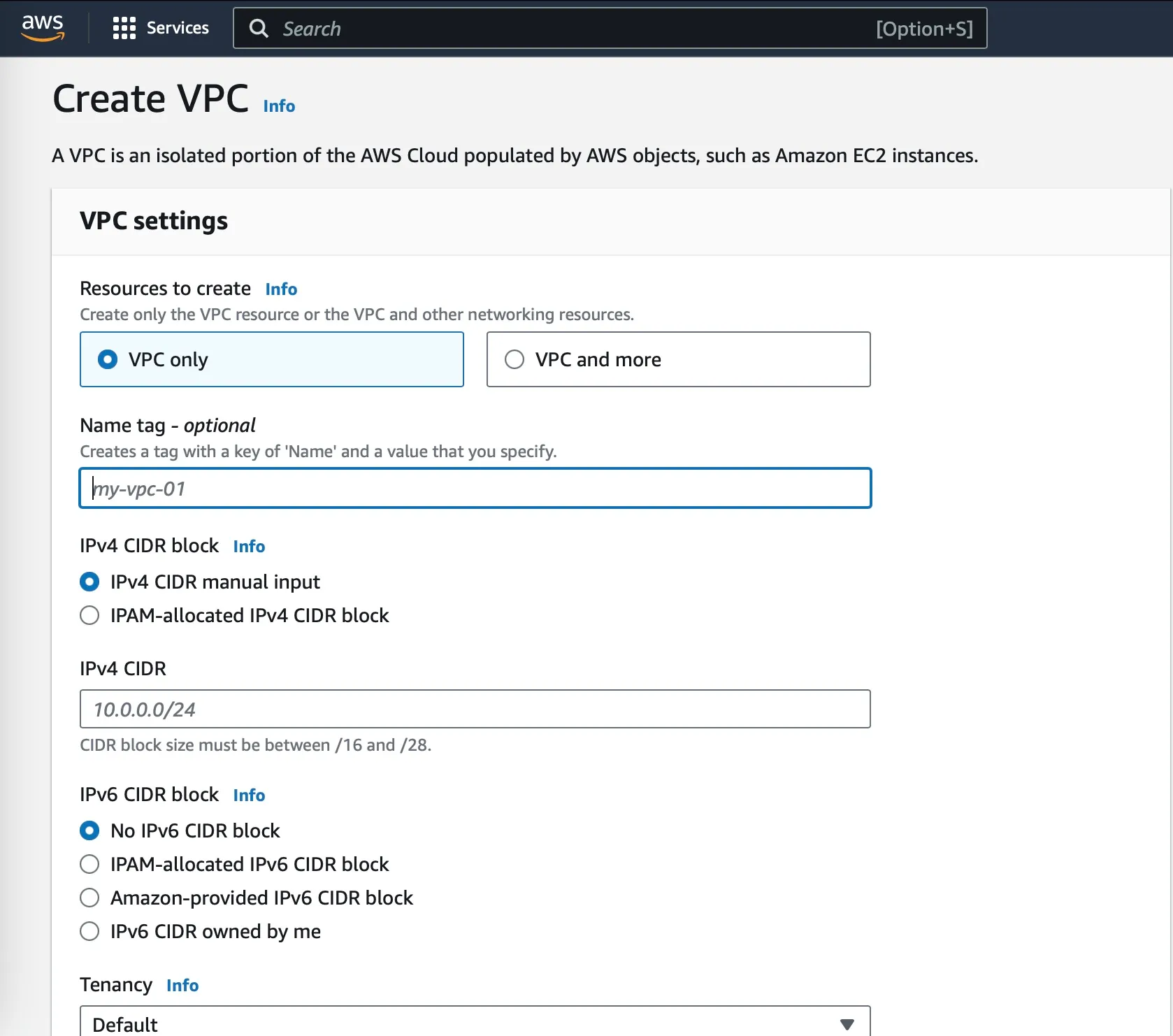
* I can view an existing VPC in my AWS account.
* I have created a new VPC with a custom CIDR block.
# Create your Subnet
> Tutorial Build in cloud - Network
## View a Subnet
[Section titled “View a Subnet”](#view-a-subnet)
1. Open the Amazon VPC console.
2. In the navigation pane, click VPCs.
3. Select the VPC that you want to view subnets for.
4. In the Subnets tab, you will see a list of all the subnets in the selected VPC.
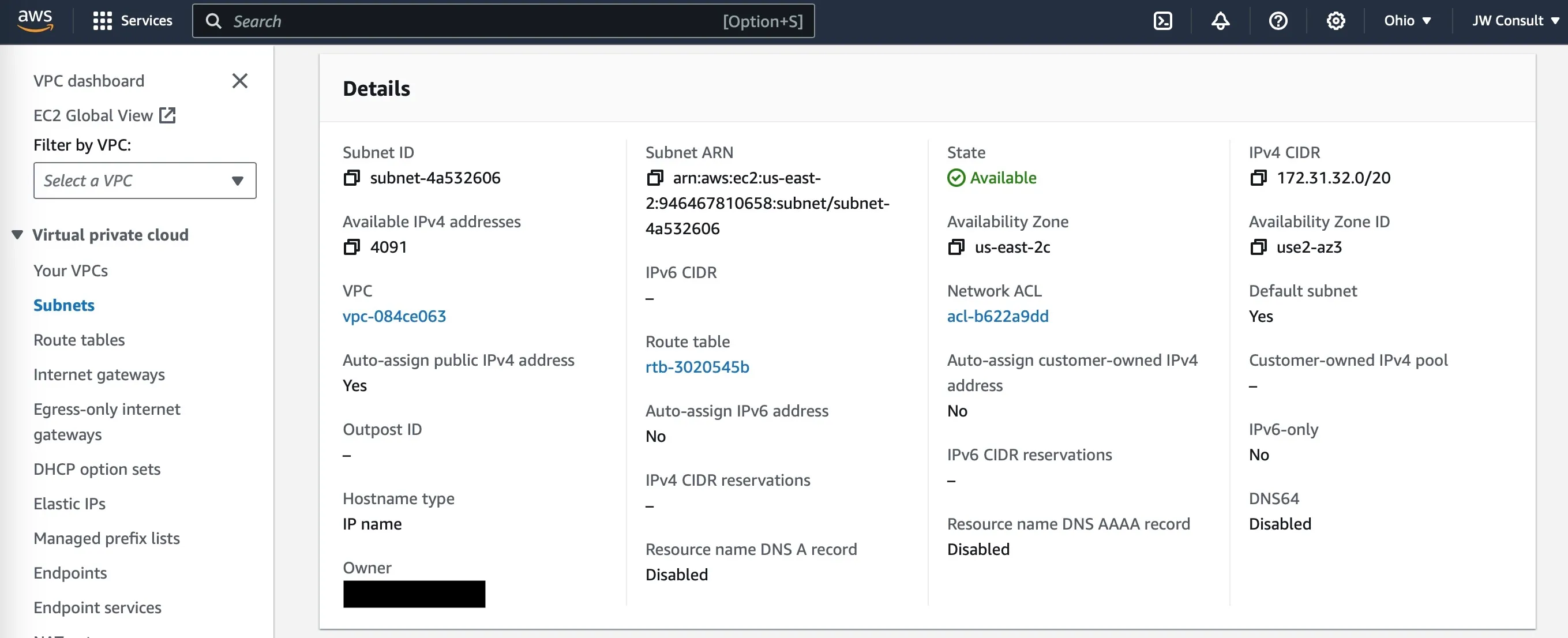
Note
Subnet CIDR of 172.31.32.0/20 supports a maximum of 4,094 address in the range of172.31.32.1 - 172.31.47.254
## Create a Subnet
[Section titled “Create a Subnet”](#create-a-subnet)
1. Open the Amazon VPC console.
2. In the navigation pane, click VPCs.
3. Select the VPC that you want to create a subnet in. `myvpc`
4. Click Actions, and then click Create Subnet.
5. In the Subnet Name field, enter a name for the subnet. `mypublicsubnet`
6. In the VPC ID field, select the VPC that the subnet will be in. `myvpc`
7. In the CIDR Block field, enter a CIDR block for the subnet. `10.0.0.0/24`
8. In the Availability Zone field, select the availability zone where the subnet will be located. `ap-south-1a`
9. Click Create Subnet.
10. This is still not a public subnet, by default there is no Internet Gateway attached. You will add this in upcoming excercise.
11. When you create a subnet its associated “Routing Table” and “Network ACLs” are also created. You just need to edit them to your requirement.
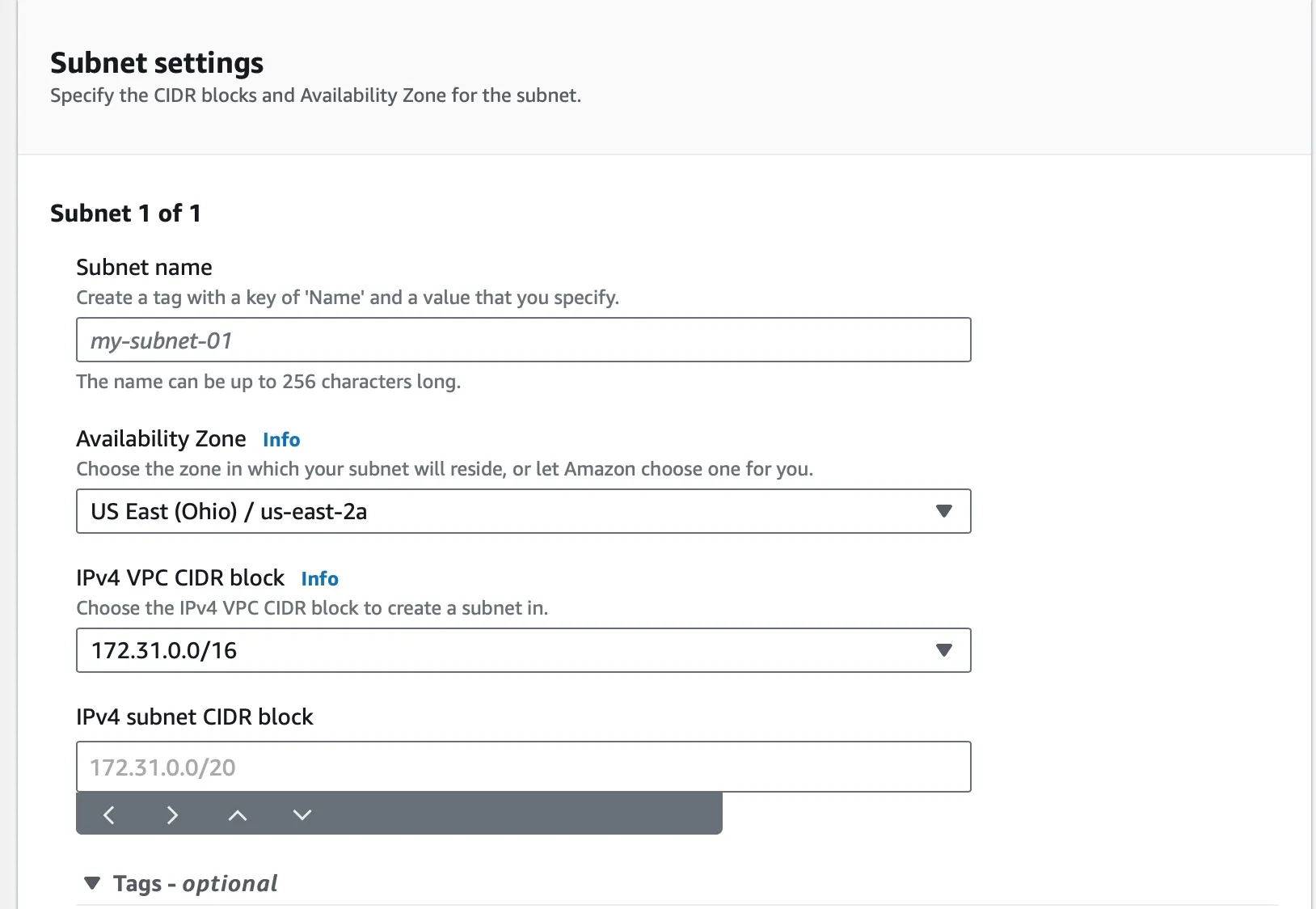
Note
Subnet maps to one Availability Zone and always associated with a VPC
* I have created a Subnet in my VPC.
* I can view the Subnet in my VPC.
# Create Internet Gateway and Routing Table
> Tutorial Build in cloud - Network
To create an internet gateway, follow these steps:
1. Open the Amazon VPC console.
2. In the navigation pane, click Internet Gateways.
3. Click `Create internet gateway`
4. Provide a name to the gateway `my-igw`
5. Once created this needs to be attached to VPC. Click on the `my-igw` and it will show you the details.
6. On right top corner Actions -> Attach to VPC
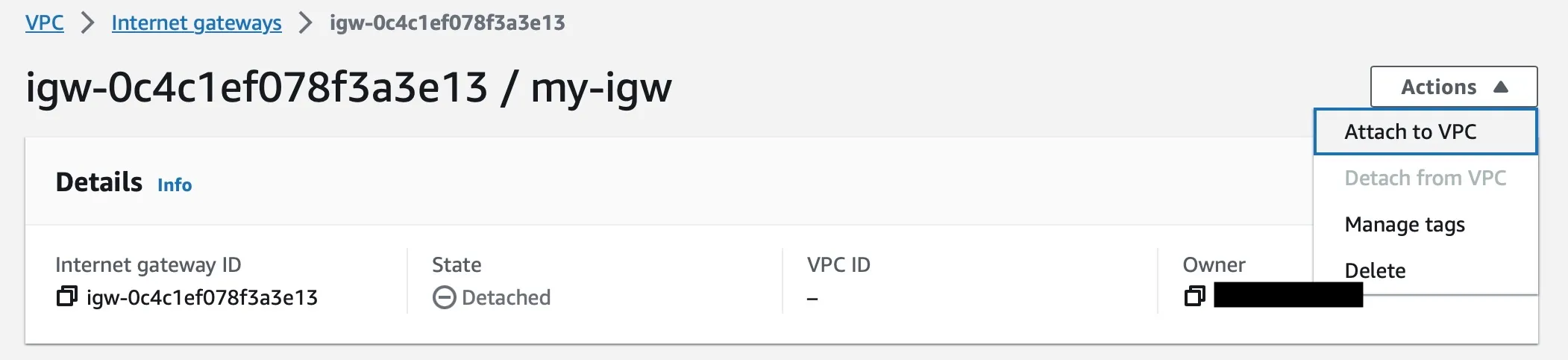
7. Select the VPC `myvpc` and click `Attach internet gateway`
Note
Generally, you only need one internet gateway for each VPC. An internet gateway is a highly available and scalable component that allows you to route traffic between your VPC and the internet.
## Viewing Routing Tables
[Section titled “Viewing Routing Tables”](#viewing-routing-tables)
1. Open the Amazon VPC console ().
2. In the navigation pane, choose Route Tables.
3. Select the VPC for which you want to view routing tables.
4. The routing tables for the selected VPC will be displayed in a list.
5. Click on the name of a routing table to view its details.
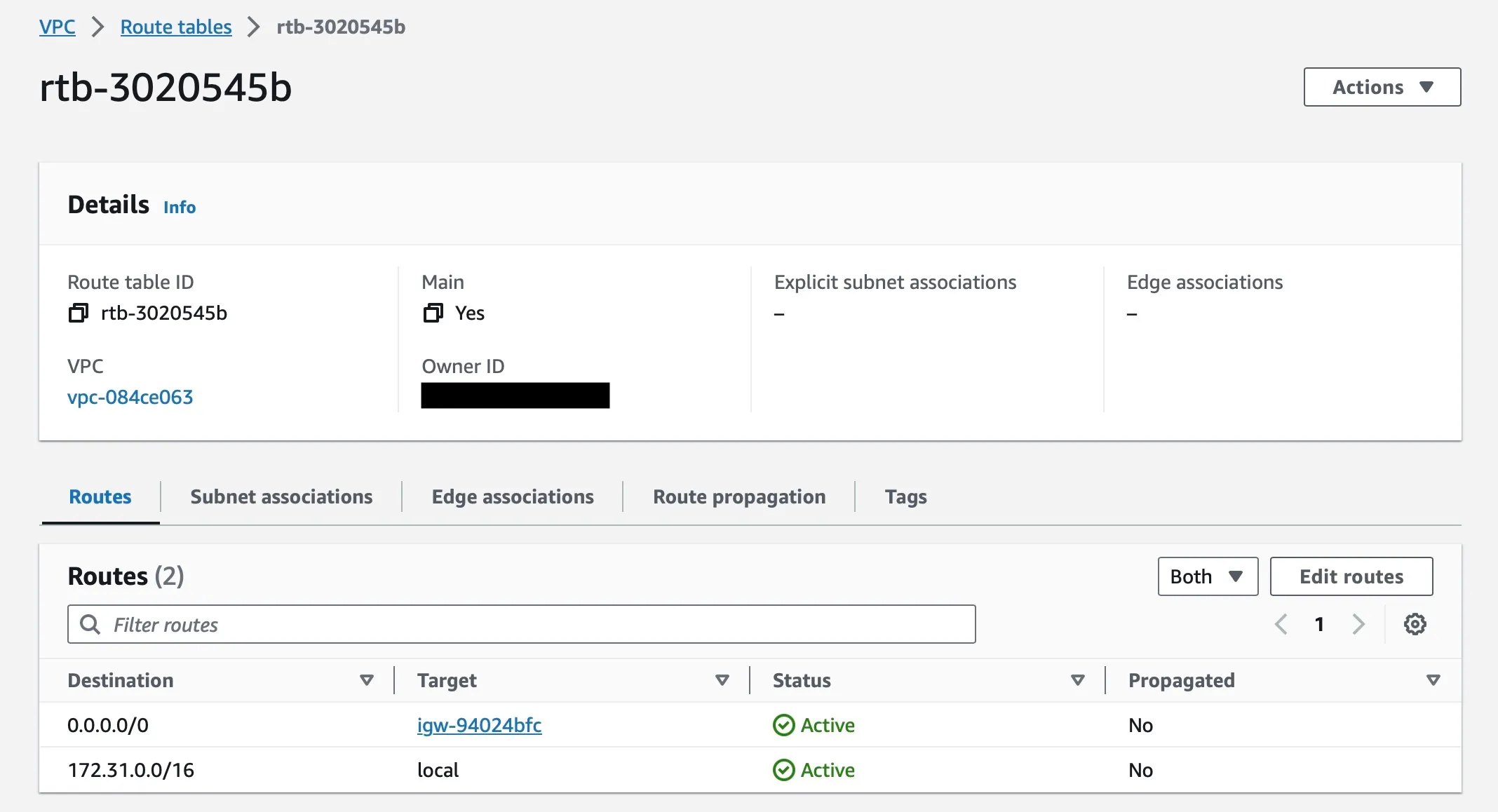
Note
This table shows a destination `172.31.0.0/16` and target local - meaning that any traffic goes to this IP range will be routed locally within the VPC.
`0.0.0.0/0` meaning that any other IP outside that range will be routed to Internet Gateway from which the traffic will be passed out to the internet
## Editing Routing Table
[Section titled “Editing Routing Table”](#editing-routing-table)
1. Open the Amazon VPC console ().
2. In the navigation pane, choose Route Tables.
3. Select the VPC `myvpc` for which you want to view routing tables.
4. The routing tables for `myvpc` will be displayed in a list.
5. Click on the name of a routing table to view its details.
6. To make the subnet associated with this routing table to access the internet, you need to add a new route as below,
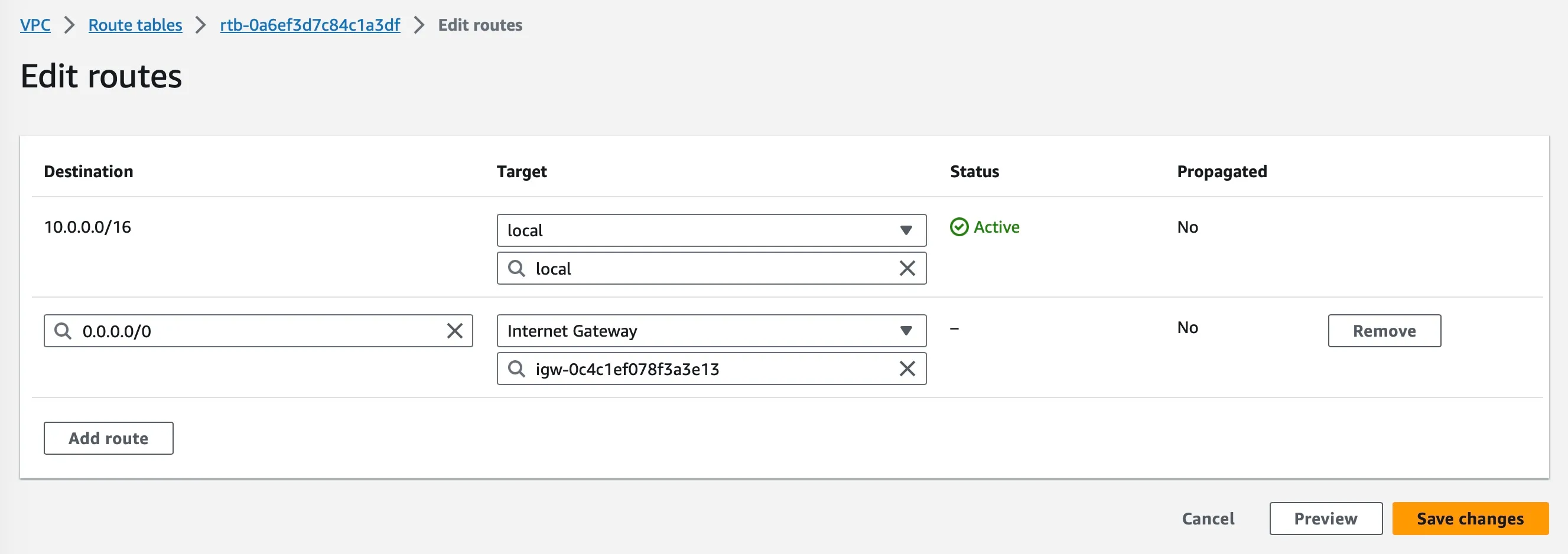
7. Click “Save Changes” and now the subnet is public subnet
* I have created an Internet Gateway and attached to my VPC.
* I have edited the Routing Table to make subnet public.
# Security Groups and NACLs
> Tutorial Build in cloud - Network
## Viewing Security Groups
[Section titled “Viewing Security Groups”](#viewing-security-groups)
1. Open the Amazon VPC console (\[]).
2. In the navigation pane, choose Security Groups.
3. The security groups for your account will be displayed in a list.
4. Click on the name of a security group to view its details.
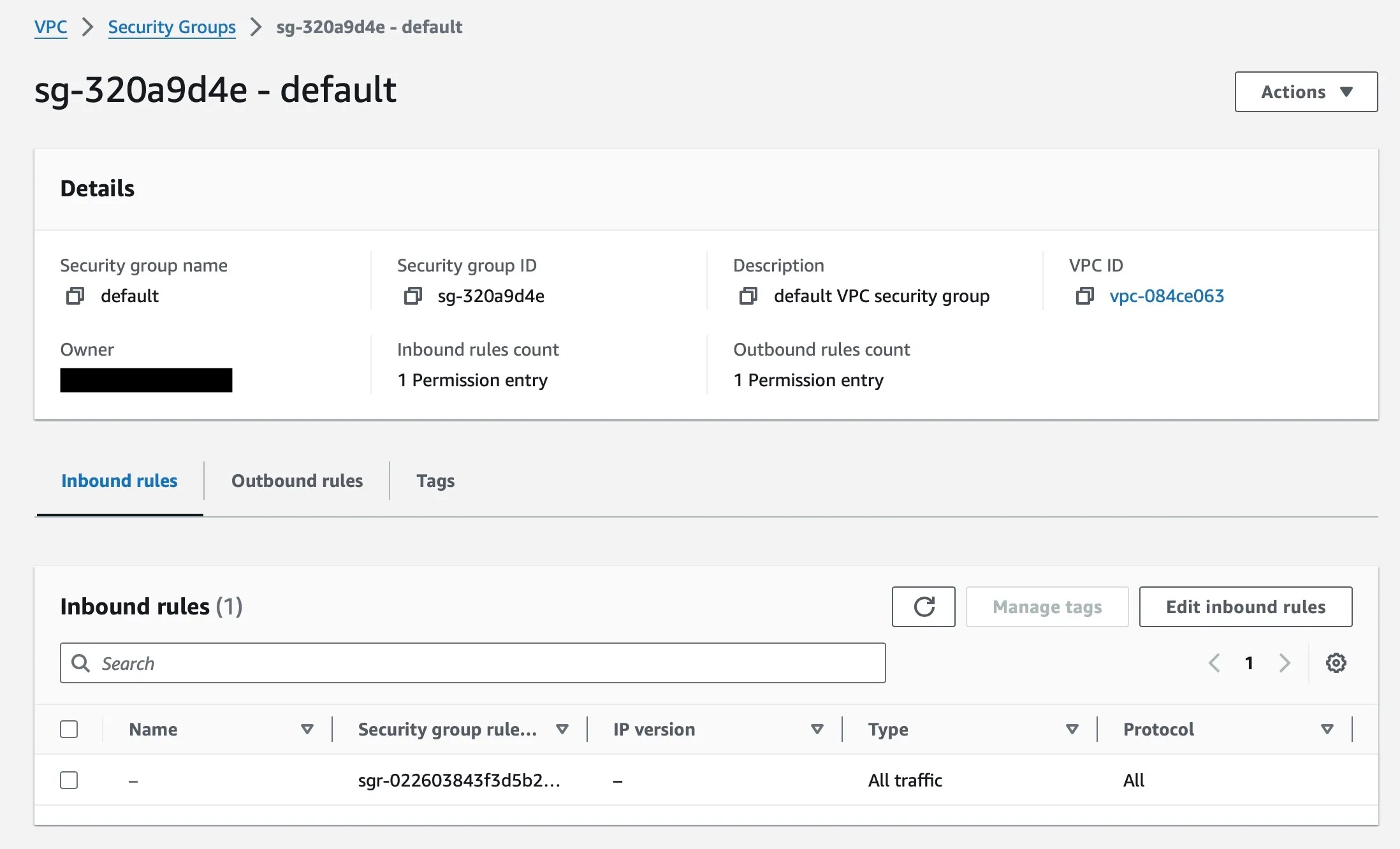
## Viewing Network Access Control Lists (NACLs)
[Section titled “Viewing Network Access Control Lists (NACLs)”](#viewing-network-access-control-lists-nacls)
1. Open the Amazon VPC console (\[]).
2. In the navigation pane, choose VPCs.
3. Select the VPC `myvpc` for which you want to view NACLs.
4. Choose Subnets.
5. Select the subnet `mypublicsubnet` for which you want to view NACLs.
6. Choose the Network ACLs tab.
7. The NACLs that are associated with the selected subnet will be displayed in a list.
8. Click on the name of an NACL to view its details.
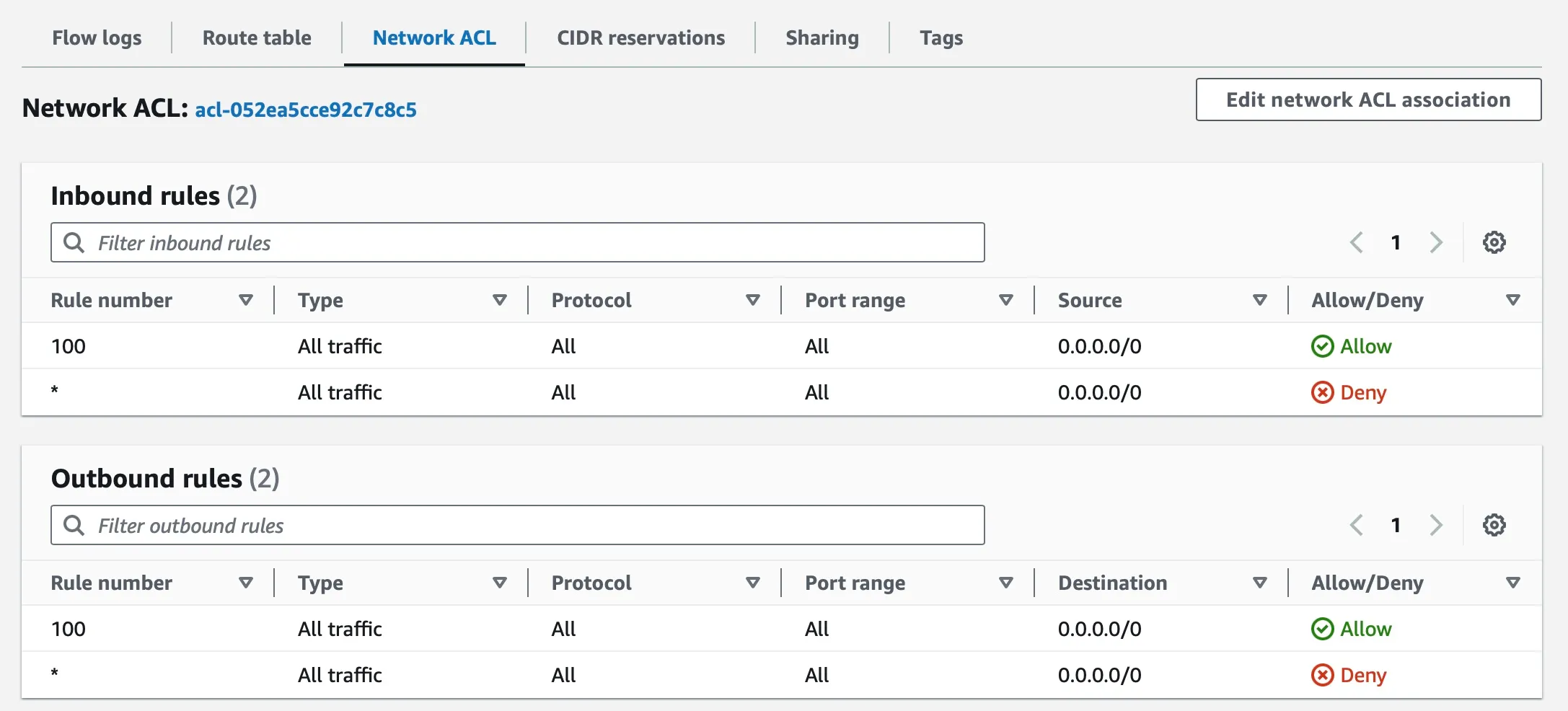
* I can view Security Groups in my AWS account.
* I can view Network Access Control Lists (NACLs) in my AWS account
# Test your knowledge
> Tutorial Build in cloud - Network
1. Which network component in AWS is stateful?
1) Subnet
2) Network ACL
3) Security Groups
Submit
2. Which component in AWS is used to route traffic out of VPC?
1) Out Gateway
2) Internet Gateway
3) NACL
Submit
3. What component in AWS defines a whole set of IP address for your organization which can be used to host applications?
1) Firewall
2) Subnet
3) VPC
Submit
4. Which network component in AWS is Stateless which requires the reverse traffic to have allow rules explicitly?
1) Network ACL
2) Security Groups
3) IP Whitelisting
Submit
* I am comfortable with networking concepts in cloud!
* Good to proceed to the next unit!
# Compute in Cloud
> Tutorial Build in cloud - Compute
Now that you have secured and prepared your cloud account, it’s time to set up compute resources to run your applications or payloads.
This unit shows you how to use compute services to create and manage virtual machines (VMs) in the cloud and introduces serverless computing.
## What you will do?
[Section titled “What you will do?”](#what-you-will-do)
* Create a VM instance using EC2 service.
* Run a simple web server on the VM instance.
* Connect to the VM instance using SSH.
* Adjust security group rules to allow HTTP traffic.
* Create a lambda function to run code without provisioning servers.
- I am logged in to my cloud account with the created user `myuser` in previous unit
# Create your EC2 Instance
> Tutorial Build in cloud - Compute
## Creating an Amazon EC2 instance
[Section titled “Creating an Amazon EC2 instance”](#creating-an-amazon-ec2-instance)
1. Open the Amazon EC2 console (\[]).
2. In the navigation pane, choose **“Instances”** and click **Launch Instances**
3. Provide a name for the ec2 instance `my-instance`
4. An AMI is a template that contains the configuration for an EC2 instance. AMIs include the operating system, applications, and other software that will be installed on the instance. Select `Amazon Linux 2023 AMI`
5. An instance type defines the hardware configuration of the EC2 instance, including the number of CPUs, amount of memory, and storage capacity. Select `t2.micro` - which has capacity of 1 vCPU and 1G RAM
6. Create a **Keypair** which will used when you want to connect to this instance via command line. `my-keypair`. Keypair is nothing but a public/private key where public key is deployed in EC2 instance and if you or anyone wants to connect should provide the private key to connect to instance.
7. In the Network Settings, click **Edit** and choose the VPC `myvpc` and Subnet `mypublicsubnet` which you have already created. Change the **Auto Assign Public IP** to Enable
8. For **Firewall (Security Group)**, choose the **Create security group** and provide a name `ssh-access`.
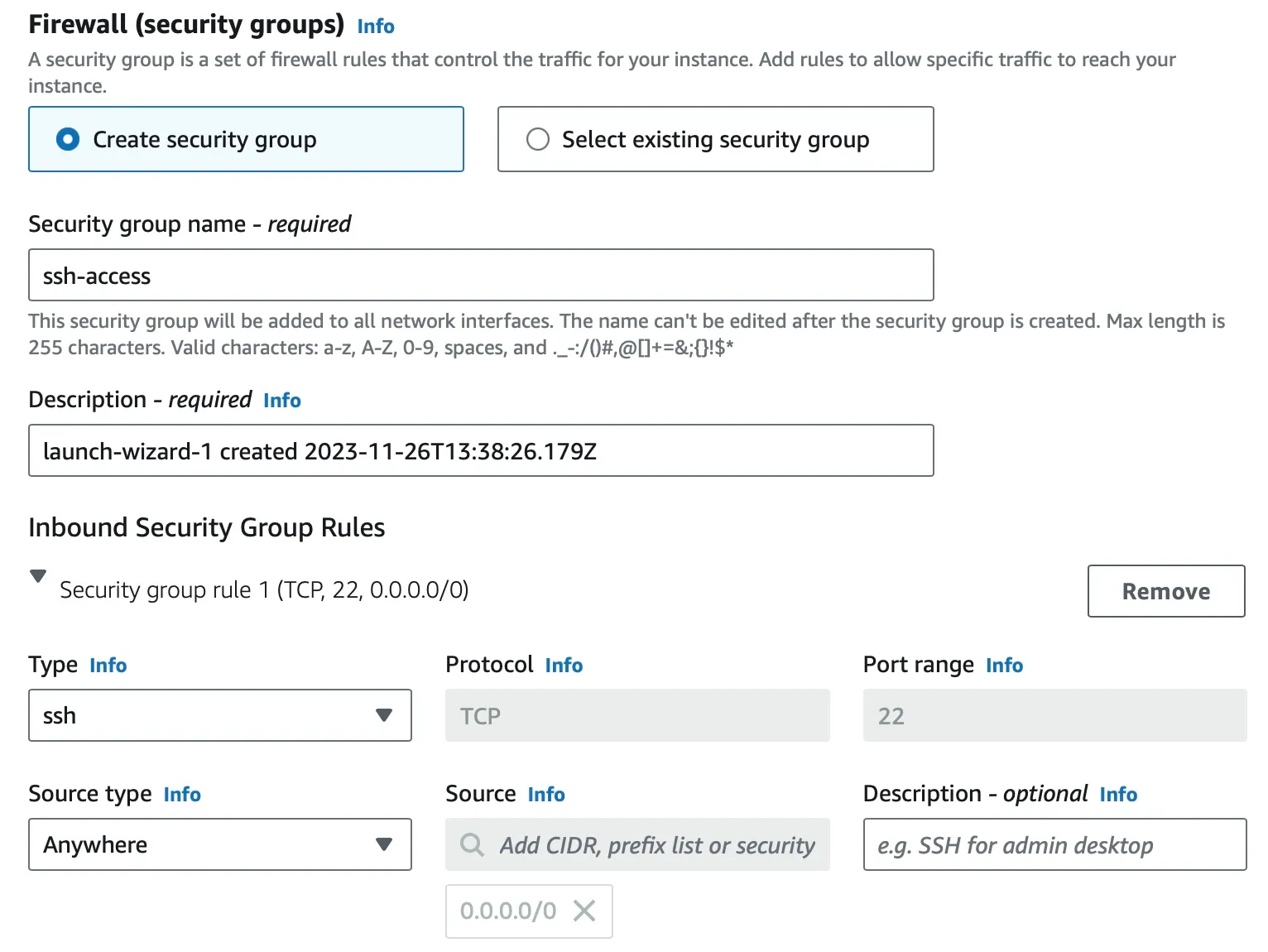
Note
If you would like your VMs to be not opened to entire world to see, since it will have a public ip created. In order to connect via EC2 Instance Connect you need to allow the `13.233.177.0/29` IPs as source on port 22 for ap-south-1 region - this IP changes for each region. [Full IP List](https://ip-ranges.amazonaws.com/ip-ranges.json)
9. Leave the remanining settings as default and proceed to Summary and verify all the details are good.
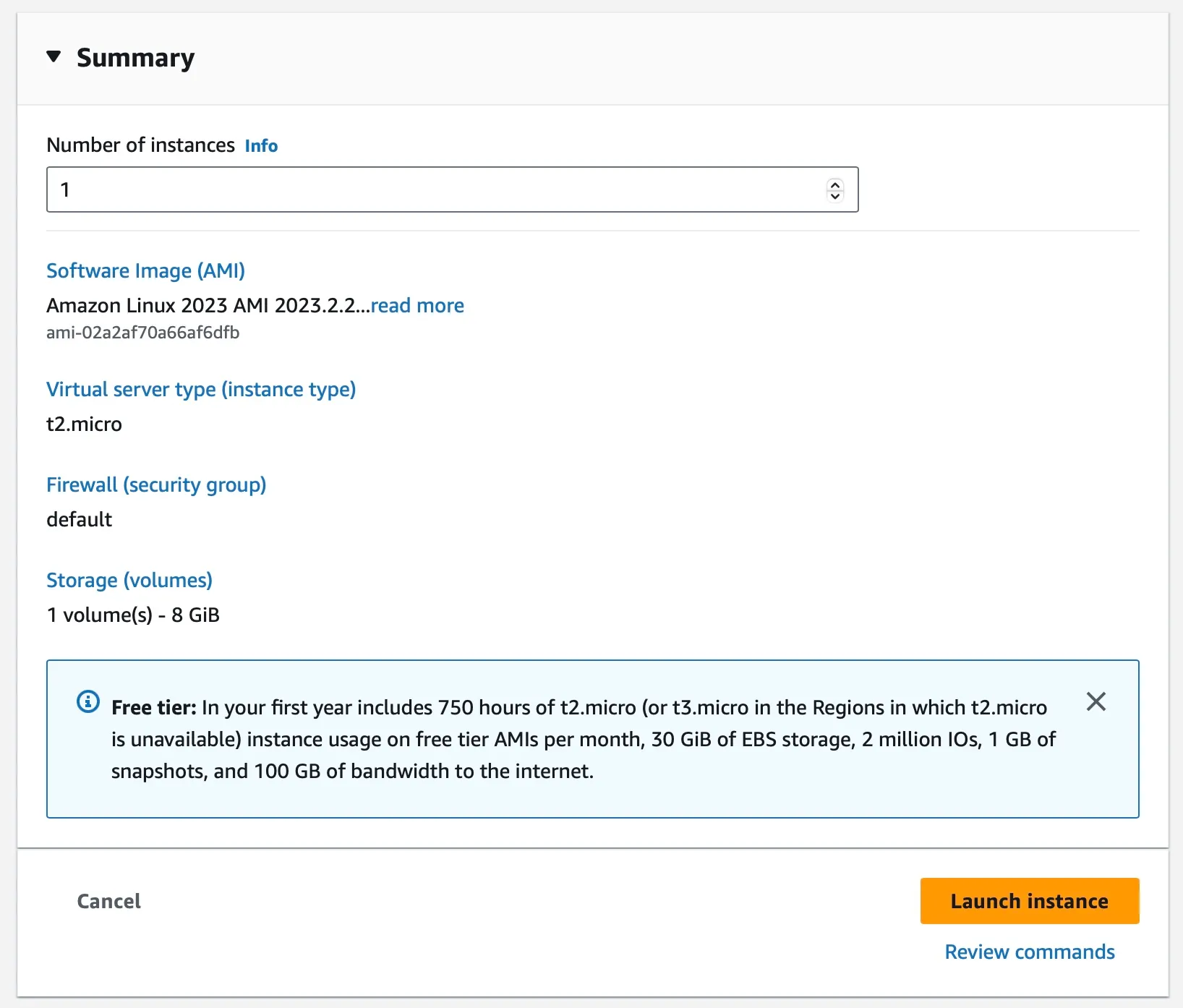
10. Once you have verified all the settings, click **Launch instance**. This will provision the instance and start running the operating system and applications.
CLI command
```sh
aws ec2 run-instances --image-id ami-02a2af70a66af6dfb --count 1 --instance-type t2.micro --key-name my-keypair --security-group-ids sg-0af660089ac5c7ab2 --subnet-id subnet-07ca6b02f2e67d507
```
## Connecting to Instance
[Section titled “Connecting to Instance”](#connecting-to-instance)
1. Goto EC2 Dashboard page and you will find the instance created
2. Click on the instance `myinstance`
3. Click “Connect” and you can choose the option “EC2 Instance Connect” to open the instance in the browser window
4. You will see the SSH window with command line logged into the user
* I can create and launch an EC2 instance in my AWS account.
* I can ssh into the EC2 instance using EC2 Instance Connect.
# Deploy a webserver
> Tutorial Build in cloud - Compute
## Install Apache webserver
[Section titled “Install Apache webserver”](#install-apache-webserver)
1. To install apache server, run the command `sudo dnf install -y httpd`
2. Start the server using command `sudo systemctl start httpd`
3. This server is now listening on port `80`
4. You can perform a curl within the SSH terminal `curl http://localhost:80` and will see the below result
```plaintext
It works!
```
## Testing the Firewall
[Section titled “Testing the Firewall”](#testing-the-firewall)
1. You can try to access the Public IP address in the browser `http://PUBLIC_IP`
2. You wont be able to see the `It Works` response in the browser, rather a timeout. Any guess why ???
3. This is because of your Security Group rule where you added only access to SSH port `22`
4. Now to add more rules, open the Security Group that was created earlier `ssh-access`
5. Click on “Edit Inbound Rules” and “Add Rule”
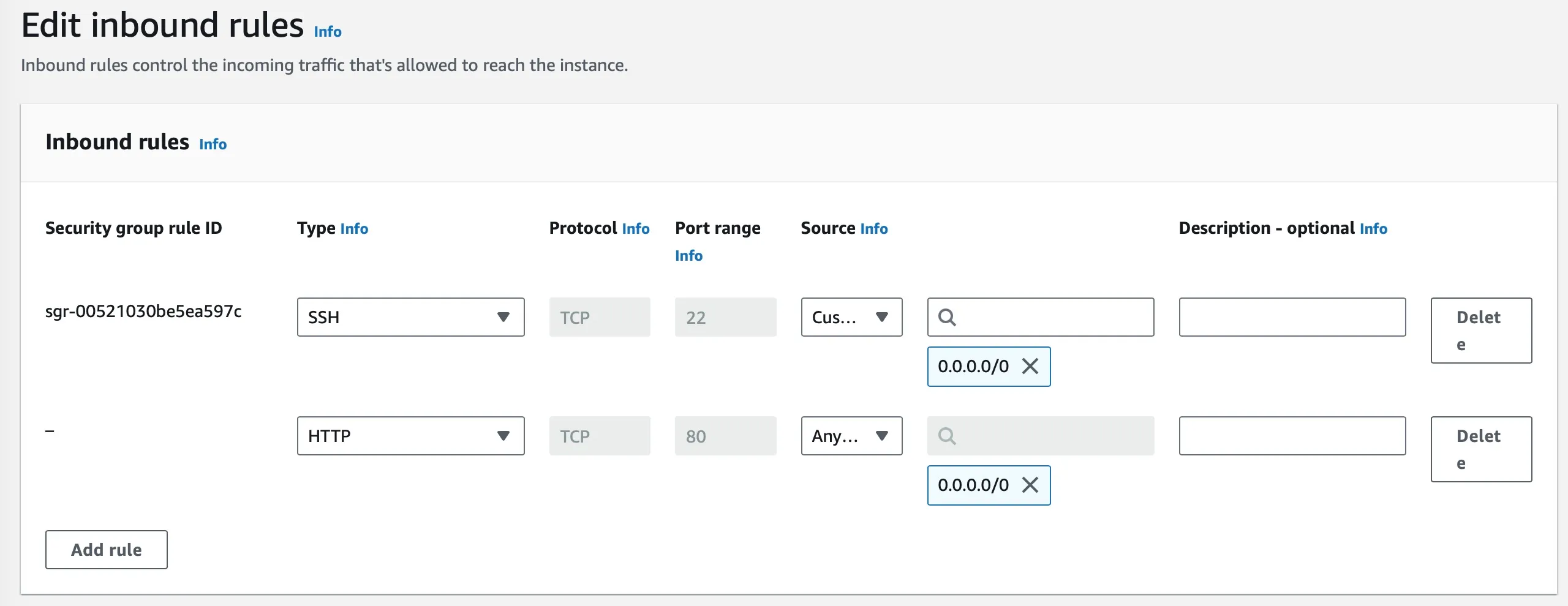
6. Add an entry with Type as “HTTP” and with Source as “Anywhere IPv4” and then click “Save Rules”
7. This rule will be propogated immediately and you would now be able to access the URL in the browser `http://PUBLIC_IP` and should see `It Works`
## Terminate instance
[Section titled “Terminate instance”](#terminate-instance)
Once you test your changes and get to explore on the instances and you no longer need this instance, you can either Stop or Terminate the instance.
Select the instance and goto Instance State and you will have options,
* Stop Instance : Current state of the VM is maintained and can be reused later if required. Stopped instance can be started again and resumed work.
* Terminate Instance: State and disk contents are deleted and you cannot recover this instance. This should be done only if you deem instance is not needed anymore.
```sh
aws ec2 stop-instances --instance-ids i-0315ccea2876d85c4
aws ec2 terminate-instances --instance-ids i-06ef6d8d73a0bac41
```
* I can deploy a webserver on my EC2 instance.
* I can access the webserver from my browser by updating security group rules.
# Deploy a lambda function
> Tutorial Build in cloud - Compute
## Creating a Lambda Function
[Section titled “Creating a Lambda Function”](#creating-a-lambda-function)
1. Open the AWS Management Console and sign in to your AWS account.
2. Navigate to the Lambda service by clicking on the “Services” tab and selecting “Lambda”.
3. In the Lambda console, click on the “Create function” button.
4. Select “Author from scratch”.
5. In the “Basic information” pane, for “Function name” enter `myLambdaFunction`.
6. For “Runtime” choose “Node.js 20.x”.
7. For “Execution role” choose “New from scratch”.
8. In the “Permissions” pane, select the “AWS Lambda basic execution role” policy and click on “Choose”.
9. Click on “Create function”.
10. In the “Function code” pane, paste the following code:
```JavaScript
exports.handler = async (event) => {
return {
statusCode: 200,
body: JSON.stringify('Hello, World!')
};
};
```
11. Click on “Save”.
12. In the “Tester” pane, click on “Test”.
13. The results of the test will be displayed in the “Execution result” pane.
## Publish Lambda
[Section titled “Publish Lambda”](#publish-lambda)
1. Once tested and validated, you need to obtain an url to trigger this from anywhere
2. Goto “Configuration” tab and select “Function URL”
3. Click “Create Function URL”
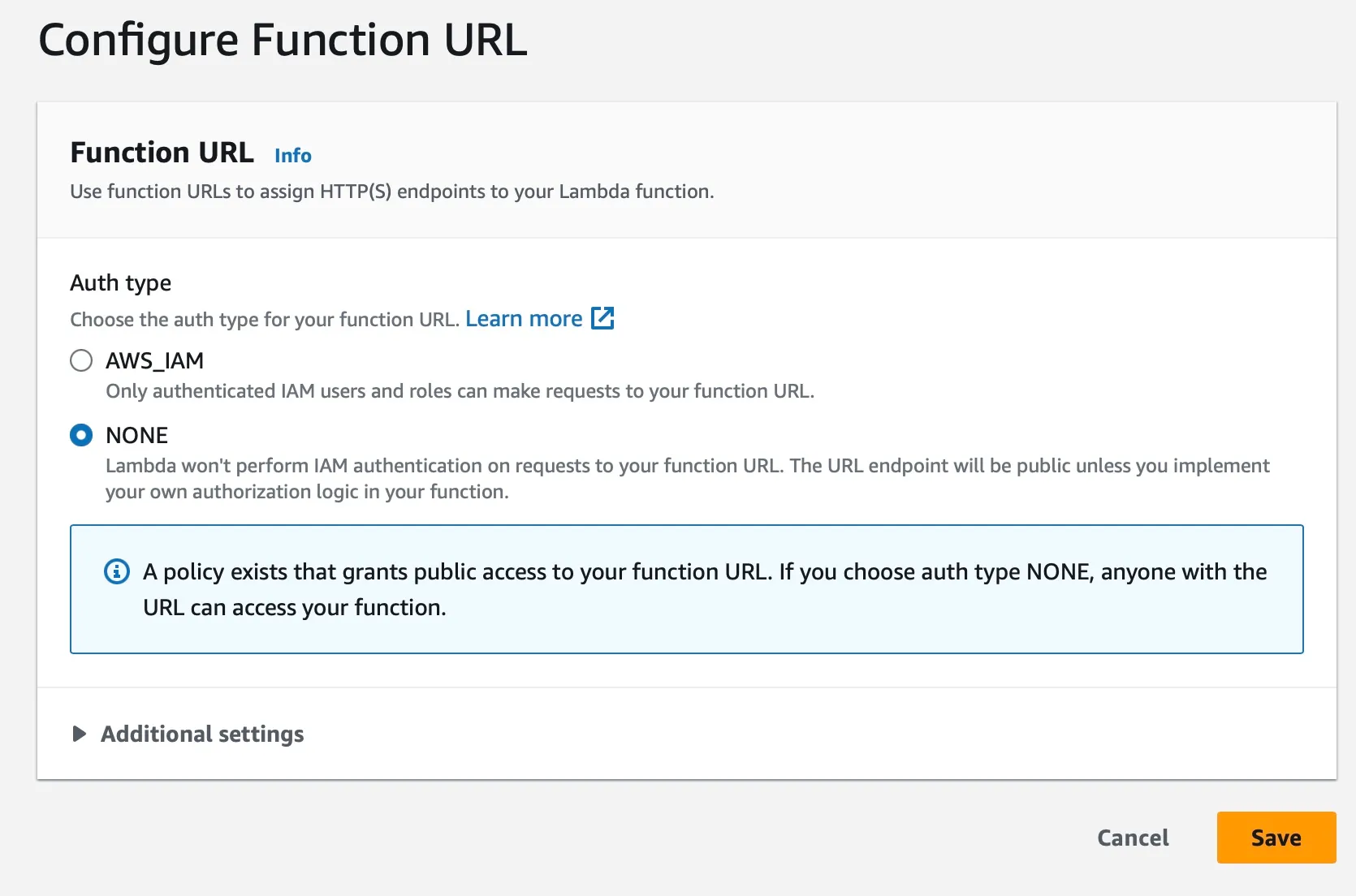
4. Select NONE to allow anyone with the link to access this function
5. Click on the function URL and you will see the output of the function in browser `Hello, World!`
* I can create and deploy a Lambda function in my AWS account.
* I can access the Lambda function using the Function URL.
# Test your knowledge
> Tutorial Build in cloud - Compute
1. What is a way of executing your code without the information of underlying infrastructure?
1) Serverless
2) Virtualization
3) Microservices
Submit
2. AWS Lambda belongs to which segment of services in AWS Cloud Computing?
1) Network
2) Database
3) Compute
Submit
3. In AWS Lambda how are the functions invoked?
1) Through URL
2) Event Driven
3) Direct access
Submit
4. You need to grant an application running on an EC2 instance permission to read files from an S3 bucket. The security team forbids putting long-term IAM credentials on the instance. What is the BEST solution?
1) Create an IAM user, generate access keys, and store them in the application code
2) Attach an IAM role to the EC2 instance with an appropriate S3 policy
3) Enable S3 server-side encryption and allow public access to the bucket
Submit
* I am comfortable with compute concepts in cloud!
* Good to proceed to the next unit!
# Storage in Cloud
> Tutorial Build in cloud - Storage
Now that you have explored compute, it’s time to explore the storage options in AWS.
This unit shows you how to use storage services to create a simple object storage bucket using Amazon S3.
## What you will do?
[Section titled “What you will do?”](#what-you-will-do)
* Create a S3 bucket to store objects.
* Upload and retrieve objects from the S3 bucket.
- I am logged in to my cloud account with the created user `myuser` in previous unit
# Create your S3 bucket
> Tutorial Build in cloud - Storage
## Creating a S3 bucket
[Section titled “Creating a S3 bucket”](#creating-a-s3-bucket)
1. Open the AWS Management Console and sign in to your AWS account.
2. Navigate to the S3 service by clicking on the Services tab and selecting S3.
3. In the S3 console, click on the Create bucket button.
4. In the Create bucket window, do the following:
* For Region, choose the region where you want to create your bucket. S3 buckets are regional, and your data will be stored in the chosen region. `ap-south-1`
* For Bucket name, enter a unique name for your bucket. S3 bucket names must be globally unique. `UNIQUEPREFIX-mybucket`
5. Leave rest of settings to defaults
6. Scroll to botton and click on Create bucket.
## Upload files to S3 from EC2
[Section titled “Upload files to S3 from EC2”](#upload-files-to-s3-from-ec2)
1. You will reuse the role created previously to get access to s3 bucket.
2. Create a new instance or if you have a instance running you can use that
3. Select the running instance and goto “Actions” -> “Security” -> “Modify IAM Role”
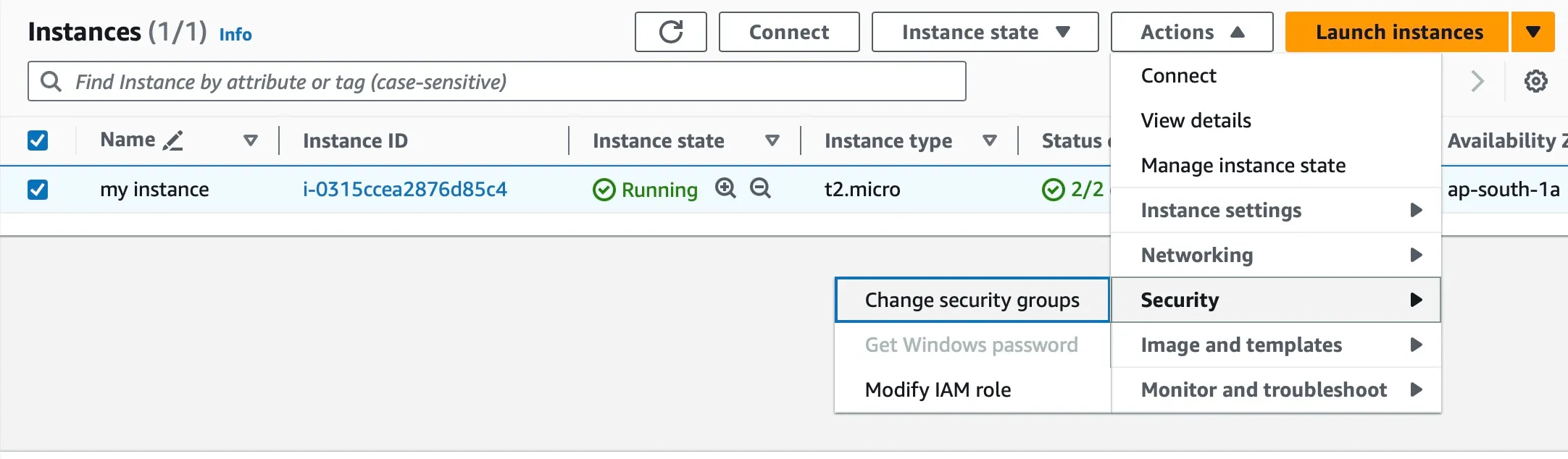
4. In the window select the role created previously `myrole-s3` and click “Update IAM Role”
5. Once its attached, you can login to instance using SSH and issue below commands,
```plaintext
[ec2-user@ip-10-0-0-147 ~]$ aws s3 ls
2023-12-01 13:22:23 jwconsult-mybucket
[ec2-user@ip-10-0-0-147 ~]$ vi sample.txt
[ec2-user@ip-10-0-0-147 ~]$ aws s3 cp sample.txt s3://jwconsult-mybucket/
upload: ./sample.txt to s3://jwconsult-mybucket/sample.txt
```
6. You can validate this by going to S3 bucket in AWS console and see the object is uploaded
Note
What you have done now is without using any hardcoded credentials you were able to access S3 bucket from EC2 instance. This is the most secure way to establish access between AWS services and underlying token generation is handled by AWS internally
* I can create and configure an S3 bucket in my AWS account.
* I can upload and retrieve objects from the S3 bucket.
# Deploy a static website
> Tutorial Build in cloud - Storage
## Installing NodeJS
[Section titled “Installing NodeJS”](#installing-nodejs)
1. Login to the instance running on EC2
2. Run the following commands to install node latest version
```shell
curl -o- https://raw.githubusercontent.com/nvm-sh/nvm/v0.39.5/install.sh | bash
. ~/.nvm/nvm.sh
nvm install --lts
node -v
```
## Creating your website
[Section titled “Creating your website”](#creating-your-website)
1. You can start with creating your website either from scratch using any web framework like [Angular](https://angular.io/guide/setup-local), [React](https://react.dev/learn/start-a-new-react-project).
2. For this example you will be using [react-static-app](https://github.com/apiprimer/react-static-app) which is a popular framework for React. Clone the git repo you created in your shell.
```shell
git clone $COPIED_URL
```
3. To run this project in local,
```shell
npm install
npm run start
```
4. This will provide a localhost url with port number which you can see preview and modify code for live reloads.
5. Once the changes are done and tested in local. We need to build this project so that it runs on browser. `build` will create JS files and minify the run time size of the code. This process will create the code which is required for your runtime in a build folder.
```shell
npm run build
```
## Create a S3 Bucket
[Section titled “Create a S3 Bucket”](#create-a-s3-bucket)
1. Navigate to the S3 service in the AWS Management Console.
2. Click on the “Create bucket” button.
3. Provide a unique name for your bucket. Choose the region where you want to store your website data. `UNIQUEPREFIX-static-site`
4. Click on “Create bucket” to finalize the bucket creation.
5. Select your newly created bucket from the list.
6. Click on the “Properties” tab.
7. Under “Static website hosting” towards the end, choose Enabled under “Use this bucket to host a website”. On the “Index Document” type `index.html` and for “Error Document” type `404.html`
8. Click on “Save changes” to enable website hosting for your bucket.
9. Click on the “Permissions” tab and enable public access by clicking “Edit” under “Block Public Access” and unchecking “Block all public access” and on pop-up confirm.
10. Click on “Bucket Policy” and choose “Edit policy.”
11. Paste the following policy into the editor:
```json
{
"Version": "2012-10-17",
"Statement": [
{
"Sid": "PublicReadGetObject",
"Effect": "Allow",
"Principal": "*",
"Action": [
"s3:GetObject"
],
"Resource": [
"arn:aws:s3:::UNIQUEPREFIX-static-site/*"
]
}
]
}
```
12. Click on “Save changes” to apply the policy.
## Upload Website Files
[Section titled “Upload Website Files”](#upload-website-files)
1. Open the S3 console and select your bucket.
2. In the “Actions” menu, select “Upload files”
3. Drag and drop your website files or select them from your local computer. You need to copy all the files under `build`
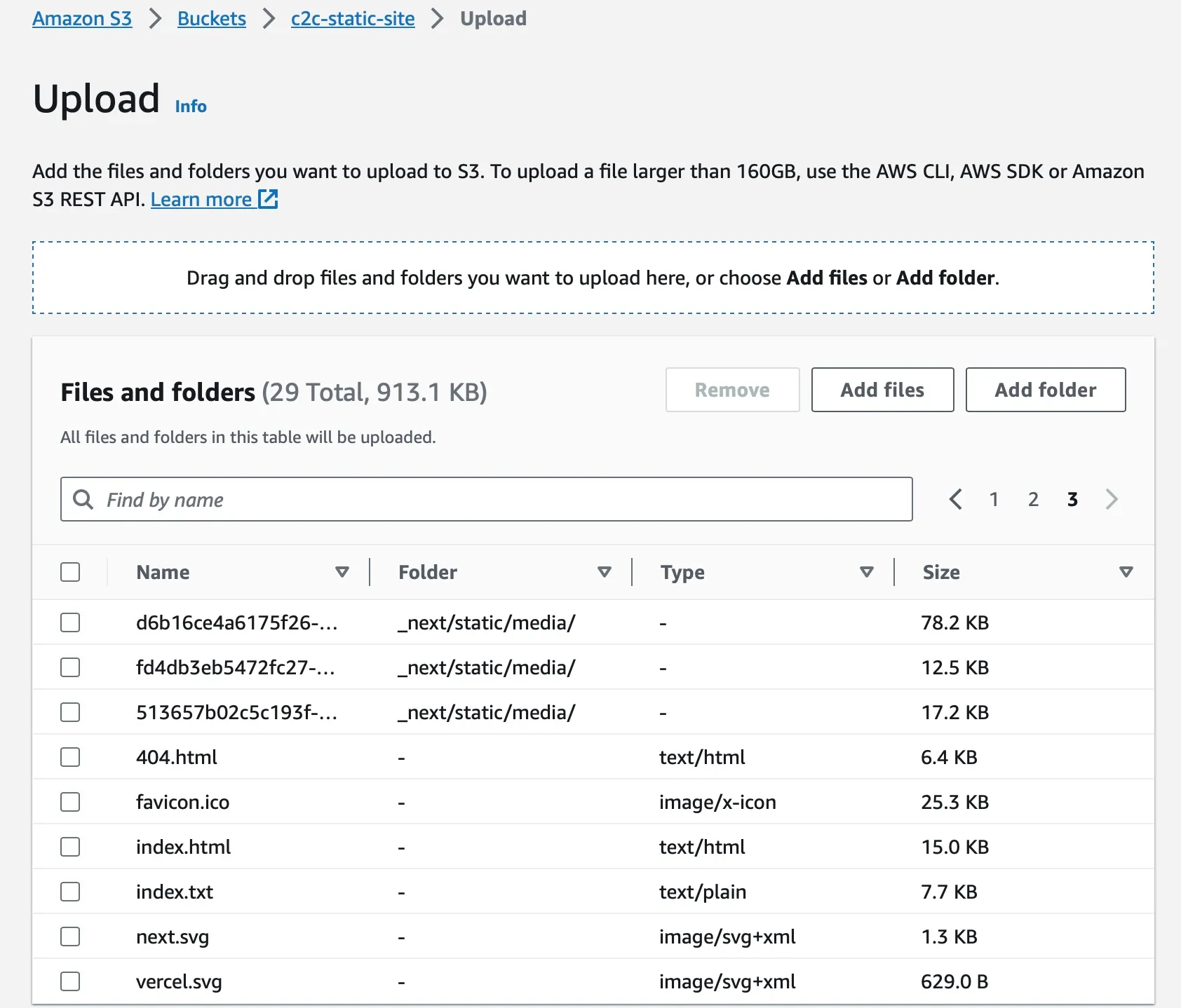
4. Click on “Upload” to transfer the files to your S3 bucket.
5. If you are using EC2 instance, then give the following command to copy all files from out directory to S3 bucket
```shell
aws s3 sync ./build/ s3://UNIQUEPREFIX-static-site --delete
```
## Access Website
[Section titled “Access Website”](#access-website)
You can access your website using your bucket’s static website hosting URL, which can be found in the “Static website hosting” section under your bucket’s properties. `http://UNIQUEPREFIX-static-site.s3-website.ap-south-1.amazonaws.com`
**Voila! You just published a website for the whole world to see :)**
Power of Cloud
You just witnessed the power of cloud computing and how easy it is to reach your users anywhere they are in just a few hours of time. Share this URL with your friends and see whether they are able to see your website
* I can create a S3 bucket for hosting static website.
* I can upload website files to S3 bucket.
* I can access my static website using S3 bucket URL.
# Test your knowledge - Storage
> Tutorial Build in cloud - Storage
1. Which service of AWS helps in hosting static website?
1) S3
2) SQS
3) SNS
Submit
2. By default, when you create a new S3 bucket, who can access the objects inside it?
1) Everyone on the internet
2) Only people in your VPC
3) Only the bucket owner (nobody else)
Submit
3. You uploaded a 100 MB photo to S3. How many objects are now in your bucket?
1) 10
2) 1
3) 100
Submit
4. Which of the following is a valid S3 bucket name?
1) MyBucket!2025
2) my-bucket-name
3) My Bucket
Submit
* I am comfortable with storage concepts in cloud!
* Good to proceed to the next unit!
# Database in Cloud
> Tutorial Build in cloud - Database
Now that you have learnt about storage, lets explore database options in AWS.
This unit shows you how to use database services, to create a simple NoSQL database using Amazon DynamoDB.
## What you will do?
[Section titled “What you will do?”](#what-you-will-do)
* Create a DynamoDB table to store data.
* Access the data from the DynamoDB table using java spring boot application.
- I am logged in to my cloud account with the created user `myuser` in previous unit
# Create your NoSQL database
> Tutorial Build in cloud - Database
## Creating a DynamoDB table
[Section titled “Creating a DynamoDB table”](#creating-a-dynamodb-table)
1. Open the AWS Management Console and sign in to your AWS account.
2. Navigate to the DynamoDB service by clicking on the Services tab and selecting DynamoDB.
3. In the DynamoDB console, click on the Create table button.
4. In the Create table window, do the following:
* For Table name, enter a name for your table. `Products`
* For Primary key, choose the partition key and sort key for your table. A partition key is a single attribute that uniquely identifies each item in the table. `id`
* There is no need to create additional columns/attributes since this is a NoSQL, no schema is required
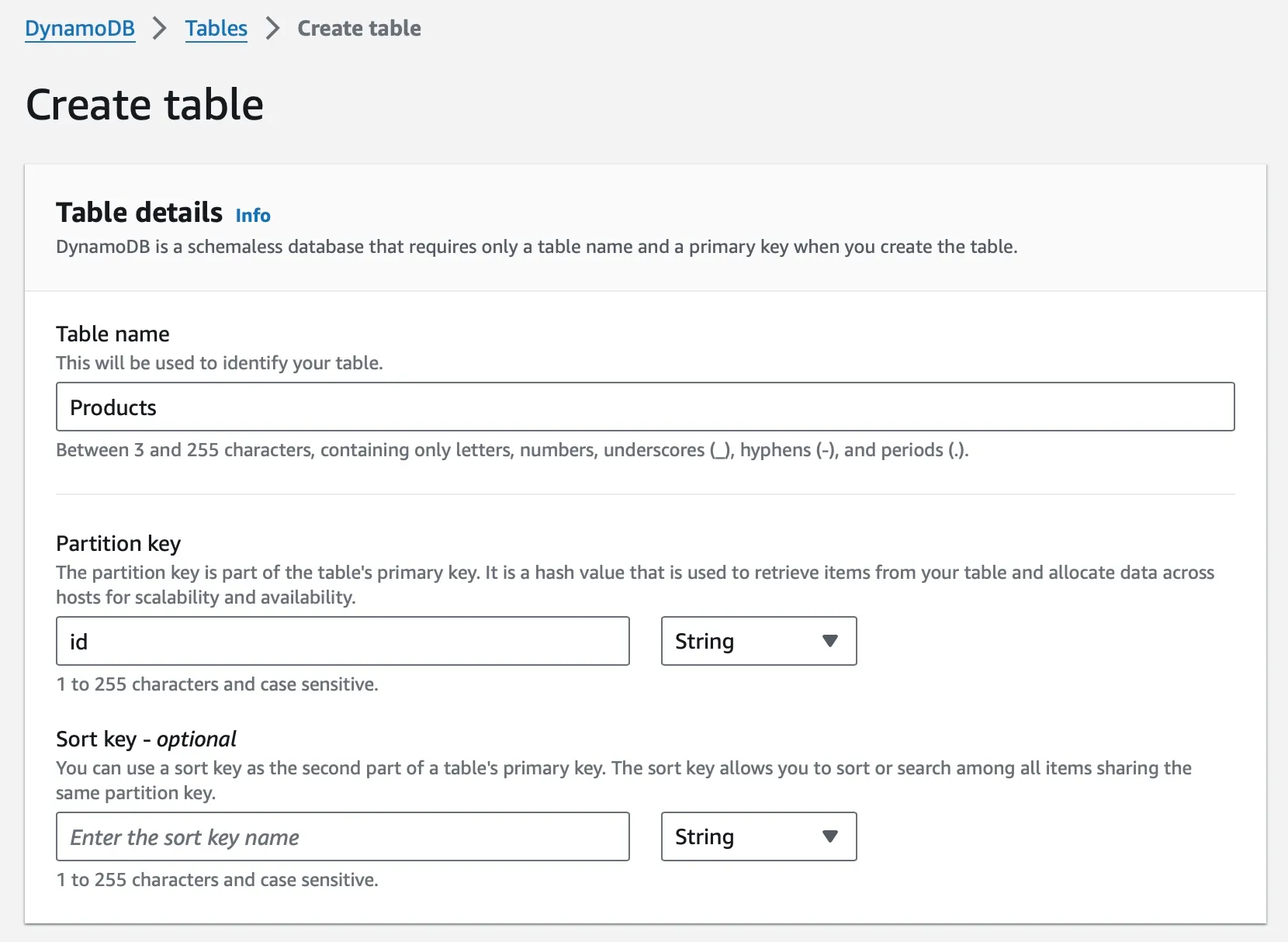
5. For “Table Settings” select Default Settings
6. If everything looks correct, click on Create table.
## Inserting data in table
[Section titled “Inserting data in table”](#inserting-data-in-table)
1. From the navigation menu selecte “Tables” -> “Explore Items”
2. Since the table is empty, click on Create item
3. You can select additional attributes to be added to table from “Add Attribute”
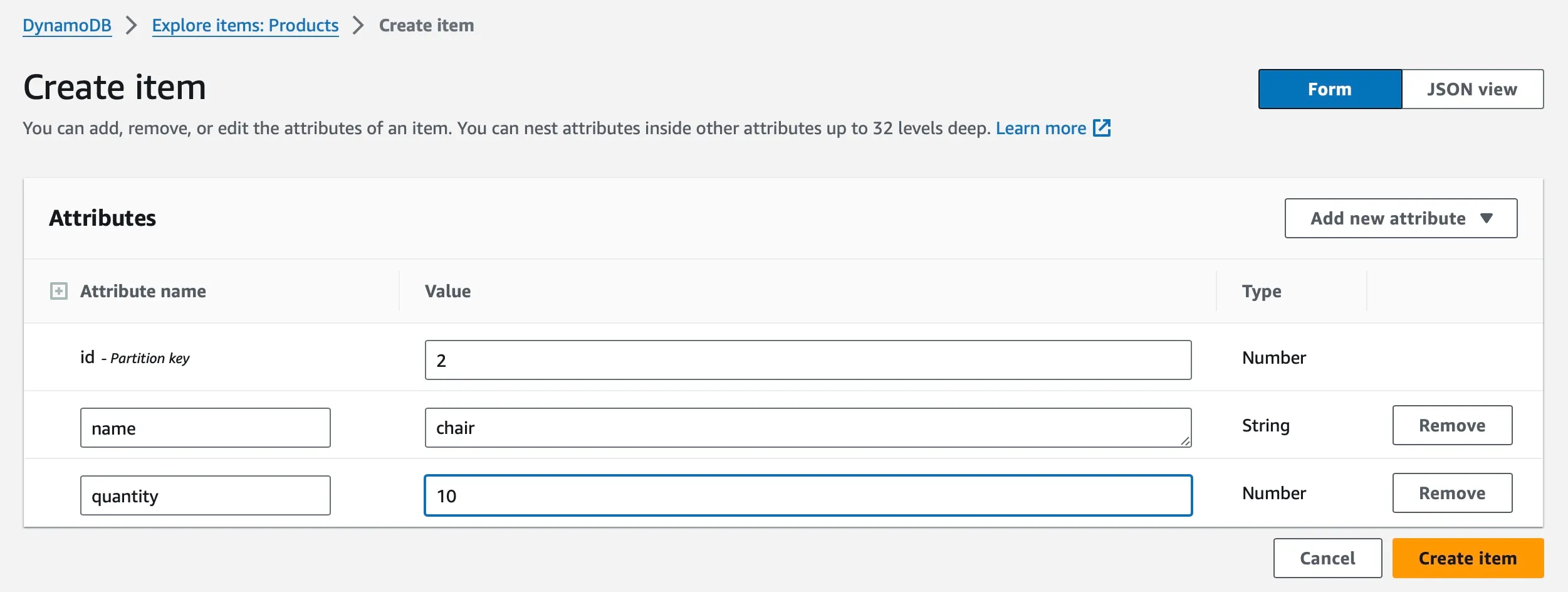
4. Since the table is NoSQL, each item can have different number of attributes
5. You can view the inserted items in the “Explore Items”
Exploratory
You can now try to add items using command line as before in S3. You might need to create new role and assign them to instance.
* I can create a dynamoDB table in my AWS account.
* I can add and view items in the DynamoDB table.
# Access with Java Springboot
> Tutorial Build in cloud - Database
## Installing Docker
[Section titled “Installing Docker”](#installing-docker)
Let’s use the EC2 instance for understanding the concepts of docker and later you can install it on your laptop or desktop using [Docker Desktop](https://www.docker.com/products/docker-desktop/)
1. Login into one of the EC2 instance that you have it running.
2. Once you SSH into the instance, issue the below commands
```shell
sudo yum install docker
```
```shell
sudo usermod -a -G docker ec2-user
```
```shell
newgrp docker
```
```shell
sudo systemctl enable docker.service
```
```shell
sudo systemctl start docker.service
```
3. To check if your docker is up and running run `ps` command
```plaintext
docker ps
```
4. To test if the docker is installed properly, you will use hello-world image from docker repository
```shell
docker pull hello-world
docker run hello-world
```
5. In order to test if you can access the service running inside the docker you can install an nginx server and try accessing using Public IP from your EC2 instance
```shell
docker pull nginx
docker run -it --rm -d -p 8080:80 --name web nginx
```
6. When you access the port 8080 from your browser with your EC2 instance IP address `http://PUBLIC_IP:8080` you will see below output.
```text
Welcome to nginx!
If you see this page, the nginx web server is successfully installed and working. Further configuration is required.
For online documentation and support please refer to nginx.org.
Commercial support is available at nginx.com.
Thank you for using nginx.
```
## Packaging API
[Section titled “Packaging API”](#packaging-api)
As you have seen earlier in [introduction](../0-introduction/2.mdx), you need to install JDK17 and Maven and other dependent packages used by project to connect to AWS DynamoDB. You cannot do this everywhere this service needs to run.
This issue is addressed by containers where it packages all the dependencies as `image` that can be just downloaded and run immediately.
1. To convert your application into a image you need to provide the instructions to docker what needs to be added. This is given in the form of Dockerfile
```text
FROM openjdk:17
VOLUME /tmp
COPY target/dynamo-1.0.0.jar app.jar
ENTRYPOINT ["java","-jar","/app.jar"]
EXPOSE 8080
```
2. Instructions say that
* Download the JDK17 from openjdk
* Mount the /tmp volume
* Copy the jar file from target directory to image
* Run the jar file
* Expose the port 8080
3. In order to build this image from the instruction file, where `ACCOUNT_NAME` is your dockerhub account name
```shell
docker build -t ACCOUNT_NAME/spring-rest-api .
```
4. This image needs to available in a place where the EC2 instance can download from, hence you publish this image to DockerHub repository which is publicly accessible. If this is your first time it will prompt you for your DockerHub credentials.
```shell
docker push ACCOUNT_NAME/spring-rest-api
```
## Running API
[Section titled “Running API”](#running-api)
1. Now login to your EC2 instance and make sure docker is up and running using command `docker ps`. If its not running refer the [Docker instrutions](docker)
2. Once the docker is up and running, you can now download the image you published earlier and start the image
```shell
docker pull ACCOUNT_NAME/spring-rest-api
docker run -it --rm -d -p 8080:8080 ACCOUNT_NAME/spring-rest-api
```
3. You can now access your API using your instance public IP `http://PUBLIP-IP:8080/products` and you should be able to see the items from your DynamoDB table
Hint
If you get any access denied error while reading from DynamoDB, remember you need to provide permission using roles for EC2 to talk to DynamoDB service.
**Tada! You just published a API for anyone to use :)**
Power of Containers
You just experienced the power of containers where you build your application once and anyone can use them without worrying about dependencies in their system. It just works and not just on your machine ;)
* I can access the data from the DynamoDB table using java spring boot application.
* I can create a docker image for my java spring boot application.
* I can run my java spring boot application inside a docker container.
# Test your knowledge
> Tutorial Build in cloud - Database
1. Which DB is Key Value pair Database provided and managed by Amazon?
1) MariaDB
2) SQL
3) DynamoDB
Submit
2. Which DB in AWS is used for Graph QL implementations?
1) Cassandra
2) Neptune
3) PostgreSQL
Submit
3. What is the only characteristic of NoSQL Databases from the given choices?
1) Schemaless
2) Stored as Rows and Columns
3) Data cannot be flexible
Submit
* I am comfortable with database concepts in cloud!
* Good to proceed to the next unit!
# Devops in Cloud
> Tutorial Build in cloud - DevOps
Now that you have secured the knowledge on the cloud computing, lets see how to automate the deployment and management of applications in the cloud using DevOps practices.
This unit shows you how to use CICD concepts to,
## What you will do?
[Section titled “What you will do?”](#what-you-will-do)
* Create a CD pipeline to deploy your web app into S3 bucket
* Create a CI pipeline to create containers and push to Docker Hub
- I am logged in to my cloud account with the created user `myuser` in previous unit
# Create containers
> Tutorial Build in cloud - DevOps
## CI Pipeline
[Section titled “CI Pipeline”](#ci-pipeline)
Continuous Integration is a pipeline which consists of steps required to create a packaged artifact which can then be used to run an application.
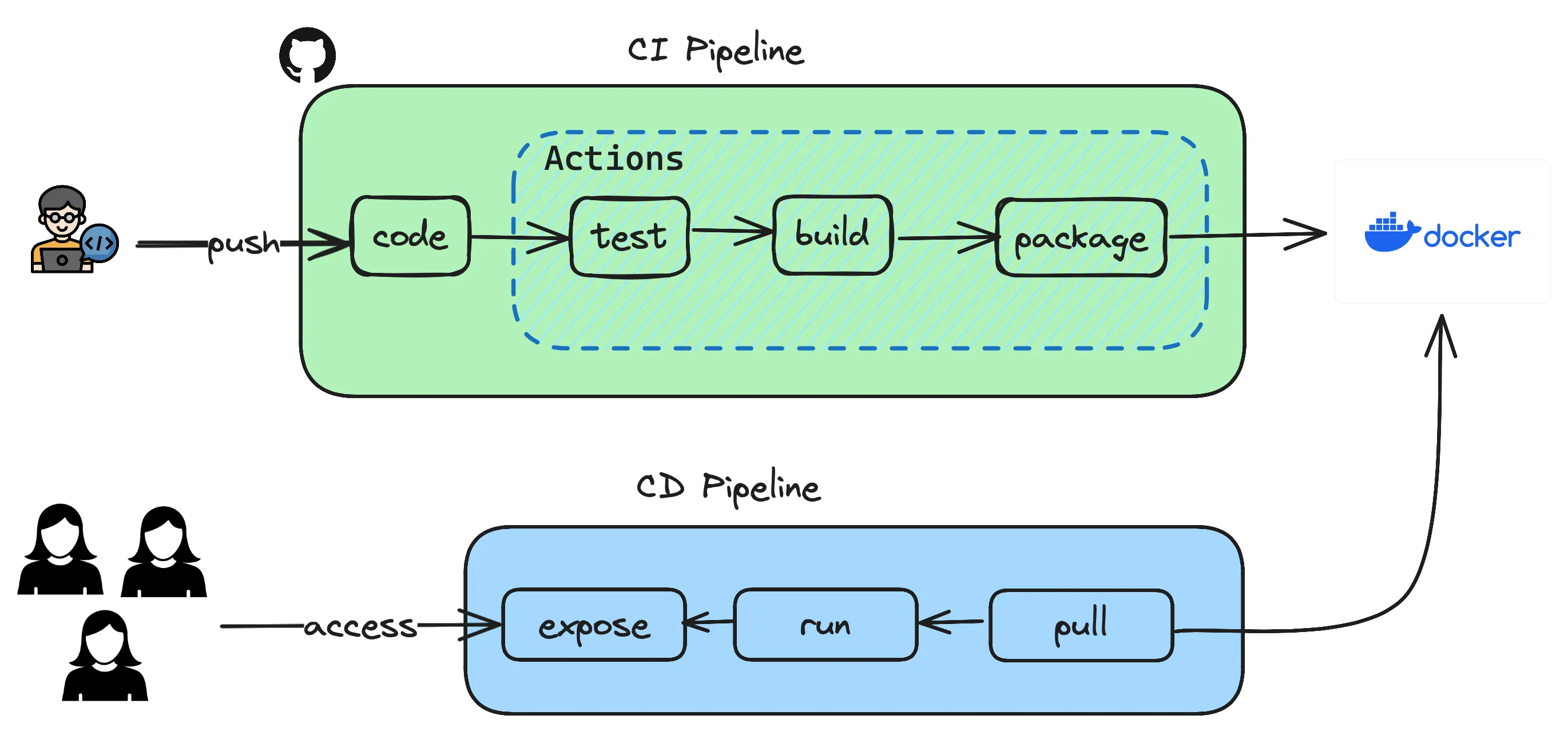
Previously you have created an API using springboot and have executed steps manually which resulted in testing, building and packaging as a container to be used. Let’s see how those steps can be automated so that it all happens in a click of button or even better when pushing a code to repository.
1. Open the GitHub repository and goto your repo which contains the Java application using springboot.
2. Goto `Settings` tab and `Security` section where you can see `Secrets and Variables` and click on Actions.
3. Based on the pipeline depicted above, the only external integration you have is to use **Docker** where you maintain the container images which are built using `Dockerfile` you already have.
4. You create two variables `DOCKERHUB_TOKEN` and `DOCKERHUB_USERNAME` as secrets so that you dont have to hardcode these secrets in your sourcecode.
5. In order to get the `DOCKERHUB_TOKEN` you login to your [DockerHub](https://hub.docker.com). Goto `MyAccount` -> `Security` and then create `New Access Token` with permissions `Read & Write`. This will give the token access to read and write to your repository in DockerHub.
6. Copy the token and create the GitHub Secret `DOCKERHUB_TOKEN`
7. For `DOCKERHUB_USERNAME`, use your login username.
8. Once the secrets are created, GitHub Actions now has the permission to write the images to your repository. You will use these values in your workflow.
9. Either from your local laptop or any terminal create the following directory structure and files and copy paste the code given below to your `maven.yml`
```plaintext
.github
└── workflows
└── maven.yml
```
```yml
# This workflow will build a Java project with Maven, and cache/restore any dependencies to improve the workflow execution time
name: Java CI with Maven
on:
push:
branches: [ "main" ]
pull_request:
branches: [ "main" ]
jobs:
build:
runs-on: ubuntu-latest
steps:
- uses: actions/checkout@v3
- name: Set up JDK 17
uses: actions/setup-java@v3
with:
java-version: '17'
distribution: 'temurin'
cache: maven
- name: Run unit test cases
run: mvn test
- name: Build the jar file
run: mvn package
- name: Set up QEMU
uses: docker/setup-qemu-action@v3
- name: Set up Docker Buildx
uses: docker/setup-buildx-action@v3
- name: Login to Docker Hub
uses: docker/login-action@v3
with:
username: ${{ secrets.DOCKERHUB_USERNAME }}
password: ${{ secrets.DOCKERHUB_TOKEN }}
- name: Build and push
uses: docker/build-push-action@v5
with:
context: .
push: true
tags: ${{ secrets.DOCKERHUB_USERNAME }}/spring-rest-api:latest
```
10. Now you commit your changes `git add . && git commit -m "added github actions"` and push `git push` this to your repository. Once the change is pushed goto your `Actions` tab on the repository and see the magic happening.
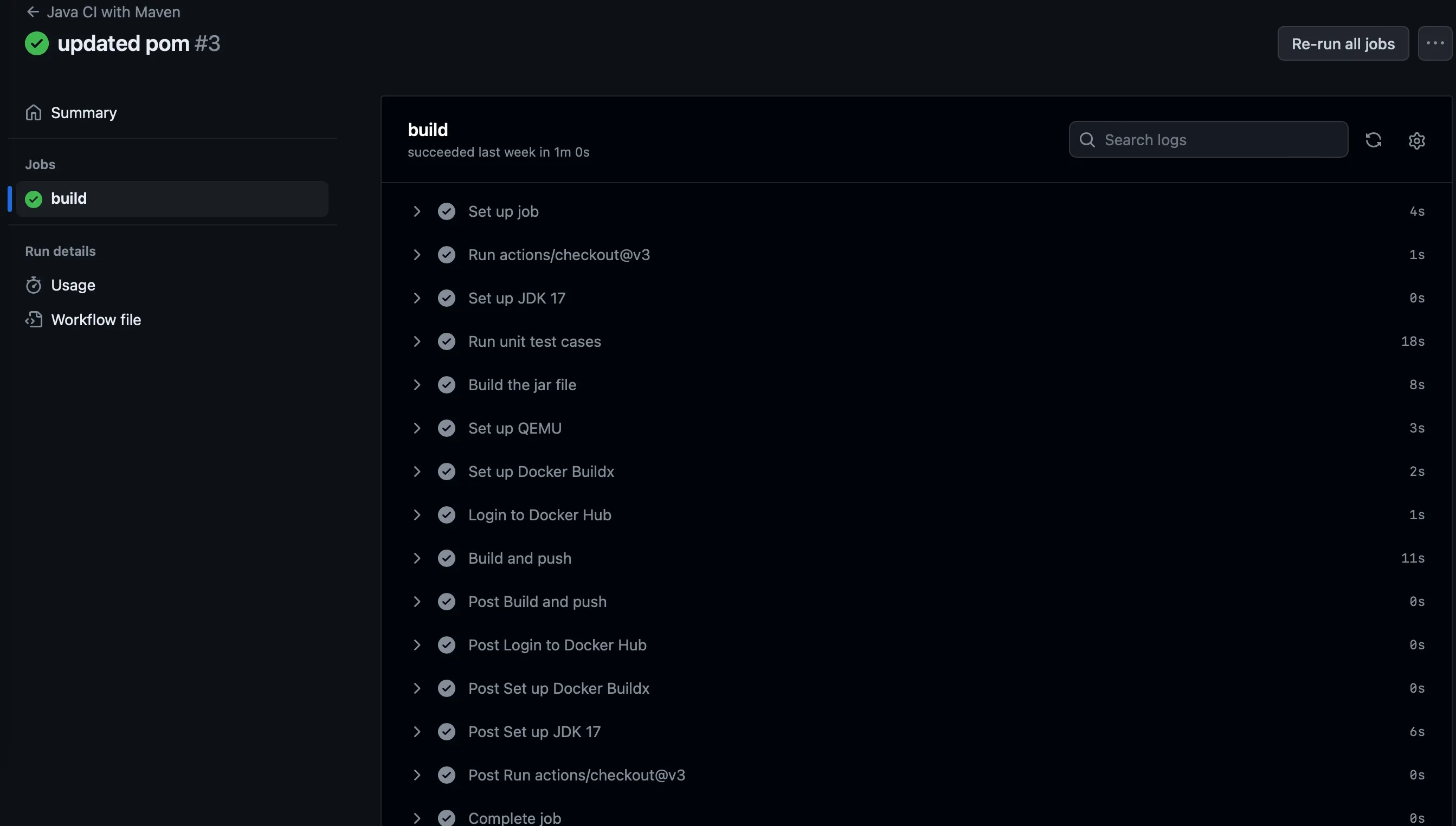
Caution
Everytime you push a code to main branch, the build will be triggered and new version of image will be pushed to docker hub.
* I can create a pipeline in GitHub actions.
* I can setup secrets in GitHub repository.
* I can generate new container image in DockerHub from GitHub actions.
# Deploy a static website to S3
> Tutorial Build in cloud - DevOps
## CD Pipeline
[Section titled “CD Pipeline”](#cd-pipeline)
Continuous Deployment is the process of sending the changes you made to your users immediately so that it can bring value to your business. For simplicity of deployment, you are going to build and deploy your website to S3 bucket.
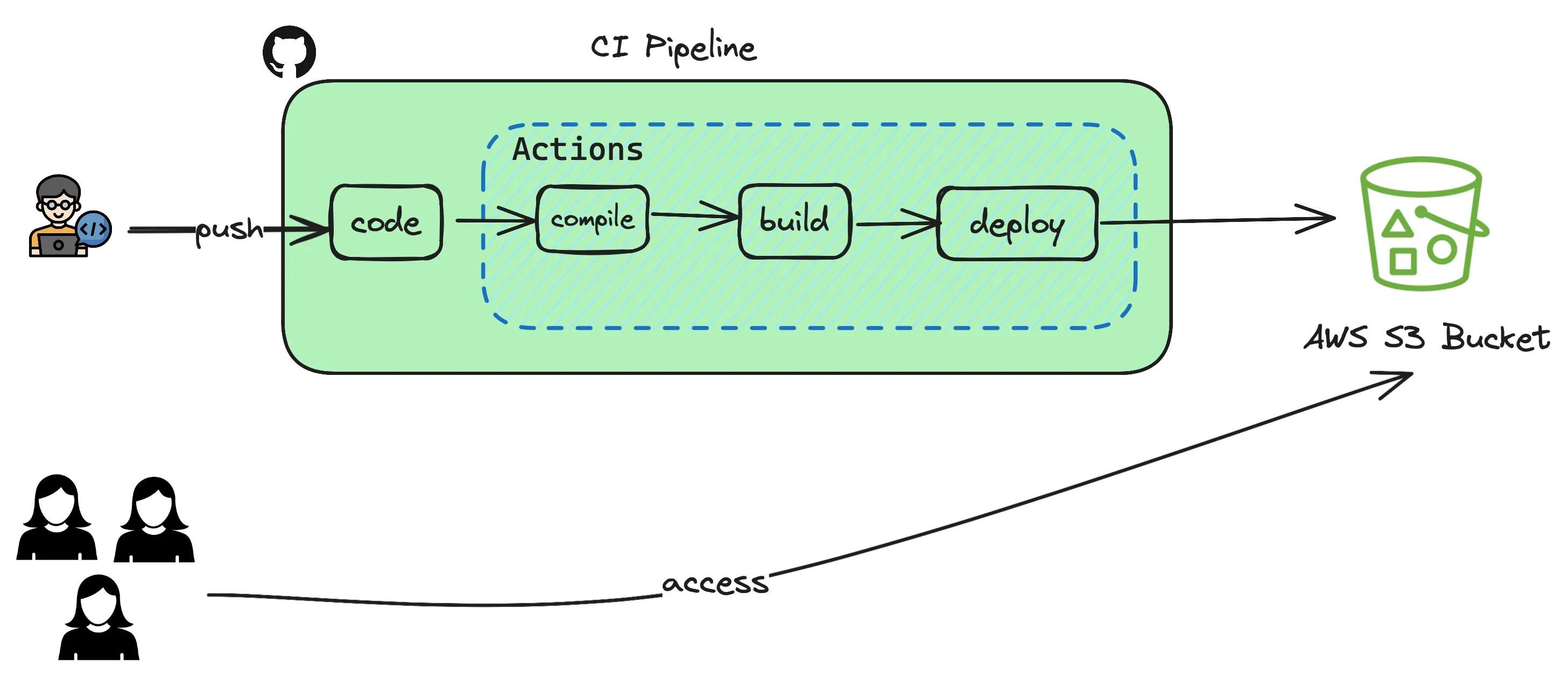
Previously you have uploaded the static website manually using aws cli commands. Let’s see how those steps can be automated so that it all happens when pushing a code to repository.
1. Open the GitHub repository and goto your repo which contains the static react website.
2. Goto `Settings` tab and `Security` section where you can see `Secrets and Variables` and click on Actions.
3. Based on the pipeline depicted above, the only integration you have is to use **S3 Bucket** where you maintain the html/javascript code.
4. You create two variables `AWS_ACCESS_KEY_ID`, `AWS_SECRET_ACCESS_KEY` and `AWS_S3_BUCKET_NAME` as secrets so that you dont have to hardcode these secrets in your sourcecode.
5. In order to get the `AWS_ACCESS_KEY_ID` and `AWS_SECRET_ACCESS_KEY` you login to your [AWS Account](https://console.aws.com). Goto `IAM` -> `Security` and then create `New Access Token` with permissions `Read & Write`. This will give programmatic access to read and write to your S3 bucket in AWS.
6. Copy the token and create the GitHub Secret `AWS_ACCESS_KEY_ID` and `AWS_SECRET_ACCESS_KEY` with the values you copied from AWS.
7. For `AWS_S3_BUCKET_NAME`, use your fully qualified S3 bucket name.
8. Once the secrets are created, GitHub Actions now has the permission to write files to your bucket. You will use these values in your workflow.
9. Either from your local laptop or any terminal create the following directory structure and files and copy paste the code given below to your `node.js.yml`
```plaintext
.github
└── workflows
└── node.js.yml
```
```yml
# This workflow will do a clean installation of node dependencies, cache/restore them, build the source code and run tests across different versions of node
# For more information see: https://docs.github.com/en/actions/automating-builds-and-tests/building-and-testing-nodejs
name: Node.js CI
on:
push:
branches: [ "main" ]
pull_request:
branches: [ "main" ]
jobs:
build:
runs-on: ubuntu-latest
strategy:
matrix:
node-version: [18.x]
# See supported Node.js release schedule at https://nodejs.org/en/about/releases/
steps:
- uses: actions/checkout@v3
- name: Use Node.js ${{ matrix.node-version }}
uses: actions/setup-node@v3
with:
node-version: ${{ matrix.node-version }}
cache: 'npm'
- run: npm install
- run: npm run build
- name: Configure AWS Credentials
uses: aws-actions/configure-aws-credentials@v1
with:
aws-access-key-id: ${{ secrets.AWS_ACCESS_KEY_ID }}
aws-secret-access-key: ${{ secrets.AWS_SECRET_ACCESS_KEY }}
aws-region: ap-south-1
- name: Deploy static site to S3 bucket
run: aws s3 sync ./build/ ${{ secrets.AWS_S3_BUCKET_NAME }} --delete
```
10. Now you commit your changes `git add . && git commit -m "added github actions"` and push `git push` this to your repository. Once the change is pushed goto your `Actions` tab on the repository and see the magic happening.
* I can create a GitHub Actions workflow to deploy a static website to S3.
* I am able to see the changes reflected on my static website after pushing code to GitHub.
# Congratulations!
> Tutorial Build in cloud - Completed
We hope you learned a little about the basics of cloud computing, and had fun along the way!
You can find the code for the project in this tutorial on [GitHub](https://github.com/apiprimer)
Check out our other docs for guides and reference material, and visit our Slack to ask questions, get help or just hang out!
You can also join one of our courses to deepen your knowledge
* I have learnt a lot in cloud and ready to launch 🚀
## Share your achievement!
[Section titled “Share your achievement!”](#share-your-achievement)
Congratulations on completing the build in cloud tutorial! Share your achievement with the world and let everyone know!
[Share on Twitter ](https://twitter.com/intent/tweet?text=Just%20finished%20learning%20how%20to%20build%20in%20cloud%20Check%20it%20out%20at%20https://docs.apiprimer.com/en/tutorial/0-introduction/)[Share on LinkedIn](https://www.linkedin.com/sharing/share-offsite/?url=https://docs.apiprimer.com/en/tutorial/0-introduction/)

## Next Steps
[Section titled “Next Steps”](#next-steps)
You can continue your learning journey with these resources and become a cloud pro!
[Gamified way to learn AWS Cloud. ](https://aws.amazon.com/training/digital/aws-cloud-quest/)Click on Try Cloud Practioner for free
[FreeCodeCamp ](https://www.freecodecamp.org)Free courses curated to specific programming language. Check out their Youtube channel for hands-on and follow along content